Youyeetoo Banana Pi M2 Zero Review: Who It Fits and Who Should Skip It
As an Amazon Associate we earn from qualifying purchases. Links on this page are affiliate links.
This youyeetoo banana pi m2 zero review covers a compact open-source single board computer. It targets users who need a small footprint with decent processing power. The device is defined by its Quad Core ARM Cortex A7 CPU H3 and 512MB SDRAM. These specs allow it to run various operating systems like Raspbian, Android, Armbian, and Ubuntu. It also includes onboard WiFi and Bluetooth for wireless connectivity. The board features a Mini HDMI port and a 40-pin GPIO header compatible with Raspberry Pi setups. It is designed for developers and hobbyists looking for a versatile, low-profile computing solution.
What stands out
- Quad Core ARM Cortex A7 CPU H3 processor for reliable performance
- 512MB SDRAM for basic multitasking and OS operations
- Onboard WiFi (AP6212) and Bluetooth for wireless connectivity
- 40-pin Raspberry Pi-compatible GPIO header for hardware projects
- Support for multiple operating systems including Android and Ubuntu
Who it fits
Good fit for
This board suits hobbyists and developers building small projects who need GPIO access. It is ideal for users who want a Raspberry Pi Zero alternative with a stronger CPU. The onboard WiFi and Bluetooth make it suitable for wireless IoT devices. Developers who need to test multiple operating systems like Android or Ubuntu will find the flexibility useful. The compact size fits well in tight enclosures or portable setups.
Who should skip it
You should look elsewhere if you need high performance for heavy computing tasks. The 512MB SDRAM limits multitasking and running resource-intensive applications. Users requiring high-resolution video output will find the Mini HDMI port limiting. If you need more RAM or a faster processor, this board is not suitable. It is also not for users who prefer plug-and-play simplicity without OS configuration.
Verdict: The Youyeetoo Banana Pi M2 Zero is a capable, compact option for developers and hobbyists who need GPIO access and onboard wireless connectivity. Its modest RAM and processor speed make it best suited for light, specialized tasks rather than general computing.
Key specs explained for this mini PC
Processor: Quad Core ARM Cortex A7 CPU H3
This processor offers four cores running at a moderate speed. It handles basic tasks like web browsing and simple scripting without lag. You get more power than a single-core board, but it is not for heavy video editing. Compare it to entry-level mini PCs when you need small size with enough muscle for light computing.
RAM Capacity: 512MB SDRAM
This amount of memory is quite low by modern standards. It limits how many apps you can run at once. You must close background programs to keep the system responsive. This spec suits dedicated devices like media centers or simple controllers rather than general-purpose desktops where multitasking is required.
Operating System Support: Raspbian, Android, Armbian, Ubuntu
The board runs several popular Linux distributions and Android. This flexibility lets you choose the software that fits your project. You are not locked into one interface. This openness is valuable for hobbyists building custom setups. It offers more choice than proprietary systems found in some commercial small form factor computers.
Wireless Connectivity: WiFi (AP6212) & Bluetooth
Built-in wireless connections remove the need for external adapters. You can connect to networks and peripherals easily. The AP6212 chip provides standard Wi-Fi performance for streaming or updates. Bluetooth allows pairing with keyboards or mice. This integration keeps the setup clean and reduces cable clutter on your desk.
RAM Type: SDRAM
Synchronous Dynamic Random Access Memory is the standard type for this era of boards. It synchronizes with the system clock for predictable performance. While not the fastest memory type available today, it is sufficient for the listed processor. You should expect standard speeds suitable for embedded tasks rather than high-end gaming.
Design and build overview
The listing describes the Youyeetoo Banana Pi M2 Zero as a compact single board computer. Its small form factor targets users who need a minimal footprint for embedded projects. The board features a Quad Core ARM Cortex A7 CPU H3 and 512MB SDRAM. This combination provides enough processing power for basic tasks while keeping the physical size small. You can use it in tight spaces where larger computers do not fit.
Connectivity is built directly onto the board. The listing states it includes onboard WiFi (AP6212) and Bluetooth. This removes the need for external adapters, simplifying your setup. You also get a Mini HDMI port for display output. A 40-pin Raspberry Pi-compatible GPIO header is present, supporting UART, SPI, and I2C connections. These ports allow you to interface with sensors and other hardware components easily.
Power is delivered via a micro USB port. The listing specifies you must use a 5V 2A power supply to avoid damage. It also warns about static electricity during power on. According to the listing, these design choices make the board suitable for hobbyist electronics and small-scale server tasks. The integrated wireless and compact layout mean you can deploy it in various positions without cluttering your workspace with extra cables or devices.
Setup and daily usage guide
Setting up this single board computer requires attention to power and static. The listing specifies a 5V 2A power supply. You must connect it via the micro USB DC input port. Using incorrect voltage can damage the device. You should also manage static electricity during handling to protect the components.
The board supports multiple operating systems. You can install Raspbian, Android, Armbian, or Ubuntu. This flexibility lets you choose the environment that fits your project. The system includes onboard WiFi and Bluetooth. The wireless module is identified as AP6212. This provides connectivity without needing external adapters. You can use these features for network access or peripheral pairing.
For everyday use, the Quad Core ARM Cortex A7 CPU H3 and 512MB SDRAM define performance. These specs support basic tasks like web browsing and simple scripting. The 40-pin GPIO header is compatible with Raspberry Pi standards. This allows you to connect sensors and modules using UART, SPI, and I2C protocols. The Mini HDMI port lets you connect a display for visual output.
This setup suits users who need a small footprint with decent processing power. It is ideal for embedded projects that require specific connectivity options. The open-source nature and OS support make it adaptable. You get a compact device that handles fundamental computing needs. The combination of wired and wireless options provides versatility for various applications.
Before you buy the M2 Zero
This board is not a standalone desktop replacement. You need to supply your own storage, typically a microSD card, to install the operating system. The listing confirms support for Raspbian, Android, Armbian, and Ubuntu. You must verify that your chosen OS is compatible with the Quad Core ARM Cortex A7 CPU H3. Power requirements are strict. You must use a 5V 2A power supply via the micro USB port. Incorrect voltage can damage the hardware. Static electricity is also a risk during setup. You should handle the board carefully. Connectivity relies on onboard WiFi (AP6212) and Bluetooth. If you need wired Ethernet, you will require a separate USB adapter. This device fits into the 1 options as a niche choice for embedded projects or learning Linux. It does not replace larger mini PCs for general desktop use. Check your project needs before purchasing.
Check before you buy
- Verify 5V 2A power supply availability.
- Check OS compatibility with ARM Cortex A7.
- Ensure microSD card is ready for installation.
- Confirm static safety during handling.
The product at a glance
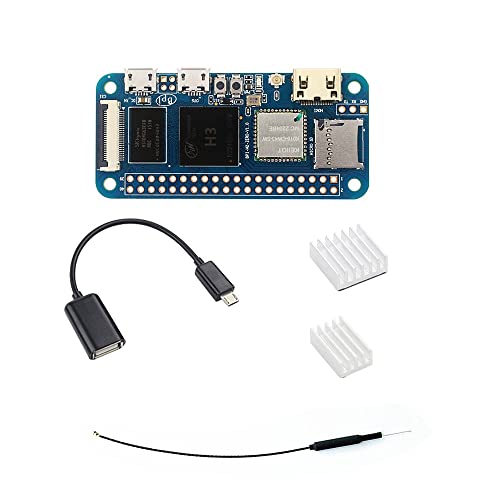
Youyeetoo Banana Pi M2 Zero
Best for: Compact GPIO projects needing WiFi
- Processor
- Quad Core ARM Cortex A7 CPU H3
- RAM Capacity
- 512MB
- RAM Type
- SDRAM
- Wireless Connectivity
- WiFi (AP6212) & Bluetooth
- Operating System Support
- Raspbian, Android, Armbian, Ubuntu
View on Amazon: Youyeetoo Banana Pi M2 Zero Affiliate link
This open-source single-board computer uses a Quad Core ARM Cortex A7 CPU H3 and 512MB SDRAM. It supports Raspbian, Android, Armbian, and Ubuntu. The board includes onboard WiFi and Bluetooth. It features a Mini HDMI port and a 40-pin GPIO header. This model suits users needing a compact, Raspberry Pi-compatible device for basic computing or embedded projects.
Pros
- Quad Core ARM Cortex A7 CPU H3
- Onboard WiFi and Bluetooth connectivity
- 40-pin Raspberry Pi-compatible GPIO header
- Supports multiple operating systems including Android
Cons
- Limited to 512MB SDRAM capacity
- Requires specific 5V 2A power supply
- Uses Mini HDMI instead of standard HDMI
Good fit if
- You need a compact board with GPIO pins
- You want WiFi and Bluetooth without extra adapters
- You are building a project compatible with Raspberry Pi headers
Skip if
- You require more than 512MB of RAM for heavy tasks
- You need a standard HDMI port for direct display connection
- You prefer a system with more than 512MB of memory
Verdict: Youyeetoo Banana Pi M2 Zero SBC offers a Quad Core ARM Cortex A7 CPU H3 and 512MB SDRAM for compact projects. It fits hobbyists who need GPIO access and wireless connectivity in a small form factor.
Specifications side by side
| Spec | Youyeetoo Banana Pi M2 Zero |
|---|---|
| Processor | Quad Core ARM Cortex A7 CPU H3 |
| RAM Capacity | 512MB |
| RAM Type | SDRAM |
| Wireless Connectivity | WiFi (AP6212) & Bluetooth |
| Operating System Support | Raspbian, Android, Armbian, Ubuntu |
| Operating System | Android |
Frequently asked questions
Does the Youyeetoo Banana Pi M2 Zero support Android?
Yes, the device supports Android as its primary operating system. The listing explicitly identifies Android as the supported OS. This allows you to run standard Android applications on the board. It is suitable for hobbyists who prefer the Android ecosystem for their compact projects.
What processor does the Banana Pi M2 Zero use?
It uses a Quad Core ARM Cortex A7 CPU H3. This processor provides four cores for handling basic computing tasks. It is designed to manage simple scripting and web browsing without significant lag. The architecture is efficient for low-power embedded applications.
How much memory does the M2 Zero have?
The board comes equipped with 512MB of SDRAM. This amount of memory is sufficient for lightweight tasks and simple projects. It supports the device's role as a compact single-board computer. Users should keep resource-heavy applications in mind when utilizing this memory capacity.
Is this board good for GPIO projects?
Yes, it is best for compact GPIO projects needing WiFi. The small form factor makes it ideal for embedded setups. You get access to GPIO pins for connecting sensors and other hardware. The inclusion of wireless connectivity adds flexibility to your project design.
What power supply does the M2 Zero require?
You need a 5V 2A power supply for this device. Connect it via the micro USB DC input port. Using the correct voltage is critical to prevent damage. Ensure your power adapter meets these specifications for stable operation of the single board computer.
Can I use other operating systems besides Android?
The listing confirms support for Raspbian, Armbian, and Ubuntu. While Android is the primary OS, these Linux distributions are available. You must supply your own storage, such as a microSD card, to install them. This flexibility allows you to choose the best environment for your specific needs.