ASUS Chromebox 3 Core i7 Mini PC Review: Specs, Pros and Cons
As an Amazon Associate we earn from qualifying purchases. Links on this page are affiliate links.
This asus chromebox 3 mini PC review focuses on the model powered by an Intel Core i7-8550U processor. It is a compact desktop computer running Chrome OS, designed for users who need reliable performance in a small footprint. The system includes 8GB of DDR4 memory and a 128GB M.2 SATA SSD for storage. These two specs define its capability for everyday tasks and light multitasking. The unit measures 5.75 x 5.5 x 1.8 inches, making it easy to mount behind a monitor or place on a desk without taking up much space.
What stands out
- Intel Core i7-8550U processor for efficient multitasking
- 8GB DDR4 installed RAM for smooth operation
- Chrome OS with full Android app support from Google Play
- Dual monitor support via HDMI and DisplayPort over Type C
- Gigabit LAN and 802.11ac Wi-Fi for stable connectivity
Who it fits
Good fit for
You should consider this mini PC if you primarily use web browsers, Google Workspace apps, or Android applications. The Chrome OS environment is ideal for students or office workers who need a secure, low-maintenance system. The 128GB SSD provides enough space for documents and cached data. If you need to connect two displays for productivity, the dual monitor support is a key benefit. The compact size also suits users who want to minimize desk clutter while retaining a full desktop experience.
Who should skip it
You should look at another option if you require a traditional Windows or Linux environment for specific professional software. Chrome OS does not support native installation of desktop applications like Adobe Creative Cloud or heavy PC games. The 128GB storage capacity may fill up quickly if you store large local media files. Additionally, if you need extensive legacy port compatibility, this unit relies on USB Type C and Type A ports, which may require adapters for older peripherals. The system is not designed for high-end 3D rendering or intensive video editing tasks.
Verdict: This is a capable, compact machine for Chrome OS users who need reliable daily performance. It suits light office work and web-based tasks well.
Key specs explained
Intel Core i7-8550U Processor
This is an eighth-generation mobile processor designed for efficiency. It offers four cores and eight threads, which helps handle multiple browser tabs and Chrome OS tasks smoothly. You will notice faster app loading times compared to older dual-core chips. This CPU is suitable for office work, web browsing, and light media consumption without generating excessive heat.
8GB DDR4 Memory
This amount of RAM allows you to run several applications simultaneously without significant slowdowns. DDR4 is a standard memory type that provides good bandwidth for daily computing tasks. With 8GB, you can comfortably keep multiple Chrome windows open alongside Android apps. This specification is the baseline for a responsive Chrome OS experience in 2024.
128GB M.2 SATA SSD
Solid-state drives are much faster than traditional hard drives, leading to quicker boot times and file access. This 128GB capacity is sufficient for the operating system, installed applications, and local documents. Since Chrome OS often relies on cloud storage, you may not need extensive local space. This storage type ensures the system feels snappy during everyday use.
Intel 4K UHD Graphics
Integrated graphics handle video playback and display output without a dedicated video card. This GPU supports 4K resolution, allowing you to connect to high-definition monitors for crisp visuals. It is adequate for streaming media and basic desktop tasks. You do not need this for heavy gaming, but it ensures smooth performance for web-based content and video calls.
Compact Black Design and Build
The ASUS Chromebox 3 features a black chassis with dimensions of 5.75 inches in length, 5.5 inches in width, and 1.8 inches in height. This small footprint allows you to mount the unit behind a monitor or place it discreetly on a desk without consuming valuable workspace. The listing identifies the model as CHROMEBOX3-N7290U, indicating a specific hardware revision for this configuration.
According to the listing, the device includes five USB 3.1 Gen 1 Type A ports and one USB Type C port. The Type C port supports DisplayPort over Type C and offers optional Power over Type C capabilities. This feature minimizes cable clutter by delivering power to connected monitors, projectors, or mobile devices. You can also connect two monitors using HDMI and the DisplayPort over Type C output, thanks to the integrated Intel 4K UHD graphics.
The build prioritizes connectivity and space efficiency. The Gigabit LAN and 802.11ac Wi-Fi ensure stable network connections, while Bluetooth 4.2 supports peripheral pairing. The compact size and port selection make it suitable for environments where desk space is limited but multiple displays and peripherals are required. The design focuses on practical integration into existing setups rather than aesthetic flair.
Setup and everyday use
Setting up this Mini PC is straightforward because it runs Chrome OS. You connect the power adapter and attach your peripherals to the available ports. The unit includes Gigabit LAN and 802.11ac Wi-Fi, giving you flexible networking options. For video output, you can use the HDMI port and the DisplayPort over Type C to drive two monitors simultaneously. This dual-monitor support is useful for multitasking, allowing you to view documents alongside web pages or video streams. The integrated Intel 4K UHD graphics handle these displays without issue. You also have access to five USB 3.1 Gen 1 Type A ports and one USB Type C port. These connections let you attach keyboards, mice, and storage devices. The optional Power over Type C feature helps minimize cable clutter by delivering power to connected monitors or mobile devices. In daily use, the 8GB of DDR4 memory and the 128GB M. 2 SATA SSD provide sufficient resources for web browsing and office tasks. The system supports Android apps from Google Play, expanding its utility beyond standard web applications. The compact dimensions of 5.75 by 5.5 by 1.8 inches make it easy to place under a desk or mount behind a screen. This setup ensures a clean workspace while keeping all necessary connections within reach for efficient workflow.
Before You Buy This Mini PC
You should verify that your monitors support the video outputs available on this unit. It features HDMI and DisplayPort over Type C, allowing you to drive two displays simultaneously with 4K UHD resolution. If you plan to connect multiple screens, ensure your cables match these ports. The system runs Chrome OS, which means you will rely on web apps and Android applications from Google Play. Consider whether this ecosystem fits your daily workflow. You may need external storage if the 128GB SSD fills up quickly. Regularly updating Chrome OS ensures security and performance remain stable. This device sits alongside other small form factor computers as a lightweight, efficient option. It suits users who prioritize portability and basic productivity over heavy local processing. Check your peripheral compatibility before purchasing to avoid connectivity issues later.
Check before you buy
- Confirm your monitors support HDMI or DisplayPort connections for dual screen setup.
- Ensure your workflow aligns with Chrome OS and Android app capabilities.
- Verify that your existing peripherals fit the USB and Type C ports.
- Check if 128GB storage is sufficient for your file and app needs.
The product at a glance
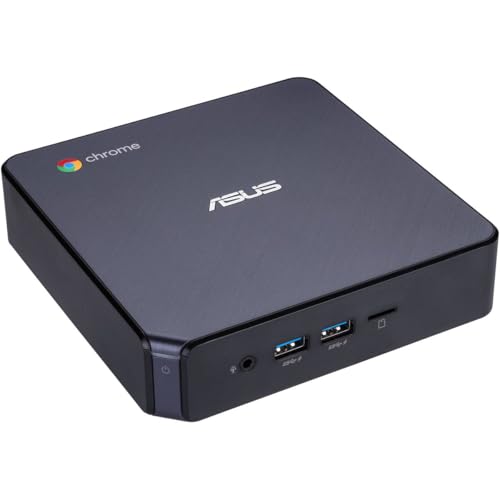
ASUS Chromebox 3 Core i7 Mini PC
Best for: compact dual-monitor office setups
- Processor
- Intel Core i7-8550U
- Installed RAM
- 8GB
- Storage Capacity
- 128GB
- Memory Type
- DDR4
- Graphics
- Intel 4K UHD Graphics
- Ethernet Ports
- Gigabit LAN
View on Amazon: ASUS Chromebox 3 Core i7 Mini PC Affiliate link
The ASUS Chromebox 3 packs an 8th Gen Intel Core i7-8550U processor and 8GB of DDR4 RAM into a compact chassis. It runs Chrome OS with 128GB of SSD storage. The system supports dual 4K displays via HDMI and DisplayPort over Type C. It includes Gigabit LAN and 802.11ac Wi-Fi for connectivity. This setup suits users who need reliable performance for web tasks and media streaming in a small footprint.
Pros
- Intel Core i7-8550U processor for solid multitasking
- 8GB DDR4 memory supports smooth operation
- Dual 4K UHD display support via HDMI and Type C
- 128GB SSD provides fast boot and load times
- Power over Type C option reduces cable clutter
Cons
- 128GB storage capacity is limited for large file libraries
- Chrome OS restricts software to web apps and Android
- Bluetooth 4.2 is older than current 5.0+ standards
Good fit if
- You need a quiet, compact desktop for office work
- You prefer the simplicity and security of Chrome OS
- You want to connect two 4K monitors simultaneously
Skip if
- You require full Windows compatibility for specialized software
- You need more than 128GB of internal storage
- You rely on Bluetooth 5.0 or higher for audio
Verdict: ASUS Chromebox 3 i7 Mini PC delivers efficient performance for everyday computing tasks. It is an ideal fit for users who prioritize a small form factor and dual 4K display support over extensive local storage.
Specifications side by side
| Spec | ASUS Chromebox 3 Core i7 Mini PC |
|---|---|
| Processor | Intel Core i7-8550U |
| Installed RAM | 8GB |
| Storage Capacity | 128GB |
| Memory Type | DDR4 |
| Graphics | Intel 4K UHD Graphics |
| Ethernet Ports | Gigabit LAN |
| Operating System | Chrome OS |
| Storage | 128GB SSD |
| Dimensions | 5.5 × 5.75 × 1.8 inches |
| Color | Black |
| Model | CHROMEBOX3-N7290U |
Frequently asked questions
Does the ASUS Chromebox 3 support dual monitors?
Yes, it supports dual 4K displays. The system includes HDMI and DisplayPort over Type C outputs. This allows you to connect two monitors simultaneously for a productive workspace. It is ideal for users who need extended screen real estate for office tasks.
What processor is in the ASUS Chromebox 3?
It features an Intel Core i7 processor. Specifically, the model uses an eighth-generation i7-8550U chip. This four-core, eight-thread CPU provides efficient performance for everyday computing. You will experience smooth multitasking with multiple browser tabs and applications open at once.
How much storage does this Mini PC have?
The unit comes with 128GB of SSD storage. This solid-state drive offers fast boot times and quick file access. While the capacity is modest, it is sufficient for Chrome OS, which relies heavily on cloud storage. You can expand your workspace using online services.
What are the dimensions of the ASUS Chromebox 3?
The chassis measures 5.75 inches in length, 5.5 inches in width, and 1.8 inches in height. This compact footprint allows for flexible placement. You can mount it behind a monitor or tuck it away discreetly. The black design helps it blend into most office environments.
Is the ASUS Chromebox 3 good for office work?
It is an ideal fit for compact dual-monitor office setups. The combination of the Core i7 processor and dual 4K display support makes it efficient for daily tasks. You get reliable performance in a small form factor. It prioritizes display capabilities and portability over extensive local storage.
What operating system runs on this Mini PC?
The device runs Chrome OS. This operating system is designed for simplicity and security. You benefit from fast startup times and automatic updates. It is optimized for web-based applications and cloud storage, making it a streamlined choice for users who primarily work online.
Can I upgrade the RAM on this model?
The product data does not specify user-upgradeable memory. The review notes it includes 8GB of DDR4 memory. However, specific details about RAM slots or upgradeability are not provided in the specifications. You should assume the memory configuration is fixed for this particular model.