ASUS NUC 15 Pro Mini Review (2026): A Spec-Based Look
As an Amazon Associate we earn from qualifying purchases. Links on this page are affiliate links.
This asus nuc 15 pro mini review examines a compact desktop built for sustained performance. It features an Intel Core Ultra 5 225H processor with 14 cores and 32GB of DDR5 RAM. These two specs define its capability for multitasking and creative work. The unit measures just 4.4 by 4.6 by 2.1 inches, fitting easily into tight spaces. It runs Windows 11 Pro out of the box. The design prioritizes tool-free access for upgrades. You get a solid foundation for daily computing tasks without sacrificing power. This mini PC balances size with serious internal hardware.
What stands out
- Intel Core Ultra 5 225H processor with up to 4.9GHz boost speed
- 32GB DDR5 RAM for smooth multitasking
- Thunderbolt 4 port for high-speed data transfer
- Tool-less chassis design for easy component access
- Support for up to four 4K HDR displays
Who it fits
Good fit for
This machine suits developers, researchers, and educators who need local AI acceleration. The integrated NPU helps reduce power usage during model inference. Professionals handling large datasets will appreciate the 1TB PCIe SSD and expandable storage options. Users requiring multiple high-resolution monitors will benefit from the 8K or Quad 4K HDR support. It is ideal for office environments where space is limited but performance remains critical.
Who should skip it
Gamers seeking high-end graphics should look elsewhere. The Intel Arc 130T GPU handles light creative work but lacks the power for demanding titles. Users needing extensive legacy connectivity might find the port selection limited. If you require a dedicated GPU for heavy 3D rendering, this compact form factor is not suitable. The focus is on efficiency and multitasking rather than raw graphical horsepower.
Verdict: The ASUS NUC 15 Pro offers a balanced mix of processing power and compact design. It is a practical choice for productivity-focused users who value expandability and efficiency.
Key specs explained for this unit
Processor: Intel Core Ultra 5 225H
This processor features 14 cores and 14 threads, reaching speeds up to 4.9GHz. These specifications allow you to handle multiple applications simultaneously without significant slowdowns. You will notice smoother performance when editing video or running complex software. This core count is standard for modern productivity mini PCs, ensuring you can switch between tasks efficiently.
Memory: 32GB DDR5 RAM
Thirty-two gigabytes of DDR5 memory provides ample space for your active programs and files. DDR5 technology offers faster data transfer rates than older DDR4 standards. This amount of RAM lets you keep many browser tabs and heavy applications open at once. It is ideal for users who multitask heavily or run virtual machines without experiencing memory bottlenecks.
Storage: 1TB PCIe SSD
A one-terabyte solid-state drive gives you plenty of room for your operating system, applications, and large files. PCIe drives connect directly to the motherboard, offering much faster read and write speeds than traditional hard drives. You will experience quicker boot times and faster file transfers. This capacity is sufficient for most professional workflows and media libraries.
Graphics: Intel Arc 130T
The integrated Intel Arc graphics chip handles visual tasks without needing a separate video card. This GPU supports high-resolution displays and assists with AI processing tasks. You can use it for light photo editing, streaming high-quality video, and running local AI models. It provides a balanced visual experience for general use and creative work within a compact form factor.
Connectivity: Thunderbolt 4
Thunderbolt 4 ports offer high-speed data transfer and support for external displays or docking stations. This standard ensures compatibility with a wide range of peripherals and high-bandwidth devices. You can connect multiple monitors or fast external storage drives with a single cable. It is a crucial feature for expanding your workspace and connecting professional-grade equipment efficiently.
Design and build overview
The ASUS NUC 15 Pro measures 4.6 inches in length, 4.4 inches in width, and 2.1 inches in height. Its black chassis is compact enough to mount behind a monitor or slide into tight desk spaces. You can position it horizontally or vertically using VESA compatibility. This flexibility lets you clear desk surface area while keeping the unit accessible.
According to the listing, the chassis supports tool-free upgrades. You can access internal components in seconds without needing screwdrivers. This design choice simplifies maintenance and allows you to swap storage or memory modules quickly. The unit also includes built-in 2.5-inch SATA slots for additional storage flexibility. This means you can expand capacity beyond the primary PCIe drive without complex internal modifications.
The exterior finish is a durable black material. The listing notes MIL-STD-810H durability certification, suggesting the build can withstand minor shocks and vibrations. This makes it suitable for lab environments or mobile setups. The compact footprint and robust construction allow you to place the PC in various workspaces, from home offices to educational labs, without taking up valuable real estate.
Setup and everyday use guide
You can mount this unit behind a display or place it on a desk. The chassis supports VESA mounting, which keeps your workspace clear. Setup begins with connecting power and peripherals. The back panel offers Thunderbolt 4, HDMI 2.1, and USB-C ports. These connections allow you to attach monitors, storage devices, and networks. You can drive up to four 4K HDR displays or a single 8K screen. The included Windows 11 Pro operating system provides a professional interface for work tasks. You do not need to install additional drivers for basic functionality. The system runs quietly even under load. Advanced cooling with dual copper heat pipes and a rear turbo fan manages heat efficiently. This design supports 24/7 operation, which suits always-on applications or background rendering. You can upgrade components without tools. The chassis allows access to the DDR5 RAM slots and PCIe Gen4 SSD bay. You can expand memory up to 96GB or add storage via the 2.5-inch SATA slot. This flexibility means you can adjust the PC to match changing project demands. The integrated NPU accelerates local AI tasks, reducing reliance on cloud services. You will see faster inference for developer workflows or creative software. WiFi 7 and Bluetooth 5.4 ensure stable wireless connections for peripherals and network transfers. The MIL-STD-810H certification indicates durability for various environments. You can rely on consistent performance for coding, data handling, or media creation. The compact form factor fits seamlessly into tight spaces while delivering desktop-grade capabilities.
Before you buy this mini PC
You will need a display, keyboard, and mouse to operate this system. The unit ships without these peripherals. Check your monitor’s input options. This PC supports up to four 4K HDR displays or one 8K output via HDMI 2.1 and Thunderbolt 4. Ensure your monitor matches these capabilities for optimal clarity. You should also verify your network setup. WiFi 7 and Bluetooth 5.4 are built-in, but older routers may not utilize the latest standards fully. Keep the area around the air inlets clear. The dual copper heat pipes and rear fan require unobstructed airflow for 24/7 reliability. Dust accumulation can impact cooling efficiency over time. When comparing this to other options in Mini PCs & Small Form Factor Computers, consider your need for tool-free upgrades. The chassis allows easy access to RAM and storage, which is rare in sealed mini designs. This flexibility suits users who plan to expand capacity later.
Check before you buy
- Verify your monitor supports HDMI 2.1 or Thunderbolt 4 for 8K output.
- Ensure you have a keyboard and mouse, as they are not included.
- Check your router compatibility with WiFi 7 for optimal wireless speeds.
- Confirm your desk space allows for unobstructed rear fan airflow.
The product at a glance
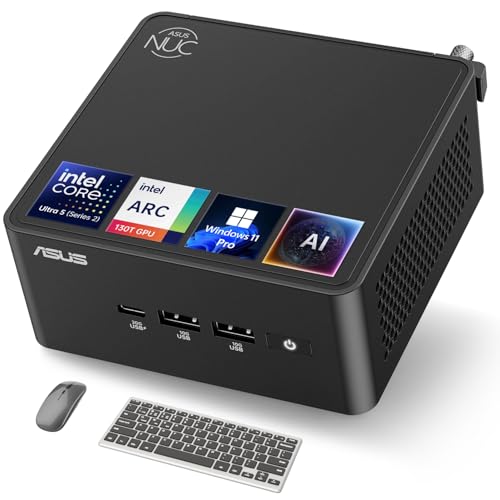
ASUS NUC 15 Pro Ultra 5 Mini PC
Best for: local AI workloads and professional multitasking
- Processor
- Intel Core Ultra 5 225H
- Installed RAM
- 32GB
- Storage Capacity
- 1TB
- Memory Type
- DDR5
- Graphics
- Intel Arc 130T
- High-Speed Expansion
- Thunderbolt 4
View on Amazon: ASUS NUC 15 Pro Ultra 5 Mini PC Affiliate link
The ASUS NUC 15 Pro Mini uses an Intel Core Ultra 5 225H processor with 14 cores and 32GB of DDR5 RAM. It includes a 1TB PCIe SSD and Intel Arc 130T graphics. The unit supports Windows 11 Pro and offers Thunderbolt 4 connectivity. This compact PC suits developers and researchers needing local AI acceleration. Its tool-free chassis allows easy upgrades to 96GB RAM or larger storage drives.
Pros
- Intel Core Ultra 5 225H processor with up to 4.9GHz boost speed
- 32GB DDR5 RAM expandable to 96GB
- 1TB PCIe Gen4 x4 SSD storage
- Intel Arc 130T integrated graphics
- Thunderbolt 4 port for high-speed data transfer
Cons
- Intel Arc 130T graphics are less powerful than discrete options
- No mention of included peripherals like a keyboard or mouse
- Limited to 2.1 inches in height for taller cases
Good fit if
- You need local AI model inference without cloud reliance
- You require tool-free access for RAM or SSD upgrades
- You want a compact unit with Thunderbolt 4 connectivity
Skip if
- You require a dedicated high-end gaming GPU
- You need a pre-assembled kit with monitor and peripherals
- You prefer a larger desktop chassis for maximum airflow
Verdict: ASUS NUC 15 Pro Mini delivers strong CPU performance and expandable memory for professional workflows. It fits developers and educators who value compact size and AI acceleration over heavy graphical rendering.
Specifications side by side
| Spec | ASUS NUC 15 Pro Ultra 5 Mini PC |
|---|---|
| Processor | Intel Core Ultra 5 225H |
| Installed RAM | 32GB |
| Storage Capacity | 1TB |
| Memory Type | DDR5 |
| Graphics | Intel Arc 130T |
| High-Speed Expansion | Thunderbolt 4 |
| Operating System | Windows 11 Pro |
| Memory | 32GB RAM |
| Storage | 1TB SSD |
| Dimensions | 4.6 × 4.4 × 2.1 inches |
| Size | 32GB RAM | 1TB SSD |
| Color | black |
| Model | RNUC15U5 |
Frequently asked questions
Is the ASUS NUC 15 Pro good for local AI tasks?
Yes, this unit is designed for local AI workloads. It includes an Intel Core Ultra 5 225H processor, which provides dedicated AI acceleration capabilities. This hardware allows you to run machine learning models and AI assistants locally on your desktop without relying on cloud services.
How much RAM does the ASUS NUC 15 Pro have?
This specific model comes with 32GB of DDR5 RAM. This high memory capacity supports professional multitasking and heavy application usage. You can run multiple virtual machines or complex software suites simultaneously without experiencing significant slowdowns or memory bottlenecks during your daily workflow.
Does this mini PC include Windows 11 Pro?
Yes, the system ships with Windows 11 Pro installed. This operating system version provides advanced security features and business-oriented tools. You get immediate access to a full desktop environment, making it ready for professional use right out of the box without needing extra setup.
What storage capacity is included in this unit?
The device features a 1TB SSD for storage. This solid-state drive offers fast read and write speeds for quick boot times and application loading. You have ample space to store large project files, media libraries, and extensive software installations while maintaining system responsiveness.
Can I mount this mini PC behind a monitor?
Yes, the chassis supports VESA mounting for flexible placement. Its compact dimensions of 4.6 inches in length and 2.1 inches in height allow it to fit behind most displays. This setup keeps your desk surface clear and reduces cable clutter for a cleaner workspace organization.
What is the physical size of the ASUS NUC 15 Pro?
The unit measures 4.6 inches in length, 4.4 inches in width, and 2.1 inches in height. This small form factor allows it to slide into tight desk spaces or mount discreetly. The black color helps it blend in with most modern office or home setups.
Who is the best target audience for this mini PC?
This PC is best for developers, educators, and professionals who value compact size and AI acceleration. It is ideal for users who need strong CPU performance for multitasking but do not require heavy graphical rendering. It fits those who prioritize processing power and expandable memory.