ASUS or Msi? Mini PCs Compared in 2026
As an Amazon Associate we earn from qualifying purchases. Links on this page are affiliate links.
This ASUS vs msi mini PC comparison looks at two distinct approaches to small form factor computing. Both units offer compact designs suitable for desk placement. The ASUS Chromebox 3 runs Chrome OS with an 8th Gen Core i7. The MSI Cubi NUC uses Windows 11 Pro and a newer 13th Gen Core 3. You need to decide between an established Chrome platform and a modern Windows machine with higher RAM.
Key differences
| Aspect | ASUS Chromebox 3 Core i7 Mini PC | MSI Cubi NUC Mini PC |
|---|---|---|
| Processor | Intel Core i7-8550U (8th Gen) | Intel Core 3 100U (13th Gen, 6-core) |
| Memory | 8GB DDR4 | 16GB high-bandwidth RAM |
| Storage | 128GB SSD | 256GB SSD |
| Operating System | Chrome OS | Windows 11 Pro |
| Networking | Gigabit LAN, 802.11ac Wi-Fi | 2 x RJ45, WiFi 6 |
| Ports | 5x USB 3.1, 1x USB-C, HDMI, DP | 4x USB 10Gbps, 2x Thunderbolt 4, 2x HDMI |
Which one should you choose?
Choose ASUS Chromebox 3 Core i7 Mini PC if
- You prefer the simplicity and security of Chrome OS for web-based work.
- You need Power over Type C to reduce cable clutter for displays.
- You already have Android apps integrated into your daily workflow via Google Play.
Choose MSI Cubi NUC Mini PC if
- You require Windows 11 Pro for specific desktop software compatibility.
- You need more RAM and storage for multitasking and file storage.
- You want faster data transfer speeds via Thunderbolt 4 and WiFi 6.
Verdict: The MSI Cubi NUC offers more modern internals, including a newer processor generation, double the RAM, and Windows 11 Pro. The ASUS Chromebox 3 is a solid choice if you strictly use Chrome OS and value the Power over Type C feature. Your decision rests on whether you need the full Windows environment or the streamlined Chrome experience.
ASUS vs MSI Mini PC Specs
processor performance
The MSI Cubi NUC uses a 13th Gen Intel Core 3 100U processor. This chip features six cores and eight threads with a boost speed up to 4.7GHz. It is designed for responsive daily office work and light multitasking. The ASUS Chromebox 3 relies on an older 8th Gen Intel Core i7-8550U. While the i7 is a capable quad-core chip, it lacks the newer architecture of the Core 3. The MSI unit offers more modern processing power for current software demands. You will notice better speed with the newer MSI silicon for heavier tasks.
memory capacity
Memory handles how many apps you can run at once. The MSI Cubi NUC comes with 16GB of high-bandwidth RAM. This allows you to keep many browser tabs and applications open smoothly. The ASUS Chromebox 3 is equipped with 8GB of DDR4 memory. This is half the capacity of the MSI model. For users who multitask frequently, the extra RAM in the MSI unit provides more breathing room. The ASUS model may feel slower if you open too many programs simultaneously.
storage space
Storage holds your files, operating system, and installed programs. The MSI Cubi NUC includes a 256GB M.2 Solid State Drive. This provides ample space for Windows, apps, and personal data. The ASUS Chromebox 3 features a 128GB M.2 SATA SSD. This is significantly less storage than the MSI option. If you store many local files or install many programs, the MSI drive is more practical. The ASUS drive is sufficient for basic Chrome OS tasks but offers less room for expansion.
operating system
The operating system defines how you interact with the hardware. The ASUS Chromebox 3 runs Chrome OS. This system is lightweight and supports Android apps from Google Play. It is ideal for web-centric tasks and media streaming. The MSI Cubi NUC ships with Windows 11 Pro. This is a full desktop operating system that supports traditional Windows software and Android apps. If you need specific desktop applications or enterprise features, the MSI Windows setup is more versatile. Chrome OS is simpler but less flexible for professional work.
connectivity options
Ports determine what devices you can connect to your mini PC. The MSI Cubi NUC offers extensive connectivity, including two Thunderbolt 4 ports, four USB 10Gbps Type A ports, and two HDMI outputs. It also has dual RJ45 Ethernet ports for robust networking. The ASUS Chromebox 3 provides five USB 3.1 Gen 1 Type A ports and one USB Type C port. It supports two monitors via HDMI and DisplayPort over Type C. The MSI unit wins with faster Thunderbolt 4 speeds and more modern high-speed data transfer capabilities.
Which Mini PC Fits Your Needs
Users who need Windows and modern ports
The MSI Cubi NUC runs Windows 11 Pro, which supports a wider range of desktop applications than Chrome OS. It includes Thunderbolt 4 ports for high-speed data transfer and external displays. The 13th Gen Core 3 processor offers strong multitasking performance for office work and media streaming.
Those wanting Android app support on Chrome OS
This ASUS Chromebox 3 operates on Chrome OS, allowing you to install Android apps from the Google Play Store. It features an 8th Gen Core i7 processor and 8GB of RAM for smooth operation. The compact design fits well in tight spaces while providing essential connectivity options.
Buyers needing dual Ethernet connections
The MSI Cubi NUC stands out with two RJ45 Ethernet ports, offering flexibility for network setups. It also provides 16GB of RAM and a 256GB SSD for ample storage and speed. This configuration ensures stable performance for business environments or users requiring redundant network connections.
The products compared
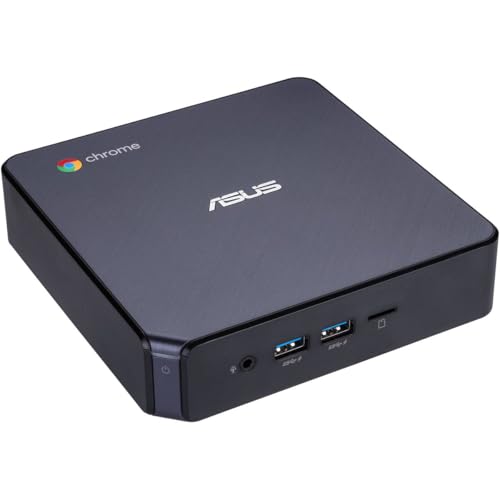
ASUS Chromebox 3 Core i7 Mini PC
Best for: Chrome OS users needing compact Android-friendly desktop
- Processor
- Intel Core i7-8550U
- Installed RAM
- 8GB
- Storage Capacity
- 128GB
- Memory Type
- DDR4
- Graphics
- Intel 4K UHD Graphics
- Ethernet Ports
- Gigabit LAN
View on Amazon: ASUS Chromebox 3 Core i7 Mini PC Affiliate link
The ASUS Chromebox 3 is a compact desktop running Chrome OS. It uses an 8th Gen Intel Core i7-8550U processor with 8GB of DDR4 RAM and a 128GB SSD. This setup supports Android apps and 4K video output. The small form factor fits tight spaces while offering Gigabit LAN and Wi-Fi 802.11ac connectivity. It is designed for users who need a reliable, lightweight system for web-based tasks and media streaming.
Pros
- Intel Core i7-8550U processor for solid performance
- Chrome OS supports Android apps from Google Play
- Compact dimensions of 5.75 x 5.5 x 1.8 inches
- 4K UHD graphics with dual monitor support
Cons
- Only 128GB of storage limits large file libraries
- Bluetooth 4.2 is older than current standards
- Chrome OS is not suitable for Windows-only software
Good fit if
- You need a small footprint for a desk or monitor mount
- You primarily use web apps and Android applications
- You want a quiet system for media playback
Skip if
- You require heavy Windows desktop applications
- You need extensive local storage for large files
- You want the latest Bluetooth version for peripherals
Verdict: The ASUS Chromebox 3 i7 Mini PC is a capable compact system for Chrome OS users. It suits those who value space-saving design and Android app support over high-end gaming or Windows compatibility.

MSI Cubi NUC Mini PC
Best for: Dual Ethernet needs and Thunderbolt 4 connectivity
- Processor
- Intel Core 3 100U
- Installed RAM
- 16GB
- Storage Capacity
- 256GB
- Ethernet Ports
- 2 x RJ45
- High-Speed Expansion
- Thunderbolt 4
- Operating System
- Windows 11 Pro
View on Amazon: MSI Cubi NUC Mini PC Affiliate link
The MSI Cubi NUC packs a 13th Gen Intel Core 3 100U processor into a compact 5.22 by 5.34 by 1.97-inch chassis. It includes 16GB of RAM and a 256GB SSD for daily tasks. Windows 11 Pro runs on board. You get two Thunderbolt 4 ports and dual Ethernet jacks. This setup suits users needing reliable office performance and flexible connectivity in a small footprint.
Pros
- 13th Gen Intel Core 3 100U processor with up to 4.7GHz boost
- 16GB high-bandwidth RAM for smooth multitasking
- Two Thunderbolt 4 ports for high-speed expansion
- Dual RJ45 Ethernet ports for network flexibility
- Windows 11 Pro operating system included
Cons
- 256GB SSD storage is limited for large media libraries
- No built-in display or peripherals included
- Heavier at 6 pounds compared to lighter alternatives
Good fit if
- You need dual Ethernet ports for network redundancy
- You want Thunderbolt 4 connectivity for fast data transfer
- You require Windows 11 Pro for business features
Skip if
- You need more than 256GB of internal storage
- You prefer a lighter device under 4 pounds
- You want a higher-end processor like Core i5 or i7
Verdict: MSI Cubi NUC Mini PC offers solid daily performance with dual Ethernet and Thunderbolt 4. It fits users who need reliable business features and compact size without needing high-end gaming specs.
Specifications side by side
| Spec | ASUS Chromebox 3 Core i7 Mini PC | MSI Cubi NUC Mini PC |
|---|---|---|
| Processor | Intel Core i7-8550U | Intel Core 3 100U |
| Installed RAM | 8GB | 16GB |
| Storage Capacity | 128GB | 256GB |
| Memory Type | DDR4 | not stated |
| Graphics | Intel 4K UHD Graphics | not stated |
| Ethernet Ports | Gigabit LAN | 2 x RJ45 |
| High-Speed Expansion | not stated | Thunderbolt 4 |
| Operating System | Chrome OS | Windows 11 Pro |
| Memory | not stated | 16GB RAM |
| Storage | 128GB SSD | 256GB SSD |
| Dimensions | 5.5 × 5.75 × 1.8 inches | 5.34 × 5.22 × 1.9 inches |
| Weight | not stated | 6 pounds |
| Color | Black | Black |
| Model | CHROMEBOX3-N7290U | MSI Cubi Mini |
| Size | not stated | 16GB RAM | 256GB SSD |
Frequently asked questions
Which mini PC is smaller?
The MSI Cubi NUC is slightly more compact. It measures 5.22 by 5.34 inches with a height of 1.9 inches. The ASUS Chromebox 3 is 5.75 by 5.5 inches and 1.8 inches tall. Both units fit easily on a desk. The MSI model also weighs 6 pounds. Choose the MSI for the tightest footprint.
Does the ASUS Chromebox 3 support Android apps?
Yes, it does. The ASUS Chromebox 3 runs Chrome OS, which allows you to install and run Android applications. This feature is useful for accessing mobile software on a desktop. The system pairs this capability with an Intel Core i7 processor and 128GB of SSD storage. You get a versatile environment for daily tasks and light productivity.
What ports does the MSI Cubi NUC have?
The MSI Cubi NUC includes dual Ethernet ports and Thunderbolt 4 connectivity. These features support reliable business networking and high-speed data transfer. You can connect multiple displays or fast peripherals via Thunderbolt 4. The unit also comes with 16GB of RAM and a 256GB SSD. These specs ensure smooth performance for office workflows.
Can I use Windows on the ASUS Chromebox 3?
No, you cannot. The ASUS Chromebox 3 is designed to run Chrome OS only. It does not support the Windows operating system. If you require Windows applications, you should consider the MSI Cubi NUC instead. The MSI model runs Windows 11 Pro natively. This gives you access to the full range of desktop software and compatibility.
Is the MSI Cubi NUC good for business use?
Yes, it is well suited for business. It features dual Ethernet ports for stable network connections. The Thunderbolt 4 support allows for fast data exchange and external display setups. The 16GB RAM and 256GB SSD provide adequate resources for multitasking. It runs Windows 11 Pro, which offers enhanced security and management features for professional environments.
Which system has more storage space?
The MSI Cubi NUC has more storage. It includes a 256GB SSD for your files and applications. The ASUS Chromebox 3 comes with a 128GB SSD. The extra space on the MSI unit allows you to store more data locally. Both systems use solid-state drives for fast boot times and quick file access.
Which mini PC is better for Chrome OS users?
The ASUS Chromebox 3 is the clear choice. It is built specifically for Chrome OS. The system includes an Intel Core i7 processor for smooth performance. You get Android app support for additional versatility. The compact design saves desk space. It is ideal if you prefer the simplicity and security of the Chrome ecosystem over Windows.