ASUS vs Protectli Mini PCs: Which Brand Fits You?
As an Amazon Associate we earn from qualifying purchases. Links on this page are affiliate links.
This ASUS vs protectli mini PC comparison looks at two distinct fanless devices. Both units offer 4GB of RAM and 32GB of storage in a compact, silent chassis. The main difference lies in their intended use. The ASUS model runs ChromeOS for general desktop tasks, while the Protectli unit is built for network security with four Ethernet ports and no pre-installed operating system.
Key differences
| Aspect | ASUS Fanless Chromebox 4 | Protectli Vault 4-Port Fanless Mini PC |
|---|---|---|
| Processor | Intel Celeron 5265U | Intel Celeron J3160 |
| Operating System | ChromeOS | None |
| Networking | WiFi 6 | 4x Gigabit Ethernet |
| Memory Type | DDR4 | DDR3L |
| Storage Interface | eMMC | mSATA |
Which one should you choose?
Choose ASUS Fanless Chromebox 4 if
- You need a ready-to-use desktop for web browsing and office work
- You require wireless connectivity via WiFi 6
- You prefer a system with a pre-installed operating system
Choose Protectli Vault 4-Port Fanless Mini PC if
- You are building a dedicated firewall or network appliance
- You need multiple wired Ethernet ports for traffic management
- You want to install custom open-source software like pfSense
Verdict: Choose the ASUS Fanless Chromebox 4 for everyday computing tasks where ease of use and wireless connectivity matter. The Protectli Vault FW4B is the better fit if you are setting up a secure network gateway and need multiple wired connections. Your choice depends entirely on whether you need a general desktop or a specialized network tool.
ASUS vs Protectli: Key Specs
Processor speed
The ASUS Fanless Chromebox 4 uses an Intel Celeron 5265U processor. This chip is part of the newer Apollo Lake refresh and offers better single-core performance and power efficiency than older designs. In contrast, the Protectli Vault FW4B relies on the Intel Celeron J3160. While this is a quad-core chip, it is an older architecture with lower clock speeds. For general desktop tasks and multitasking, the ASUS processor provides a noticeable speed advantage. The Protectli chip is sufficient for basic networking duties but lags in computational power.
Operating system
The ASUS unit comes pre-installed with ChromeOS. This operating system is designed for web-based applications and offers a simple, secure interface out of the box. You do not need to configure the software to start using it for browsing or office tasks. The Protectli Vault arrives with no operating system installed. It is designed for users who want to install open-source firewall software like pfSense or OPNsense. This makes the Protectli ideal for network security roles but requires technical knowledge to set up. The ASUS is ready for immediate general use.
Networking ports
Networking capabilities differ significantly between these two mini PCs. The Protectli Vault FW4B features four Intel Gigabit Ethernet ports. This configuration is essential for firewall appliances that need to manage multiple network zones, such as LAN, WAN, and DMZ connections. The ASUS Chromebox 4 does not list multiple Ethernet ports in its specifications. It focuses on connectivity via USB-C, HDMI, and legacy RS232 interfaces. If you need to route traffic through multiple network segments, the Protectli hardware is the only viable option.
Memory type
Both systems include 4GB of installed RAM, but the memory technology varies. The ASUS Fanless Chromebox 4 uses DDR4 memory. This newer standard offers higher bandwidth and better energy efficiency compared to its predecessor. The Protectli Vault uses DDR3L memory. While 4GB is adequate for lightweight tasks on either machine, the DDR4 in the ASUS unit supports faster data transfer rates. This difference is more relevant for the desktop environment of the Chromebox. For the firewall role of the Protectli, the memory speed difference is less critical but still favors the ASUS architecture.
Storage interface
Storage technology impacts longevity and speed. The ASUS Chromebox 4 utilizes 32GB of eMMC storage. eMMC is a flash storage standard commonly found in mobile devices and entry-level laptops, offering decent speed for booting an operating system and loading apps. The Protectli Vault uses 32GB of mSATA SSD storage. The mSATA interface connects directly to the PCIe bus, typically providing faster read and write speeds than eMMC. This makes the Protectli slightly quicker at handling small file operations, which can benefit firewall logging and configuration tasks.
Physical dimensions
Size matters when mounting these devices. The ASUS Chromebox 4 measures 5.75 inches in length, 4.11 inches in width, and 0.89 inches in height. It is a low-profile slab designed for VESA mounting behind monitors. The Protectli Vault is slightly taller at 1.5 inches but shorter in length at 4.5 inches. Both are compact, but the ASUS form factor is optimized for display attachment. The Protectli’s taller chassis may offer slightly better airflow distribution in confined spaces, though both are fanless. The ASUS is more discreet for desktop setups.
Which Mini PC Fits Your Needs
Office workers needing a simple desktop
Choose the ASUS Fanless Chromebox 4 for everyday computing. It runs ChromeOS, which provides a familiar interface for web browsing and document editing. The Intel Celeron 5265U processor handles light multitasking efficiently. You get WiFi 6 for stable connectivity and USB-C ports for modern peripherals. This device is ready to use out of the box without extra configuration.
Network administrators building a firewall
Select the Protectli Vault FW4B if you need to secure your network. It features four Intel Gigabit Ethernet ports, allowing you to segment traffic between WAN and LAN connections. The unit supports open-source firewall software like pfSense or OPNsense. Its compact fanless design ensures silent operation in a server rack or home office. You install the OS yourself for maximum control.
Users requiring legacy serial connections
The ASUS Chromebox 4 includes an RS232 port via RJ50 interface. This allows you to connect to older industrial monitors or legacy devices that require serial communication. The fanless aluminum chassis helps maintain stable thermal performance in enclosed spaces. You can also mount it behind a display using VESA mounting holes. This versatility makes it suitable for specialized commercial environments.
The products compared

ASUS Fanless Chromebox 4
Best for: Quiet, compact ChromeOS tasks
- Processor
- Intel 5205U
- Installed RAM
- 4GB
- Storage Capacity
- 32GB
- Memory Type
- DDR4
- Operating System
- Chrome OS
- Cooling
- Fanless
View on Amazon: ASUS Fanless Chromebox 4 Affiliate link
The ASUS Fanless Chromebox 4 is a compact mini PC built for ChromeOS. It uses an Intel Celeron 5265U processor with 4GB of DDR4 RAM and 32GB of eMMC storage. The fanless design relies on an extruded-aluminum chassis for cooling. You get WiFi 6, USB Type-C, and legacy RS232 support. It fits well in tight spaces or on VESA mounts for basic computing tasks.
Pros
- Fanless design with extruded-aluminum chassis
- Supports up to 3 displays simultaneously
- Includes legacy RS232 via RJ50 interface
- Built-in power switch for commercial use
Cons
- Only 4GB of installed RAM
- Small 32GB eMMC storage capacity
- Runs ChromeOS, not Windows
Good fit if
- You need a fanless device for quiet operation
- You require legacy RS232 connectivity
- You want a compact unit for VESA mounting
Skip if
- You need more than 4GB of RAM
- You require Windows operating system
- You need large local storage space
Verdict: ASUS Fanless Chromebox 4 suits users who need a quiet, compact device with legacy serial support for specific commercial or industrial tasks.
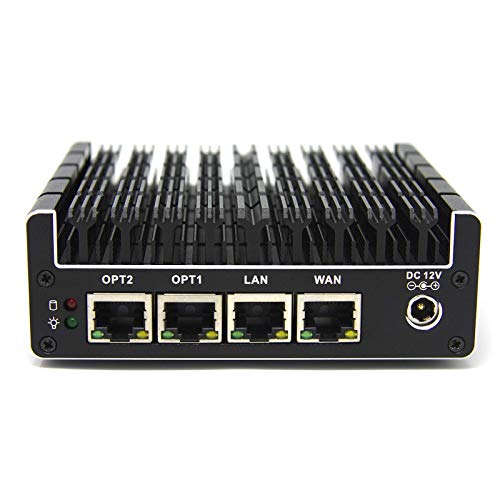
Protectli Vault 4-Port Fanless Mini PC
Best for: Dedicated home firewall setups
- Processor
- Intel Celeron J3160
- Installed RAM
- 4GB
- Storage Capacity
- 32GB
- Memory Type
- DDR3L
- Ethernet Ports
- 4x Gigabit
- Use
- Firewall
View on Amazon: Protectli Vault 4-Port Fanless Mini PC Affiliate link
The Protectli Vault FW4B is a fanless mini PC designed for network security. It features an Intel Celeron J3160 processor and four Gigabit Ethernet ports. You get 4GB of DDR3L RAM and 32GB of mSATA storage. The unit comes without a pre-installed operating system. It supports open-source firewall software like pfSense. This compact device suits users building a dedicated home firewall.
Pros
- Four Gigabit Ethernet ports for network segmentation
- Fanless design ensures silent operation
- AES-NI hardware support for encryption
- Compact 4.3 x 4.5 x 1.5 inch footprint
Cons
- Only 4GB of RAM limits multitasking
- 32GB mSATA storage is minimal
- No operating system pre-installed
Good fit if
- You need a dedicated firewall appliance
- You prefer silent, fanless hardware
- You are comfortable installing open-source software
Skip if
- You require a pre-installed Windows OS
- You need high performance for gaming
- You want more than 4GB of RAM
Verdict: Protectli Vault FW4B Mini PC offers four Ethernet ports and silent operation for network tasks. It fits users who want a dedicated firewall and can handle manual software installation.
Specifications side by side
| Spec | ASUS Fanless Chromebox 4 | Protectli Vault 4-Port Fanless Mini PC |
|---|---|---|
| Processor | Intel 5205U | Intel Celeron J3160 |
| Installed RAM | 4GB | 4GB |
| Storage Capacity | 32GB | 32GB |
| Memory Type | DDR4 | DDR3L |
| Ethernet Ports | not stated | 4x Gigabit |
| Operating System | Chrome OS | not stated |
| Memory | 4GB RAM | 4GB RAM |
| Storage | 32GB SSD | 32GB SSD |
| Use | not stated | Firewall |
| Cooling | Fanless | not stated |
| Dimensions | 5.75 × 4.11 × 0.89 inches | 4.5 × 4.3 × 1.5 inches |
| Weight | 2.2 pounds | not stated |
| Size | 4GB RAM | 32GB eMMC | 4GB RAM, 32GB SSD |
| Color | BLACK | Black |
| Model | CHROMEBOX4-FC017U | FW4B-0-4-32 |
Frequently asked questions
Can I use the ASUS Fanless Chromebox 4 as a general desktop computer?
Yes, it is designed for general desktop tasks. It runs ChromeOS, which provides a familiar interface for web browsing and document editing. The Intel Celeron processor handles light multitasking efficiently. This makes it suitable for office workers needing a simple, quiet device for everyday computing needs.
Does the Protectli Vault have multiple Ethernet ports?
Yes, the Protectli Vault 4-Port Fanless Mini PC includes four Ethernet ports. This hardware allows it to function as a dedicated firewall or router. You can connect multiple network interfaces directly to the device, making it ideal for users who want to manage network traffic with manual software installation.
Are both mini PCs fanless for silent operation?
Both devices feature fanless cooling designs. The ASUS Fanless Chromebox 4 and the Protectli Vault 4-Port model operate silently. This lack of moving parts reduces noise, which is beneficial for quiet environments like home offices or bedrooms. You get compact, silent operation without the distraction of fan noise.
What is the RAM capacity of these mini PCs?
Both units come with 4GB of RAM. The ASUS Fanless Chromebox 4 and the Protectli Vault 4-Port Mini PC share this memory specification. This amount of RAM supports basic multitasking and general desktop tasks. It is sufficient for light computing workloads in a compact form factor.
Which device is better for a home firewall setup?
The Protectli Vault is the better choice for a home firewall. It offers four Ethernet ports, which are essential for dedicated network tasks. The device is built for users who want to install firewall software manually. Its design prioritizes network connectivity over general desktop features.
Does the ASUS Chromebox support legacy serial connections?
Yes, the ASUS Fanless Chromebox 4 includes legacy serial support. This feature allows it to handle specific commercial or industrial tasks that require serial communication. If you need a compact device for specialized hardware integration, this model provides the necessary connectivity options alongside its ChromeOS interface.
How large are these fanless mini PCs?
Both devices are compact. The ASUS model measures 4.11 inches wide, 0.89 inches high, and 5.75 inches long. The Protectli Vault is 4.3 inches wide, 1.5 inches high, and 4.5 inches long. These dimensions allow them to fit easily behind monitors or in tight spaces without taking up much desk area.