ASUS or UDPTCP? Mini PCs Compared in 2026
As an Amazon Associate we earn from qualifying purchases. Links on this page are affiliate links.
This ASUS vs UDPTCP mini PC comparison helps you choose between a ready-to-use Chromebox and a barebone firewall appliance. Both are compact black units designed for specific tasks. The ASUS Chromebox 3 comes with an Intel Core i7, RAM, and storage pre-installed. The UDPTCP model is a barebone system built for network security. It offers four 2.5G LAN ports and supports custom router software. You must select the option that matches your technical needs.
Key differences
| Aspect | ASUS Chromebox 3 Core i7 Mini PC | UDPTCP Celeron N5105 Barebone Firewall Mini PC |
|---|---|---|
| Processor | Intel Core i7-8550U | Intel Celeron N5105 |
| Memory | 8GB DDR4 | Barebone (up to 16GB) |
| Storage | 128GB SSD | Barebone (M.2 NVMe + SATA) |
| Networking | Gigabit LAN | 4x 2.5GbE LAN |
| Operating System | Chrome OS | Not listed |
| Use | General computing | Firewall/Router |
Which one should you choose?
Choose ASUS Chromebox 3 Core i7 Mini PC if
- You want a mini PC that works immediately with Chrome OS and Android apps.
- You need a quiet, compact computer for everyday browsing and media.
- You prefer a single device with built-in storage and memory.
Choose UDPTCP Celeron N5105 Barebone Firewall Mini PC if
- You are building a home lab or firewall using pfSense or OPNsense.
- You require high-speed 2.5G Ethernet ports for network throughput.
- You want to customize your RAM and SSD choices for your project.
Verdict: The ASUS Chromebox 3 is the better choice for users who need a simple, pre-configured computer for daily tasks. The UDPTCP barebone unit is ideal for network enthusiasts who want to build a custom firewall or router. Your decision depends on whether you need a ready-to-use system or a customizable networking appliance.
ASUS vs UDPTCP Mini PC Specs
processor performance
The ASUS Chromebox 3 uses an Intel Core i7-8550U processor. This is an 8th generation chip with four cores and eight threads. It offers strong multi-threaded performance for everyday tasks and Chrome OS efficiency. The UDPTCP unit features an Intel Celeron N5105. This is a quad-core, quad-thread processor with a lower base clock but a boost up to 2.90 GHz. The Celeron is designed for low power and basic routing duties. For general computing speed and multitasking, the i7-8550U provides significantly more processing power than the N5105.
networking ports
Networking is where the UDPTCP appliance shines. It includes four Intel i226-V 2.5GbE LAN ports. This allows for high-speed data transmission and link aggregation, which is critical for firewall and router applications. The ASUS Chromebox 3 has only a single Gigabit LAN port. While sufficient for internet browsing and media streaming, it cannot handle the multi-interface routing needs that the UDPTCP model supports. If you need to connect multiple high-speed network segments, the UDPTCP hardware is superior.
memory configuration
The ASUS Chromebox 3 comes with 8GB of DDR4 memory pre-installed. You can use it immediately without adding components. The UDPTCP model is sold as a barebone unit. It has dual DDR4 RAM slots but includes no installed memory. You must purchase and install RAM yourself to make the system operational. This adds to the initial setup effort and cost for the UDPTCP. For users who want a plug-and-play experience with ready-to-use memory, the ASUS configuration is more convenient.
storage options
Storage differs significantly between the two units. The ASUS Chromebox 3 includes a 128GB M.2 SATA SSD. This provides immediate boot and application storage. The UDPTCP is a barebone system with no installed storage. It offers one M.2 NVMe 2280 slot and one 2.5-inch SATA SSD or HDD bay. This gives you flexibility to choose your own drive types and capacities. However, you must source and install the storage media. The ASUS unit is ready to use out of the box.
operating system
The ASUS Chromebox 3 runs Chrome OS. This operating system is lightweight, secure, and supports Android apps from Google Play. It is ideal for web browsing, media consumption, and light productivity. The UDPTCP is designed for network operating systems like pfSense, OPNsense, or ESXi. It supports features like AES-NI for encryption and Wake-on-LAN. It is not intended for general desktop use. If you need a desktop computer for daily tasks, the ASUS system is the clear choice.
display outputs
Both units support dual 4K displays, but the ports differ. The ASUS Chromebox 3 uses one HDMI port and one DisplayPort over Type C. It also features Power over Type C to minimize cable clutter. The UDPTCP uses HDMI 2.0 and DisplayPort 1.4. Both support 4K at 60Hz. The ASUS configuration is more versatile for desktop setups due to the Type C option. The UDPTCP ports are standard for a firewall appliance that may not always need a monitor attached.
Choose the right Mini PC for your needs
Users needing a ready-to-use Chrome OS device
This ASUS model includes an Intel Core i7-8550U processor, 8GB DDR4 RAM, and a 128GB SSD. It runs Chrome OS with full Android app support. You get built-in Wi-Fi, Bluetooth, and dual monitor support via HDMI and DisplayPort. It is a complete package with no additional parts required for immediate use.
Network engineers building a custom firewall appliance
The UDPTCP unit features four 2.5GbE LAN ports using Intel i226-V controllers. It is designed for firewall software like pfSense or OPNsense. You must add your own RAM and storage, as it is a barebone system. It supports AES-NI hardware encryption and offers extensive connectivity for professional network management tasks.
Users requiring high-speed multi-Gigabit networking
You get four 2.5 Gigabit Ethernet ports on this UDPTCP mini PC. This provides significantly higher throughput than standard Gigabit connections. The system uses an Intel Celeron N5105 processor and supports dual 4K displays. It is built for 24/7 operation with industrial-grade cooling, making it ideal for demanding network environments.
The products compared
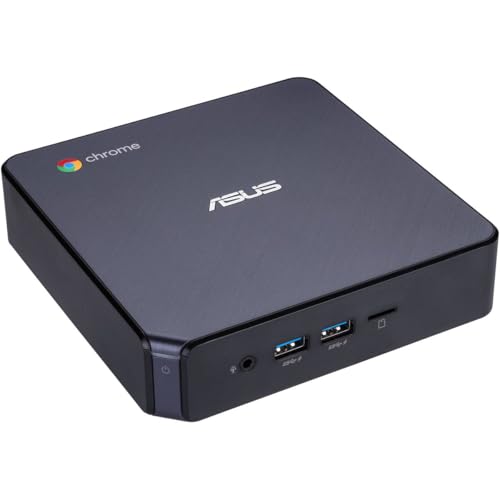
ASUS Chromebox 3 Core i7 Mini PC
Best for: Chrome OS users needing dual 4K displays
- Processor
- Intel Core i7-8550U
- Installed RAM
- 8GB
- Storage Capacity
- 128GB
- Memory Type
- DDR4
- Graphics
- Intel 4K UHD Graphics
- Ethernet Ports
- Gigabit LAN
View on Amazon: ASUS Chromebox 3 Core i7 Mini PC Affiliate link
The ASUS Chromebox 3 uses an Intel Core i7-8550U processor with 8GB of DDR4 RAM and a 128GB SSD. It runs Chrome OS and supports Android apps. Dual 4K displays connect via HDMI and DisplayPort. You get Gigabit LAN, Wi-Fi 802.11ac, and Bluetooth 4.2. This compact unit suits users who need a small, efficient machine for web tasks and media.
Pros
- Intel Core i7-8550U processor
- 8GB DDR4 memory
- 128GB M. 2 SATA SSD
- Dual 4K UHD display support
- Power over Type C option
Cons
- Only 128GB storage capacity
- Bluetooth 4.2 is older standard
- No dedicated graphics card
Good fit if
- You need a small desktop for Chrome OS
- You want dual 4K monitor support
- You prefer Power over Type C
Skip if
- You require Windows or Linux
- You need heavy gaming performance
- You want more than 128GB storage
Verdict: The ASUS Chromebox 3 Mini PC fits office workers who need a quiet, compact machine for web browsing and document editing on two 4K screens.

UDPTCP Celeron N5105 Barebone Firewall Mini PC
Best for: custom firewall and home server builds
- Processor
- Intel Celeron N5105
- Installed RAM
- Barebone
- Storage Capacity
- Barebone
- Memory Type
- DDR4
- Graphics
- Intel UHD Graphics
- Ethernet Ports
- 4x 2.5GbE
View on Amazon: UDPTCP Celeron N5105 Barebone Firewall Mini PC Affiliate link
This UDPTCP barebone unit uses an Intel Celeron N5105 processor and four 2.5GbE ports for network tasks. It supports dual 4K displays and includes slots for DDR4 RAM and storage. The aluminum chassis provides passive cooling for continuous operation. You should choose this if you need a dedicated firewall appliance or home server. It fits users who want to install their own router operating system.
Pros
- Four 2.5GbE LAN ports for high-speed networking
- Intel Celeron N5105 quad-core processor
- Supports dual 4K displays via HDMI and DisplayPort
- Aluminum alloy chassis for industrial durability
- Includes M.2 NVMe and 2.5-inch SATA storage slots
Cons
- Sold as a barebone system without RAM or SSD
- Processor is less powerful than the i7-8550U in the other listed option
- No built-in Wi-Fi or cellular connectivity module
Good fit if
- You need a dedicated firewall or router appliance
- You want to install pfSense, OPNsense, or similar software
- You require multiple 2.5 Gigabit Ethernet connections
Skip if
- You need a ready-to-use system with pre-installed RAM and storage
- You require high-performance video editing or gaming
- You want a device with built-in wireless internet capability
Verdict: UDPTCP N5105 Firewall Mini PC is a specialized barebone platform for network enthusiasts. It suits users building a custom firewall or home server who prioritize network ports over raw processing power.
Specifications side by side
| Spec | ASUS Chromebox 3 Core i7 Mini PC | UDPTCP Celeron N5105 Barebone Firewall Mini PC |
|---|---|---|
| Processor | Intel Core i7-8550U | Intel Celeron N5105 |
| Installed RAM | 8GB | Barebone |
| Storage Capacity | 128GB | Barebone |
| Memory Type | DDR4 | DDR4 |
| Graphics | Intel 4K UHD Graphics | Intel UHD Graphics |
| Ethernet Ports | Gigabit LAN | 4x 2.5GbE |
| Operating System | Chrome OS | not stated |
| Storage | 128GB SSD | not stated |
| Use | not stated | Firewall |
| Networking | not stated | 2.5G LAN |
| Form Factor | not stated | Barebone |
| Dimensions | 5.5 × 5.75 × 1.8 inches | not stated |
| Color | Black | Black |
| Model | CHROMEBOX3-N7290U | BK-N5105-4L |
| Size | not stated | No RAM/No SSD |
Frequently asked questions
Can I use the ASUS Chromebox 3 for dual 4K monitors?
Yes, this unit supports dual 4K displays. It is designed for users who need high-resolution output for office work or document editing. The compact black chassis houses the necessary ports to drive two screens simultaneously without requiring additional adapters.
Does the UDPTCP mini PC come with RAM and storage installed?
No, this is a barebone platform. The specifications list it as having no RAM and no SSD pre-installed. You must purchase and install these components separately to build a functional system for your firewall or home server needs.
Which mini PC is better for running a custom firewall?
The UDPTCP model is the better choice. It is specifically marketed as a firewall appliance with a Celeron N5105 processor. It includes 2.5G LAN connectivity, which is essential for high-speed network throughput in home server or custom firewall builds.
Is the ASUS Chromebox 3 a complete computer out of the box?
Yes, it is a ready-to-use device. It comes with an Intel Core i7 processor, RAM, and a 128GB SSD already installed. You can power it on immediately for web browsing and Chrome OS tasks without needing to add internal components.
What processor does the ASUS Chromebox 3 use?
It uses an Intel Core i7 processor. This chip provides strong performance for everyday tasks on Chrome OS. It handles web browsing, document editing, and multi-tasking efficiently within the small form factor of the black mini PC chassis.
How large is the UDPTCP firewall mini PC?
The dimensions are not explicitly listed in the provided data, but it is described as a compact black unit. Its model number is BK-N5105-4L. It is designed to fit easily into tight spaces suitable for network equipment or home server racks.
Can I install Android apps on the ASUS Chromebox 3?
Yes, the ASUS Chromebox 3 runs Chrome OS. This operating system supports full Android app integration. You can access a wide range of applications from the Google Play Store directly on the device for enhanced productivity and entertainment.