Best MINISFORUM Mini PCs Under $2000 in 2026: 13 Picks
As an Amazon Associate we earn from qualifying purchases. Links on this page are affiliate links.
These are the best MINISFORUM mini PCs under $2000. We compared 13 models using only the specifications published on their listings. The top pick is the MINISFORUM Core Ultra 9 Mini Workstation because it offers dual 25G networking and extensive storage expansion. This specialized tool fits users who need high-speed connectivity in a small form factor. The remaining selections cover AI workloads, gaming, and developer needs. Each choice relies on published data for RAM, storage, and processor details. Use this guide to decide which Mini PC matches your specific hardware requirements.
Quick picks
The best fit for you
- You need dual 25G networking and storage expansion MINISFORUM Core Ultra 9 Mini Workstation The MS-02 Ultra supports dual 25G networking and extensive storage options.
- You want the best budget option for multitasking MINISFORUM M1 Pro-285H Mini PC The M1 Pro offers 16-core performance and ample RAM for multitasking.
- You need 2K gaming and quad 4K displays MINISFORUM RX 9060 XT Ryzen 9 Mini PC The G1 Pro delivers strong 2K gaming with a 140W dedicated GPU.
Our 13 picks

MINISFORUM Core Ultra 9 Mini Workstation
Best for: Users needing dual 25G networking and storage expansion
- Processor
- Intel Core Ultra 9 285HX
- Installed RAM
- 32GB
- Storage Capacity
- 1TB
- Memory Type
- DDR5
- Graphics
- Intel Graphics
- Ethernet Ports
- 2x 25G SFP+, 1x 10G, 1x 2.5G RJ45
View on Amazon: MINISFORUM Core Ultra 9 Mini Workstation Affiliate link
This mini workstation uses an Intel Core Ultra 9 285HX processor with 24 cores and 24 threads. It includes 32GB of DDR5 RAM and a 1TB SSD. The system features dual 25G SFP+ ports for high-speed networking. It also supports Wi-Fi 7 and Bluetooth 5.4. The unit offers four video outputs for multi-monitor setups. It suits users needing strong wired connectivity and expandable storage.
Pros
- Intel Core Ultra 9 285HX processor with up to 5.5 GHz speed
- Dual 25G SFP+ Ethernet ports for ultra-fast wired connections
- Support for up to 256GB DDR5 RAM across four slots
- Four video outputs including HDMI 2.1 and USB4 ports
- Wi-Fi 7 and Bluetooth 5.4 wireless connectivity
Cons
- Only 32GB of RAM is installed in this configuration
- XMP overclocking for memory is not supported
- PCIe 5.0 x16 slot is physically occupied by the NIC
Good fit if
- You need dual 25G SFP+ ports for high-speed network storage
- You require four simultaneous monitor displays for productivity
- You want to expand storage using multiple M.2 SSD slots
Skip if
- You need more than 32GB of RAM pre-installed
- You prefer a standard 2.5G or 10G Ethernet connection
- You want to use the PCIe slot for a graphics card
Verdict: MINISFORUM MS-02 Ultra Core Ultra 9 Workstation is a specialized tool for users who need dual 25G networking and extensive storage expansion options in a small form factor.

Minisforum AI X1 Pro Ryzen AI 9 HX 370 Mini PC
Best for: AI workloads and multi-network setups
- Processor
- AMD Ryzen AI 9 HX 370
- Installed RAM
- 64GB
- Storage Capacity
- 2TB
- Memory Type
- DDR5
- Graphics
- AMD Radeon 890M
- Ethernet Ports
- 2x 2.5G
View on Amazon: Minisforum AI X1 Pro Ryzen AI 9 HX 370 Mini PC Affiliate link
This mini PC features the AMD Ryzen AI 9 HX 370 processor with 12 cores and 24 threads. It includes 64GB of DDR5 RAM and a 2TB SSD. The system supports Wi-Fi 7 and dual 2.5G LAN ports. You get an OCuLink port for external GPU expansion. It handles four displays simultaneously. This setup suits users needing high AI performance and extensive connectivity options.
Pros
- AMD Ryzen AI 9 HX 370 with 50 TOPS NPU performance
- 64GB DDR5 RAM and 2TB PCIe 4.0 SSD
- OCuLink port for external GPU expansion
- Dual 2.5G LAN ports and Wi-Fi 7 support
Cons
- OCuLink port is not hot-swappable
- Requires one M.2 SSD slot for OCuLink operation
- Limited to 12 cores compared to 16-core competitors
Good fit if
- You need high AI processing power for local models
- You require multiple wired network connections
- You want to expand storage up to 12TB
Skip if
- You need hot-swappable external GPU connections
- You require more than 12 CPU cores
- You prefer Thunderbolt 4 over OCuLink
Verdict: MINISFORUM AI X1 Pro AMD Ryzen AI 9 HX 370 is a powerful workstation for users who need dedicated AI acceleration and flexible networking. It fits professionals who value expandable storage and external GPU capabilities over maximum core counts.

MINISFORUM M1 Pro-285H Mini PC
Best for: multitasking and storage expansion
- Processor
- Intel Core Ultra 9 Processor 285H
- Installed RAM
- 64GB
- Storage Capacity
- 1TB
- Memory Type
- DDR5 5600MHz
- Graphics
- Intel Arc
- High-Speed Expansion
- USB4, OCuLink
View on Amazon: MINISFORUM M1 Pro-285H Mini PC Affiliate link
This MINISFORUM M1 Pro features an Intel Core Ultra 9 285H processor with 16 cores and 16 threads. It includes 64GB of DDR5 RAM and a 1TB PCIe 4.0 SSD. The system supports quad 4K display output and OCuLink GPU expansion. It is suitable for content creation, light gaming, and multimedia editing. You get strong multi-threaded performance and high-speed storage in a compact form factor.
Pros
- Intel Core Ultra 9 285H with 16 cores and 16 threads
- 64GB DDR5 RAM with speeds up to 6400 MT/s
- Dual M.2 PCIe 4.0 slots supporting up to 4TB each
- OCuLink GPU expansion for enhanced gaming performance
- Quad 4K display output via HDMI 2.1 and USB4
Cons
- 16 cores is fewer than the 24 cores found in competing models
- 1TB SSD storage is smaller than the 2TB options available in other configurations
- Maximum 4K resolution at 60Hz is lower than the 8K support seen in some competitors
Good fit if
- You need high RAM capacity for multitasking
- You want to expand storage with dual drives
- You require multiple high-resolution displays
Skip if
- You need more than 16 processor cores
- You require more than 1TB of built-in storage
- You need 8K display output capability
Verdict: MINISFORUM M1 Pro Core Ultra 9 Mini PC offers robust 16-core performance and ample RAM for users who prioritize multitasking and storage expansion over maximum core counts.

MINISFORUM AI X1 Pro Ryzen AI 9 Mini PC
Best for: Users needing high RAM and eGPU expansion
- Processor
- AMD Ryzen AI 9 HX 370
- Installed RAM
- 64GB
- Storage Capacity
- 2TB
- Memory Type
- DDR5
- Graphics
- AMD Radeon 890M
- Ethernet Ports
- Dual 2.5 LAN
View on Amazon: MINISFORUM AI X1 Pro Ryzen AI 9 Mini PC Affiliate link
This mini PC uses the AMD Ryzen AI 9 HX 370 processor with 12 cores and 24 threads. It includes 64GB of DDR5 RAM and a 2TB SSD. The integrated AMD Radeon 890M graphics handle gaming and creation tasks. Dual USB4 ports and an OCuLink connector allow for fast data transfer and external GPU expansion. It supports up to four 4K displays and connects via WiFi 7.
Pros
- AMD Ryzen AI 9 HX 370 processor with up to 5.1 GHz speed
- 64GB DDR5 RAM and 2TB storage capacity
- Dual USB4 and OCuLink port for eGPU support
- Supports up to four 4K displays simultaneously
- Built-in fingerprint sensor for secure unlocking
Cons
- Only 12 cores compared to 16 or 24 cores in other list items
- Maximum power consumption is limited to 65W
- No mention of an included wireless keyboard or mouse
Good fit if
- You need high RAM capacity for multitasking
- You want to connect an external GPU via OCuLink
- You require support for multiple 4K monitors
Skip if
- You need more than 12 CPU cores
- You require a dedicated graphics card inside the unit
- You want a system with more than 65W power draw
Verdict: MINISFORUM AI X1 Pro Ryzen AI 9 Mini PC offers strong AI performance and expandability for users who prioritize RAM and external GPU support over core count. It suits those building a compact multi-display workstation.

MINISFORUM RX 9060 XT Ryzen 9 Mini PC
Best for: 2K gaming and quad 4K display setups
- Processor
- AMD Ryzen 9 8945HX
- Installed RAM
- 32GB
- Storage Capacity
- 1TB
- Memory Type
- DDR5
- Graphics
- AMD Radeon RX 9060 XT
- Ethernet Ports
- 5GbE
View on Amazon: MINISFORUM RX 9060 XT Ryzen 9 Mini PC Affiliate link
The MINISFORUM G1 Pro pairs a Ryzen 9 8945HX processor with a 140W Radeon RX 9060 XT graphics card. It includes 32GB of DDR5 RAM and a 1TB SSD. The system supports quad 4K displays and Wi-Fi 7 connectivity. This setup suits gamers who need strong multi-core performance and dedicated graphics in a compact 3.8L chassis. It handles high-refresh 1080p gaming and 2K titles with ease.
Pros
- Ryzen 9 8945HX CPU with 16 cores and 32 threads
- 140W AMD Radeon RX 9060 XT GPU with 16GB GDDR6 VRAM
- 32GB DDR5 RAM and 1TB PCIe 4.0 SSD
- Quad 4K display output support via 2x DP and 2x HDMI
- Wi-Fi 7 and 5GbE Ethernet connectivity
Cons
- 16GB VRAM is lower than the 64GB system RAM found on other list picks
- 32GB RAM capacity is half the 64GB standard on several competing models
- 1TB storage is less than the 8TB expansion potential of some workstation variants
Good fit if
- You want a dedicated GPU with 16GB VRAM for 2K gaming
- You need quad 4K display outputs for a multi-monitor setup
- You require Wi-Fi 7 for high-speed wireless connectivity
Skip if
- You need 64GB of RAM for heavy professional workloads
- You prefer a workstation CPU with 24 cores over 16 cores
- You want a system with 1TB of storage as a baseline maximum
Verdict: The MINISFORUM G1 Pro Ryzen 9 Gaming PC delivers strong 1080p and 2K gaming performance with its 140W GPU and 16-core CPU. It fits users who prioritize dedicated graphics and multi-monitor setups over maximum system memory capacity.
MINISFORUM MS-02 Ultra Workstation Mini PC
Best for: network-intensive workstation tasks
- Processor
- Intel Core Ultra 9 285HX
- Installed RAM
- 32GB
- Storage Capacity
- 1TB
- Memory Type
- DDR5
- Graphics
- Intel Graphics
- Ethernet Ports
- 1x10G RJ45, 1x2.5G RJ45, 2x25G SFP+
View on Amazon: MINISFORUM MS-02 Ultra Workstation Mini PC Affiliate link
The MINISFORUM MS-02 Ultra is a workstation built for heavy data movement. It uses the Intel Core Ultra 9 285HX processor with 24 cores. You get 32GB of DDR5 RAM and a 1TB SSD. The standout feature is the dual 25G SFP+ ports, which offer fast wired connections. It supports four video outputs and includes four M.2 slots for storage expansion.
Pros
- Intel Core Ultra 9 285HX processor with 24 cores
- Dual 25G SFP+ Ethernet ports for high-speed networking
- Four M.2 2280 PCIe 4.0 SSD slots with RAID support
- Four video outputs including HDMI 2.1 and USB4
Cons
- 32GB RAM is lower than the 64GB found in several other picks
- Integrated Intel Graphics lacks dedicated GPU power for heavy gaming
- XMP overclocking is not supported for the memory
Good fit if
- You need ultra-fast 25G wired network connections
- You require extensive internal storage expansion options
- You run server-grade workloads or virtualization
Skip if
- You need 64GB of RAM for heavy multitasking
- You require a dedicated graphics card for gaming
- You want XMP memory overclocking capabilities
Verdict: The MINISFORUM MS-02 Ultra Workstation fits users who prioritize network speed and storage capacity over maximum RAM or gaming graphics. It serves as a specialized tool for data-heavy tasks rather than general entertainment.

MINISFORUM Core Ultra 5 64GB Mini PC
Best for: developers needing 10G networking and 64GB RAM
- Processor
- Intel Core Ultra 5 336H
- Installed RAM
- 64GB
- Storage Capacity
- 1TB
- Memory Type
- DDR5 5600 MT/s
- Graphics
- Intel Graphics
- Ethernet Ports
- 10GbE, 2.5GbE, 2x 10G SFP+
View on Amazon: MINISFORUM Core Ultra 5 64GB Mini PC Affiliate link
The MINISFORUM MS-03 is a compact workstation featuring an Intel Core Ultra 5 336H processor and 64 GB of DDR5 RAM. It includes a 1 TB SSD and professional networking ports, including 10GbE and 10G SFP+. This setup supports heavy multitasking, virtualization, and high-speed data transfer. It suits developers and creators who need reliable performance in a small chassis with enterprise-grade connectivity options.
Pros
- 64 GB DDR5 RAM supports heavy multitasking and virtualization
- 10GbE and 2x 10G SFP+ ports for high-speed networking
- Intel Core Ultra 5 336H with 47 TOPS NPU for AI acceleration
- Compact 196x189x48 mm chassis weighs only 1.4 kg
Cons
- Integrated Intel Graphics limits dedicated gaming performance
- No dedicated discrete GPU for heavy 3D rendering
- Only 1 TB storage in this configuration
Good fit if
- You need 10G networking for local storage or servers
- You run multiple virtual machines requiring large RAM
- You want a quiet, compact workstation for development
Skip if
- You require a dedicated graphics card for gaming
- You need more than 1 TB of built-in storage
- You prefer a larger chassis for easier upgrades
Verdict: The MINISFORUM MS-03 Intel Core Ultra 5 is a powerful, compact workstation for developers and network engineers who need 10G connectivity and large RAM. It fits users who prioritize professional I/O over gaming graphics.

MINISFORUM 895D7 Mini PC with RX 9060 XT
Best for: gamers needing dedicated graphics in a small form factor
- Processor
- AMD Ryzen 9 8945HX
- Installed RAM
- 32GB
- Storage Capacity
- 1TB
- Memory Type
- DDR5 5200MT/s
- Graphics
- AMD Radeon RX 9060 XT
- Ethernet Ports
- 1x 2.5G
View on Amazon: MINISFORUM 895D7 Mini PC with RX 9060 XT Affiliate link
The MINISFORUM 895D7 is a compact desktop built for gaming and content creation. It features an AMD Ryzen 9 8945HX processor with 16 cores and 32 threads, paired with 32GB of DDR5 RAM. A dedicated Radeon RX 9060 XT graphics card with 16GB VRAM handles 1080p to 1440p gaming. It includes a 1TB PCIe 4.0 SSD and supports Wi-Fi 7. This machine suits users who need strong performance in a small form factor.
Pros
- AMD Ryzen 9 8945HX processor with 16 cores and 32 threads
- Dedicated AMD Radeon RX 9060 XT with 16GB GDDR6 VRAM
- 32GB DDR5-5200MT/s RAM expandable to 96GB
- Wi-Fi 7 and Bluetooth 5.4 connectivity
- Multiple video outputs including HDMI 2.1 and DP 2.1
Cons
- Weighs 7.6 pounds, which is heavier than many ultra-compact alternatives
- 32GB RAM is lower than the 64GB found in several other MINISFORUM models on this list
- 1TB SSD is smaller than the storage capacity in some competing units
Good fit if
- You want a dedicated graphics card for gaming in a small case
- You need high-speed Wi-Fi 7 for stable wireless connections
- You require multiple display outputs for a multi-monitor setup
Skip if
- You prefer a lighter device under 5 pounds
- You need 64GB of RAM pre-installed for heavy multitasking
- You want more than 1TB of storage without upgrading
Verdict: The MINISFORUM 895D7 Ryzen 9 Gaming Mini PC delivers strong gaming performance with its dedicated RX 9060 XT graphics and Ryzen 9 processor. It is a solid choice for gamers who value high refresh rates and modern connectivity standards like Wi-Fi 7.
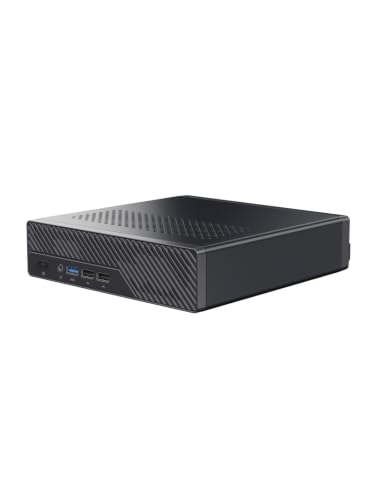
MINISFORUM Intel Core Ultra 9 Workstation Mini PC
Best for: Enterprise networking and hardware expansion
- Processor
- Intel Core Ultra 9 386H
- Installed RAM
- 64GB
- Storage Capacity
- 1TB
- Memory Type
- DDR5 7200 MT/s
- Graphics
- Intel GPU
- Ethernet Ports
- 2x 10G SFP+, 1x 10GbE, 1x 2.5GbE
View on Amazon: MINISFORUM Intel Core Ultra 9 Workstation Mini PC Affiliate link
This workstation packs an Intel Core Ultra 9 386H processor with 16 cores and 64GB of DDR5 RAM. It features dual 10G SFP+ ports and a PCIe x16 slot for serious expansion. You get 1TB of storage and robust networking options. It suits users who need high bandwidth and local AI acceleration for complex workflows.
Pros
- Intel Core Ultra 9 386H with 16 cores
- 64GB DDR5 RAM at 7200 MT/s
- Dual 10G SFP+ and 10GbE LAN ports
- PCIe x16 physical slot for upgrades
- 1TB PCIe 4.0 NVMe SSD
Cons
- 16 cores is fewer than the 24 cores in other list options
- 1TB storage is less than the 1TB capacity seen in other picks
- Single PCIe x16 slot limits expansion compared to multi-slot designs
Good fit if
- You need dual 10G SFP+ ports for server environments
- You require a PCIe x16 slot for custom hardware
- You want high-speed DDR5 RAM for local AI tasks
Skip if
- You prefer a processor with more than 16 cores
- You need more than one expansion slot for cards
- You require more than 1TB of pre-installed storage
Verdict: MINISFORUM MS-03 Core Ultra 9 Mini PC fits users who need enterprise networking and a PCIe expansion slot for specialized hardware. It is ideal for homelab servers or dense AI nodes where bandwidth and upgradability matter more than raw core counts.
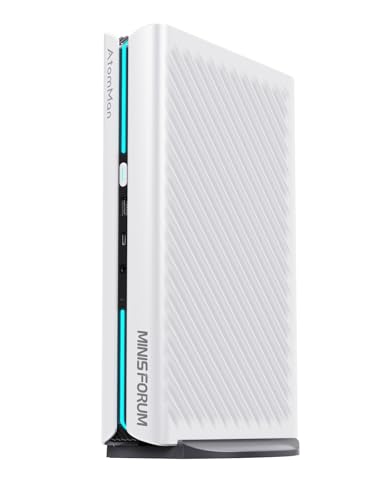
MINISFORUM G1 Pro RTX 5060 Mini PC
Best for: Multi-monitor gaming and content creation
- Processor
- AMD Ryzen 9 8945HX
- Installed RAM
- 32GB
- Storage Capacity
- 1TB
- Memory Type
- DDR5-5200MT/s
- Graphics
- GeForce RTX 5060 8GB
- Ethernet Ports
- 1x 5G RJ45
View on Amazon: MINISFORUM G1 Pro RTX 5060 Mini PC Affiliate link
The MINISFORUM G1 Pro is a white gaming mini PC built around the AMD Ryzen 9 8945HX processor with 16 cores and 32 threads. It includes 32GB of DDR5 RAM and a 1TB PCIe 4.0 SSD. A dedicated GeForce RTX 5060 8GB graphics card handles visual tasks. You get five video outputs for up to four displays. Wi-Fi 7 and 5G Ethernet ensure fast connectivity. This setup suits gamers and creators who need strong performance in a compact form.
Pros
- AMD Ryzen 9 8945HX processor with up to 5.4GHz speed
- Dedicated GeForce RTX 5060 8GB graphics with ray tracing
- Supports up to four displays via 2 HDMI and 3 DisplayPort outputs
- Wi-Fi 7 and 5G RJ45 Ethernet for stable networking
Cons
- 1TB storage is smaller than the 2TB max capacity
- 32GB RAM is below the 64GB upgrade limit
- No mention of included peripherals like a keyboard or mouse
Good fit if
- You need four simultaneous monitor connections for multitasking
- You want dedicated graphics for gaming or video editing
- You require fast wireless connectivity with Wi-Fi 7
Skip if
- You need more than 1TB of internal storage without upgrades
- You prefer a pre-installed 64GB RAM configuration
- You want a system with included input devices
Verdict: MINISFORUM G1 Pro Ryzen 9 Gaming Mini PC delivers strong gaming and multitasking power through its Ryzen 9 8945HX CPU and RTX 5060 GPU. It fits users who need multi-monitor setups and high-speed networking in a small footprint.

MINISFORUM G1 Pro RTX 5060 Mini PC
Best for: Gaming and creative work in a compact form
- Processor
- AMD Ryzen 9 8945HX
- Installed RAM
- 32GB
- Storage Capacity
- 1TB SSD
- Memory Type
- DDR5
- Graphics
- NVIDIA GeForce RTX 5060 8GB GDDR7
- Ethernet Ports
- 5GbE
View on Amazon: MINISFORUM G1 Pro RTX 5060 Mini PC Affiliate link
This compact desktop pairs an AMD Ryzen 9 8945HX processor with a full-power 145W NVIDIA GeForce RTX 5060 GPU. You get 32GB of DDR5 RAM and a 1TB SSD for smooth multitasking and gaming. The 3.8L chassis supports quad 4K displays and Wi-Fi 7. It suits gamers and creators who need strong GPU performance in a small footprint.
Pros
- 145W NVIDIA GeForce RTX 5060 with 8GB GDDR7 memory
- AMD Ryzen 9 8945HX CPU with 16 cores and 5.4GHz boost
- 32GB DDR5 RAM and 1TB SSD storage
- Wi-Fi 7 and 5GbE Ethernet connectivity
- Quad 4K multi-screen output support
Cons
- 32GB RAM is lower than the 64GB or 96GB options on this list
- 1TB SSD capacity is smaller than some competitors
- Lacks a built-in display
Good fit if
- You need dedicated RTX graphics for gaming or rendering
- You want high-speed Wi-Fi 7 and 5GbE networking
- You prefer a compact vertical design with RGB lighting
Skip if
- You require more than 32GB of RAM for heavy workloads
- You need more than 1TB of internal storage
- You want a system with a larger GPU than the RTX 5060
Verdict: MINISFORUM G1 Pro Ryzen 9 Gaming Mini PC delivers strong gaming and creative performance in a small chassis. It fits users who prioritize GPU power and fast networking over maximum RAM capacity.
MINISFORUM RTX 5060 Ryzen 9 Mini PC
Best for: Gaming and multi-monitor creative work
- Processor
- AMD Ryzen 9 8945HX
- Installed RAM
- 32GB
- Storage Capacity
- 1TB
- Memory Type
- DDR5-5200MT/s
- Graphics
- GeForce RTX 5060 8GB
- Ethernet Ports
- 1x 5GbE
View on Amazon: MINISFORUM RTX 5060 Ryzen 9 Mini PC Affiliate link
The MINISFORUM G1 Pro pairs an AMD Ryzen 9 8945HX processor with a dedicated GeForce RTX 5060 8GB graphics card. You get 32GB of DDR5 RAM and a 1TB PCIe 4.0 SSD for fast multitasking and storage. It supports four displays via dual HDMI and DisplayPort outputs. This setup suits gamers and creators who need strong visual performance in a compact form factor.
Pros
- Dedicated GeForce RTX 5060 8GB graphics with ray tracing support
- AMD Ryzen 9 8945HX processor with up to 5.4GHz boost
- Wi-Fi 7 and Bluetooth 5.4 for modern wireless connectivity
- Supports up to four simultaneous displays via 2x HDMI and 3x DP ports
Cons
- Only 1TB of pre-installed storage capacity
- Limited to 32GB of DDR5 RAM out of the box
- No mention of Thunderbolt support for high-speed peripheral connections
Good fit if
- You need dedicated graphics for gaming or video editing
- You want to connect four monitors to one machine
- You require Wi-Fi 7 for stable wireless networking
Skip if
- You need more than 32GB of RAM without upgrading
- You require Thunderbolt connectivity for external docks
- You prefer integrated graphics over a dedicated GPU
Verdict: The MINISFORUM G1 Pro Ryzen 9 RTX 5060 Mini PC delivers strong gaming and creative performance thanks to its dedicated RTX 5060 graphics and high-core-count processor. It fits users who need multi-monitor setups and modern wireless standards in a small footprint.

MINISFORUM G7 Pro Core i9-14900HX RTX 5070
Best for: Gaming and content creation with dedicated graphics
- Processor
- Intel Core i9-14900HX
- Installed RAM
- 32GB
- Storage Capacity
- 1TB
- Memory Type
- DDR5
- Graphics
- GeForce RTX 5070 8G
- Ethernet Ports
- 1x RJ45 Ethernet
View on Amazon: MINISFORUM G7 Pro Core i9-14900HX RTX 5070 Affiliate link
The MINISFORUM G7 Pro packs an Intel Core i9-14900HX processor with 24 cores and an NVIDIA RTX 5070 graphics card. You get 32GB of DDR5 RAM and a 1TB SSD for storage. This configuration supports dual ultra HD displays via HDMI 2.1 and USB4. It is a strong option for gaming, video editing, and intensive multitasking tasks.
Pros
- Intel Core i9-14900HX with 24 cores and 32 threads
- NVIDIA GeForce RTX 5070 8G graphics card
- 32GB DDR5 RAM and 1TB PCIe 4.0 SSD
- Wi-Fi 7 and Bluetooth 5.4 connectivity
- Dual screen outputs via HDMI 2.1 and USB4
Cons
- 32GB RAM is lower than the 64GB found on other MINISFORUM models in this list
- 1TB SSD storage is smaller than the 1TB or higher capacity on comparable units
- Single RTX 5070 GPU is less powerful than the workstation-grade options available from the brand
Good fit if
- You need dedicated graphics for gaming or rendering
- You want high core counts for heavy multitasking
- You require dual monitor support for productivity
Skip if
- You need more than 32GB of RAM
- You prefer the latest Ryzen AI processors
- You require workstation-level GPU performance
Verdict: The MINISFORUM G7 Pro Core i9-14900HX RTX 5070 delivers strong gaming and creative performance for users who prioritize dedicated graphics and high core counts. It suits those who need dual displays and fast wireless connectivity without requiring the highest RAM capacities.
Specifications side by side
| Spec | MINISFORUM Core Ultra 9 Mini Workstation | Minisforum AI X1 Pro Ryzen AI 9 HX 370 Mini PC | MINISFORUM M1 Pro-285H Mini PC | MINISFORUM AI X1 Pro Ryzen AI 9 Mini PC | MINISFORUM RX 9060 XT Ryzen 9 Mini PC | MINISFORUM MS-02 Ultra Workstation Mini PC | MINISFORUM Core Ultra 5 64GB Mini PC | MINISFORUM 895D7 Mini PC with RX 9060 XT | MINISFORUM Intel Core Ultra 9 Workstation Mini PC | MINISFORUM G1 Pro RTX 5060 Mini PC | MINISFORUM G1 Pro RTX 5060 Mini PC | MINISFORUM RTX 5060 Ryzen 9 Mini PC | MINISFORUM G7 Pro Core i9-14900HX RTX 5070 |
|---|---|---|---|---|---|---|---|---|---|---|---|---|---|
| Processor | Intel Core Ultra 9 285HX | AMD Ryzen AI 9 HX 370 | Intel Core Ultra 9 Processor 285H | AMD Ryzen AI 9 HX 370 | AMD Ryzen 9 8945HX | Intel Core Ultra 9 285HX | Intel Core Ultra 5 336H | AMD Ryzen 9 8945HX | Intel Core Ultra 9 386H | AMD Ryzen 9 8945HX | AMD Ryzen 9 8945HX | AMD Ryzen 9 8945HX | Intel Core i9-14900HX |
| Installed RAM | 32GB | 64GB | 64GB | 64GB | 32GB | 32GB | 64GB | 32GB | 64GB | 32GB | 32GB | 32GB | 32GB |
| Storage Capacity | 1TB | 2TB | 1TB | 2TB | 1TB | 1TB | 1TB | 1TB | 1TB | 1TB | 1TB SSD | 1TB | 1TB |
| Memory Type | DDR5 | DDR5 | DDR5 5600MHz | DDR5 | DDR5 | DDR5 | DDR5 5600 MT/s | DDR5 5200MT/s | DDR5 7200 MT/s | DDR5-5200MT/s | DDR5 | DDR5-5200MT/s | DDR5 |
| Graphics | Intel Graphics | AMD Radeon 890M | Intel Arc | AMD Radeon 890M | AMD Radeon RX 9060 XT | Intel Graphics | Intel Graphics | AMD Radeon RX 9060 XT | Intel GPU | GeForce RTX 5060 8GB | NVIDIA GeForce RTX 5060 8GB GDDR7 | GeForce RTX 5060 8GB | GeForce RTX 5070 8G |
| Ethernet Ports | 2x 25G SFP+, 1x 10G, 1x 2.5G RJ45 | 2x 2.5G | not stated | Dual 2.5 LAN | 5GbE | 1x10G RJ45, 1x2.5G RJ45, 2x25G SFP+ | 10GbE, 2.5GbE, 2x 10G SFP+ | 1x 2.5G | 2x 10G SFP+, 1x 10GbE, 1x 2.5GbE | 1x 5G RJ45 | 5GbE | 1x 5GbE | 1x RJ45 Ethernet |
| High-Speed Expansion | USB4, 2x USB4 V2 | OCuLink, USB4 | USB4, OCuLink | Dual USB4, OCuLink | not stated | USB4 | 2x USB4 | not stated | 2x USB4 | not stated | not stated | not stated | 1x USB4 |
| Memory | not stated | not stated | not stated | not stated | 32GB RAM | 32GB RAM | not stated | 32GB RAM | not stated | 32GB RAM | 32GB RAM | 32GB RAM | 32GB RAM |
| Storage | 1TB SSD | not stated | not stated | not stated | 1TB SSD | not stated | 1TB SSD | not stated | not stated | not stated | 1TB SSD | 1TB SSD | 1TB SSD |
| Use | not stated | not stated | not stated | Gaming | Gaming | not stated | not stated | Gaming | not stated | Gaming | Gaming | Gaming | Gaming |
| Networking | not stated | not stated | not stated | not stated | not stated | not stated | not stated | 2.5G LAN | 2.5G LAN | not stated | not stated | not stated | not stated |
| Dimensions | not stated | not stated | not stated | not stated | 2 × 2 × 2 inches | not stated | not stated | 3 × 2 × 1 inches | not stated | not stated | 2 × 2 × 2 inches | not stated | not stated |
| Weight | not stated | not stated | not stated | not stated | 3 pounds | not stated | not stated | 7.6 pounds | not stated | not stated | not stated | not stated | not stated |
| Size | MS02-285HX(32+1T) | X1 Pro-370(64+2T) | M1 Pro-285H-64/1TB | X1 Pro-370(64+2TB) | not stated | MS-02U 9 285HX(32+1T) | 64GB RAM+1TB SSD | 895D7(32+1T)-RX 9060 | MS-03-S386H(64+1T) | G1 Pro(32+1T) | not stated | not stated | G7 Pro(32+1T) |
| Color | Black | Silver | not stated | not stated | Withe | Black | MS-03 Intel Core Ultra 5 336H | Black | Black | White | not stated | White | not stated |
| Model | DeskMini | DeskMini | M1 Pro-285H | DeskMini | G1 Pro | Deskmini | Deskmini | DeskMini | DeskMini | DeskMini | G1 Pro | DeskMini | DeskMini |
For a detailed breakdown of these options, see our list of best mini PCs under 2000.
How to Choose the Right Mini PC
-
Check RAM Capacity First
Memory size defines your multitasking ceiling. If you run many apps or virtual machines, look for 64GB or 96GB options. The MINISFORUM AI X1 Pro offers 96GB, which handles heavy workloads without slowing down. For most users, 32GB is sufficient for standard office tasks and light gaming. Ensure the motherboard supports your chosen amount, as some models have fixed limits. More RAM allows smoother switching between programs, reducing lag during complex projects.
-
Decide on Graphics Needs
Your use case dictates the GPU strategy. Integrated graphics suit general productivity and light media consumption. For gaming or 3D rendering, a dedicated card is essential. The G1 Pro series includes an RTX 5060, providing strong visual performance in a small chassis. If you prefer flexibility, consider models that support external GPU expansion. This allows you to upgrade graphics power later without replacing the entire system. Match the GPU to your monitor resolution and refresh rate requirements.
-
Evaluate Networking Speed
Network interfaces impact data transfer and connectivity. Standard Gigabit Ethernet handles most home needs. However, professionals may require faster options. The MS-02 Ultra model features dual 25G networking, ideal for large file transfers and high-speed local storage access. Developers might need 10G connectivity for specific server tasks. Check the available ports to ensure compatibility with your current network infrastructure. Faster speeds reduce bottlenecks when moving large datasets between devices.
-
Assess Storage Expansion
Storage capacity and type affect workflow efficiency. Most models include a 1TB or 2TB SSD for fast boot times and application loading. Verify if the chassis has extra slots for additional drives. Some workstations prioritize storage expansion for media libraries or database archives. A larger SSD reduces the need for external drives, keeping your desk tidy. Consider the read and write speeds of the included drive, as these influence how quickly you can access large files during editing or compilation tasks.
-
Consider Form Factor and Weight
Physical dimensions determine placement options. Most MINISFORUM units are compact, fitting under monitors or in small cabinets. Weight varies slightly, with some models weighing around 5.3 pounds. Check the height and width to ensure it fits your chosen space. A smaller footprint saves desk area but may limit internal cooling or expansion slots. If you plan to move the device frequently, lighter models are easier to transport. Verify port accessibility based on your cable lengths and desk layout.
Frequently asked questions
Which MINISFORUM mini PC has the best networking for workstations?
The MINISFORUM MS-02 Ultra Core Ultra 9 Workstation is the best choice for users needing dual 25G networking. It also offers extensive storage expansion options. This model serves as a specialized tool for data-heavy tasks rather than general entertainment. You get high-speed connectivity and ample room for storage drives.
What is the best MINISFORUM mini PC for AI workloads?
The MINISFORUM AI X1 Pro Ryzen AI 9 HX 370 is ideal for AI workloads. It provides dedicated AI acceleration and flexible networking for professionals. This model fits users who value expandable storage and external GPU capabilities over maximum core counts. It handles complex AI tasks efficiently in a compact form.
Which model is best for 2K gaming and multi-monitor setups?
The MINISFORUM G1 Pro Ryzen 9 Mini PC with RX 9060 XT is best for 2K gaming. It delivers strong gaming performance with its 140W GPU and 16-core CPU. This model fits users who prioritize dedicated graphics and multi-monitor setups over maximum system memory capacity. It supports quad 4K displays.
Does MINISFORUM offer mini PCs with 64GB of RAM?
Yes, several models offer 64GB of RAM. The MINISFORUM M1 Pro Core Ultra 9 Mini PC offers robust 16-core performance and ample RAM for multitasking. The MINISFORUM MS-03 Intel Core Ultra 5 is also available with 64GB RAM. These options suit developers and users who need large memory for heavy workloads.
Which MINISFORUM mini PC supports external GPU expansion?
The MINISFORUM AI X1 Pro Ryzen AI 9 Mini PC supports external GPU expansion. It offers strong AI performance and expandability for users who prioritize RAM and external GPU support over core count. This model suits those building a compact multi-display workstation. You can connect powerful discrete graphics for enhanced performance.
What is the best budget MINISFORUM mini PC for multitasking?
The MINISFORUM M1 Pro Core Ultra 9 Mini PC is the best budget option. It offers robust 16-core performance and ample RAM for users who prioritize multitasking and storage expansion. This model provides strong processing power without requiring maximum core counts. It is a practical choice for general productivity and heavy application use.
Which mini PC is best for enterprise networking and hardware expansion?
The MINISFORUM MS-03 Core Ultra 9 Mini PC is best for enterprise networking. It features 2.5G LAN and a PCIe expansion slot for specialized hardware. This model is ideal for homelab servers or dense AI nodes. You get bandwidth and upgradability that matter more than raw core counts for professional network environments.