Dell vs ACEMAGIC: Mini PCs Compared by Specs
As an Amazon Associate we earn from qualifying purchases. Links on this page are affiliate links.
This dell vs ACEMAGIC mini PC comparison looks at two compact systems for home or office use. Both machines run Windows 11 Pro and include 16GB of RAM. They differ significantly in processor technology and physical size. The Dell OptiPlex 3070 Micro uses an Intel Core i5-9500 and offers a larger 500GB SSD. The ACEMAGIC K1 relies on an AMD Ryzen 7330U and provides a much smaller chassis with triple display support.
Key differences
| Aspect | Dell OptiPlex Micro Core i5 Desktop | ACEMAGIC Ryzen 7330U Mini PC |
|---|---|---|
| Processor | Intel Core i5-9500 | AMD Ryzen 3 Pro 7330U |
| Storage | 500GB SSD | 256GB SSD |
| Memory Type | DDR4 | LPDDR4 3200MT/s |
| Dimensions | 13.3 x 12.1 x 4 inches | 5.04 x 5.04 x 1.61 inches |
| Wireless | 5G WiFi + BT | WiFi 5 & Bluetooth 4.2 |
Which one should you choose?
Choose Dell OptiPlex Micro Core i5 Desktop if
- You need more storage space for files and applications
- You prefer a larger chassis that supports standard desktop mounting
- You want faster 5G wireless connectivity for internet access
Choose ACEMAGIC Ryzen 7330U Mini PC if
- You require a compact device that fits in tight spaces
- You need support for three simultaneous displays
- You want a newer processor architecture with integrated graphics
Verdict: The Dell OptiPlex 3070 Micro suits users who prioritize storage capacity and established Intel performance in a standard micro form factor. The ACEMAGIC K1 is better for those who need extreme portability and multi-monitor setups in a tiny footprint. Your choice depends on whether you value internal storage and wireless speed or physical size and display flexibility.
Dell vs ACEMATIC Mini PC Specs
Processor performance
The Dell OptiPlex 3070 Micro features an Intel Core i5-9500, a 9th Gen hexa-core processor designed for steady multitasking and business productivity. In contrast, the ACEMAGIC K1 uses the AMD Ryzen 3 Pro 7330U, a quad-core chip with eight threads that boosts up to 4.3GHz. The ACEMAGIC lists higher peak clock speeds and claims superior performance over older low-power chips. The Dell relies on more cores for parallel tasks, while the ACEMAGIC emphasizes single-thread burst speed. Both offer distinct processing approaches for different workload needs.
Memory configuration
Both systems come equipped with 16GB of RAM, which supports smooth multitasking and responsive application performance. However, the technology differs. The Dell OptiPlex 3070 Micro uses standard DDR4 memory, which typically allows for future upgrades if slots remain available. The ACEMAGIC K1 utilizes LPDDR4 running at 3200MT/s for faster data transfer speeds. The ACEMAGIC explicitly states its memory is non-expandable, locking you into the installed amount. The Dell offers more flexibility for long-term hardware changes.
Storage capacity
Storage options vary between the two machines. The Dell OptiPlex 3070 Micro includes a 500GB SSD, providing ample space for files and applications with fast load times. The ACEMAGIC K1 ships with a smaller 256GB M.2 SSD. While the ACEMAGIC allows expansion via additional M.2 slots up to 2TB, the Dell starts with double the base storage. If you need immediate space for documents and software without adding extra drives, the Dell provides a larger initial capacity right out of the box.
Form factor size
Physical dimensions are a major differentiator. The ACEMAGIC K1 is extremely compact, measuring just 5.04 inches wide and 1.61 inches high, making it easy to mount behind monitors or carry in a bag. The Dell OptiPlex 3070 Micro is larger, measuring 12.1 inches in length and 4 inches in height. While the Dell still saves desk space compared to tower PCs, the ACEMAGIC offers a significantly smaller footprint. If your priority is minimal visual clutter or VESA mounting flexibility, the ACEMAGIC is the superior choice.
Wireless connectivity
Both systems include wireless capabilities, but the versions differ. The Dell OptiPlex 3070 Micro features 5G WiFi and Bluetooth, ensuring faster internet speeds and modern device pairing. The ACEMAGIC K1 relies on WiFi 5 and Bluetooth 4.2. While WiFi 5 remains reliable for streaming and browsing, 5G WiFi generally offers better range and speed in crowded networks. The Dell provides more modern wireless standards, which may benefit users with high-bandwidth needs or newer peripheral devices.
Which Mini PC Fits Your Needs
Office users needing fast multitasking
The Dell OptiPlex 3070 Micro uses an Intel Core i5-9500 hexa-core processor. This chip offers six cores for smooth multitasking and business productivity. It pairs this power with 16GB of DDR4 RAM and a 500GB SSD. You get ample storage for files and responsive performance for everyday web browsing and office applications.
Users wanting compact portable design
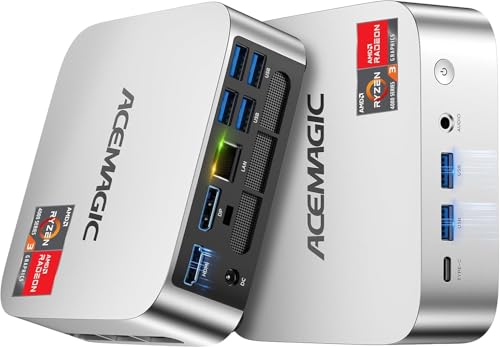
The ACEMAGIC K1 measures just 5.04 by 5.04 by 1.61 inches. Its tiny silver chassis fits easily in a bag for travel. It supports VESA mounting to save desk space. The built-in power supply keeps your setup neat with a single cable. This form factor is ideal for users who prioritize minimal footprint and portability.
Those needing multiple display outputs
The ACEMAGIC K1 supports triple displays via HDMI, USB Type-C, and DisplayPort. It handles 4K UHD video playback with AMD Radeon Graphics. The Dell OptiPlex 3070 Micro offers standard connectivity but does not highlight multi-monitor support in its specifications. If you need a larger workspace with three screens, this ACEMAGIC model is the better choice.
The products compared

Dell OptiPlex Micro Core i5 Desktop
Best for: Office multitasking and compact setups
- Processor
- Intel Core i5-9500
- Installed RAM
- 16GB
- Storage Capacity
- 500GB
- Memory Type
- DDR4
- Operating System
- Windows 11 Pro
- Dimensions
- 12.1 × 13.3 × 4 inches
View on Amazon: Dell OptiPlex Micro Core i5 Desktop Affiliate link
This Dell Optiplex 3070 Micro uses an Intel Core i5-9500 hexa-core processor and 16GB of DDR4 RAM. It includes a 500GB SSD and comes with Windows 11 Pro. The unit features 5G WiFi and Bluetooth for wireless connectivity. Its compact design fits well in tight spaces. It suits users who need reliable multitasking and business-grade software without a large footprint.
Pros
- Intel Core i5-9500 hexa-core processor
- 16GB DDR4 RAM for multitasking
- 500GB SSD for fast load times
- Pre-installed Windows 11 Pro
- 5G WiFi and Bluetooth connectivity
Cons
- Older 9th generation Intel processor
- No dedicated graphics card listed
- Limited to 500GB storage capacity
Good fit if
- You need Windows 11 Pro for business features
- You have limited desk space
- You require 16GB of RAM for smooth multitasking
Skip if
- You need dedicated graphics for gaming
- You want the latest 13th or 14th gen Intel chips
- You require more than 500GB of storage
Verdict: Dell Optiplex 3070 Micro i5-9500 is a solid choice for office work and daily tasks. It fits users who prioritize RAM and Windows 11 Pro over raw processor speed.
ACEMAGIC Ryzen 7330U Mini PC
Best for: compact office work and triple displays
- Processor
- AMD Ryzen 3 Pro 7330U
- Installed RAM
- 16GB
- Storage Capacity
- 256GB
- Memory Type
- LPDDR4 3200MT/s
- Graphics
- AMD Radeon Graphics
- Ethernet Ports
- 1x Gigabit Ethernet
View on Amazon: ACEMAGIC Ryzen 7330U Mini PC Affiliate link
This ACEMAGIC K1 mini PC uses an AMD Ryzen 3 Pro 7330U processor with 16GB of LPDDR4 RAM and a 256GB SSD. It runs Windows 11 Pro and supports triple displays via HDMI, USB-C, and DisplayPort. The unit includes Gigabit Ethernet and WiFi 5. You get a compact, silver chassis that mounts easily. It suits users who need a reliable, space-saving computer for office tasks or media viewing without requiring high-end gaming performance.
Pros
- AMD Ryzen 3 Pro 7330U processor with up to 4.3GHz boost
- 16GB LPDDR4 3200MT/s RAM for multitasking
- Windows 11 Pro operating system pre-installed
- Supports triple displays up to 4K UHD
- Built-in power supply reduces cable clutter
Cons
- LPDDR4 memory is non-expandable
- WiFi 5 is slower than modern WiFi 6 standards
- Bluetooth 4.2 lacks newer connectivity features
Good fit if
- You need a compact PC with Windows 11 Pro for office work
- You want to connect three monitors for increased productivity
- You prefer a built-in power supply for a cleaner desk setup
Skip if
- You require expandable RAM for future upgrades
- You need the latest WiFi 6 or 6E for high-speed wireless
- You want a processor with significantly higher multi-core performance
Verdict: ACEMAGIC K1 Ryzen 3 Pro Mini PC fits users who need a compact, Windows 11 Pro machine for multitasking and triple-display setups, provided you accept fixed memory and older wireless standards.
Specifications side by side
| Spec | Dell OptiPlex Micro Core i5 Desktop | ACEMAGIC Ryzen 7330U Mini PC |
|---|---|---|
| Processor | Intel Core i5-9500 | AMD Ryzen 3 Pro 7330U |
| Installed RAM | 16GB | 16GB |
| Storage Capacity | 500GB | 256GB |
| Memory Type | DDR4 | LPDDR4 3200MT/s |
| Graphics | not stated | AMD Radeon Graphics |
| Ethernet Ports | not stated | 1x Gigabit Ethernet |
| Operating System | Windows 11 Pro | Windows 11 Pro |
| Memory | 16GB RAM | not stated |
| Storage | 500GB SSD | not stated |
| Use | not stated | Home, Business, Office |
| Dimensions | 12.1 × 13.3 × 4 inches | 5.04 × 5.04 × 1.61 inches |
| Weight | not stated | 1.1 pounds |
| Color | i7/GT 1030 | Ryzen 7330U+16GB+256GB |
| Model | 3070 5070 7070 | V1 |
| Size | not stated | Ryzen 7330U+16GB+256GB |
Frequently asked questions
Which mini PC is smaller, the Dell or the ACEMAGIC?
The ACEMAGIC K1 is significantly more compact. It measures 5.04 inches in width and height, with a height of just 1.61 inches. The Dell OptiPlex 3070 Micro is larger, measuring 13.3 inches in width, 12.1 inches in length, and 4 inches in height. You will need more desk space for the Dell unit.
Does the Dell OptiPlex 3070 Micro have an integrated GPU?
The specifications list a color option labeled as i7/GT 1030, which suggests a discrete NVIDIA GeForce GT 1030 graphics card may be available in certain configurations. The base model focuses on the Intel Core i5-9500 processor. You should verify the exact graphics configuration for your specific unit before purchasing.
Can the ACEMAGIC K1 support multiple monitors?
Yes, this model is designed for triple-display setups. The ACEMAGIC K1 Ryzen 3 Pro 7330U supports three simultaneous video outputs. This makes it a strong choice if you need a multi-monitor workspace for office tasks or data monitoring without requiring a high-end dedicated graphics card.
What is the storage capacity of the Dell OptiPlex 3070?
The Dell OptiPlex 3070 Micro comes with a 500GB SSD. This provides faster boot times and application loading compared to traditional hard drives. The storage is sufficient for operating system files, office applications, and a moderate amount of personal data or business documents.
Is the ACEMAGIC K1 heavy to carry around?
The ACEMAGIC K1 weighs only 1.1 pounds. Its small dimensions and light weight make it very portable. You can easily mount it behind a monitor or carry it in a bag for travel. The Dell OptiPlex is larger and heavier, making it less suitable for frequent movement.
Does the Dell OptiPlex 3070 use Windows 11 Pro?
Yes, the Dell OptiPlex 3070 Micro includes Windows 11 Pro. This operating system offers advanced security features and management tools suitable for business environments. The ACEMAGIC K1 also runs Windows 11 Pro, ensuring both systems provide the same core software experience for multitasking and productivity.
Which processor is better for office multitasking?
The Dell OptiPlex 3070 uses an Intel Core i5-9500, which is a hexa-core processor. It has six cores for handling multiple applications smoothly. The ACEMAGIC K1 uses a quad-core Ryzen 3 Pro 7330U. While both have 16GB of RAM, the Dell offers more processing cores for heavy multitasking.
What RAM do these mini PCs include?
Both the Dell OptiPlex 3070 Micro and the ACEMAGIC K1 come with 16GB of RAM. This amount of memory allows you to run multiple browser tabs, office suites, and communication apps simultaneously without significant slowdowns. Both systems are configured to handle standard professional workloads efficiently.