Dell vs ASUS Mini PCs: Which Brand Fits You?
As an Amazon Associate we earn from qualifying purchases. Links on this page are affiliate links.
When you compare a dell vs ASUS mini PC, you are looking at two very different approaches to small computing. Both systems offer compact footprints and 8GB of RAM for everyday tasks. The main difference lies in their core identity. The Dell OptiPlex runs Windows 11 Pro, making it a traditional workstation. The ASUS Chromebox 3 uses Chrome OS, focusing on web-based productivity and Android apps. Your choice depends on whether you need full desktop software or a lightweight cloud experience.
Key differences
| Aspect | Dell OptiPlex Micro WiFi 6E Mini PC | ASUS Chromebox 3 Core i7 Mini PC |
|---|---|---|
| Processor | Intel Core i5-9500T | Intel Core i7-8550U |
| Operating System | Windows 11 Pro | Chrome OS |
| Storage | 256GB NVMe SSD | 128GB M. 2 SATA SSD |
| Networking | Wi-Fi 6E | 802. 11ac Wi-Fi |
| Dimensions | 7 x 7 x 1.5 inches | 5.75 x 5.5 x 1.8 inches |
Which one should you choose?
Choose Dell OptiPlex Micro WiFi 6E Mini PC if
- You need Windows 11 Pro for specific desktop applications.
- You want faster Wi-Fi 6E connectivity.
- You require more storage with a 256GB NVMe drive.
Choose ASUS Chromebox 3 Core i7 Mini PC if
- You prefer a lighter, web-focused Chrome OS environment.
- You want to run Android apps from Google Play.
- You need a smaller footprint with a 5.75-inch width.
Verdict: The Dell OptiPlex is the better choice if you need a full Windows environment for professional work. The ASUS Chromebox 3 suits users who prioritize a compact size and cloud-based efficiency. Your decision should hinge on whether you require Windows software or a simpler operating system.
Dell vs ASUS Mini PC Specs
Processor Power
The Dell OptiPlex Micro WiFi 6E Mini PC uses an Intel Core i5-9500T processor. This is a 9th Gen chip designed for steady performance in business environments. The ASUS Chromebox 3 Core i7 Mini PC features an Intel Core i7-8550U. This is an 8th Gen processor with four cores and eight threads. While the Dell has a newer generation, the ASUS i7 has more threads for multitasking. Both chips are efficient for office work. The i7-8550U often handles heavier loads better due to its threading, while the i5-9500T offers a slightly newer architecture. It is a close call based on your specific workload needs.
Operating System
The Dell OptiPlex runs Windows 11 Pro. This gives you full desktop compatibility with standard Windows applications and enterprise management tools. The ASUS Chromebox 3 runs Chrome OS. This is a cloud-first operating system that is lightweight and secure. It supports Android apps from the Google Play store. If you need traditional Windows software, the Dell is the clear choice. If you prefer a simple, web-centric experience with Android app support, the ASUS is suitable. The OS choice defines the entire user experience and software ecosystem available to you.
Storage Capacity
The Dell OptiPlex comes with 256GB of NVMe storage. NVMe drives are faster than standard SATA drives. The ASUS Chromebox 3 includes 128GB of M. 2 SATA SSD storage. The Dell offers double the storage space of the ASUS. Additionally, NVMe technology generally provides quicker boot times and file transfers. For users who store many local files, the Dell provides more room. The ASUS storage is sufficient for basic Chrome OS tasks and cloud reliance. The Dell has a clear advantage in both capacity and speed technology.
Networking
The Dell OptiPlex includes built-in WiFi 6E. This is the latest wireless standard, offering faster speeds and less interference on 6GHz bands. It also includes an AX210 module. The ASUS Chromebox 3 features 802. 11ac Wi-Fi. This is an older standard that operates on 2. 4GHz and 5GHz bands. The Dell also has Gigabit LAN support. WiFi 6E provides better performance in congested wireless environments. For modern connectivity and future-proofing, the Dell is superior. The ASUS networking is adequate for basic internet browsing but lacks the latest speed benefits.
Form Factor
The Dell OptiPlex measures 7 inches by 7 inches by 1.5 inches. It weighs 6 pounds. The ASUS Chromebox 3 measures 5.75 inches by 5.5 inches by 1.8 inches. The ASUS is physically smaller and more compact than the Dell. This makes it easier to mount behind a monitor or fit in tight spaces. The Dell is slightly larger but still qualifies as a mini PC. If space is your primary constraint, the ASUS Chromebox is the better fit. The Dell offers a bit more internal space for potential upgrades or cooling.
Choose Your Dell Or ASUS Mini PC
Windows users needing business reliability
The Dell OptiPlex runs Windows 11 Pro, which is standard for office software and enterprise management. It includes an Intel Core i5-9500T and 8GB of RAM for steady multitasking. The built-in WiFi 6E ensures fast, stable connections. This system is a practical choice for users who require a familiar desktop environment and professional-grade stability.
Chrome OS fans wanting Android apps
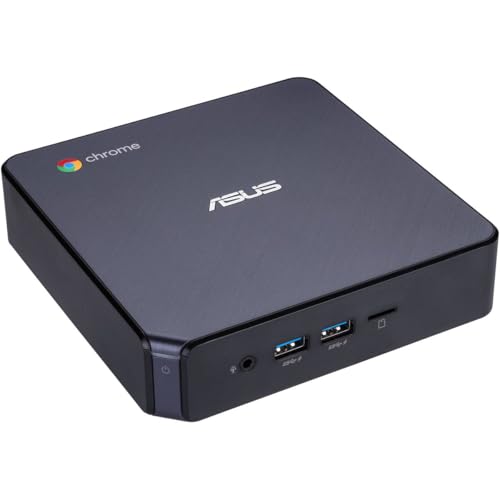
The ASUS Chromebox 3 runs Chrome OS, offering full support for Android apps from Google Play. It features an Intel Core i7-8550U and 8GB of DDR4 RAM for smooth performance. The compact size and integrated 4K UHD graphics make it ideal for media streaming. This pick suits those who prefer a lightweight, cloud-centric operating system.
Users wanting versatile connectivity options
The ASUS model provides a USB Type C port that supports optional Power over Type C. This feature minimizes cable clutter by delivering power to monitors or mobile devices. It also includes Bluetooth 4.2 and Gigabit LAN. If you need flexible power delivery and modern port options in a small form factor, this ASUS unit is the better technical fit.
The products compared

Dell OptiPlex Micro WiFi 6E Mini PC
Best for: Compact Windows 11 Pro office work
- Processor
- Intel Core i5-9500T
- Installed RAM
- 8GB
- Storage Capacity
- 256GB
- Operating System
- Windows 11 Pro
- Memory
- 8GB RAM
- Networking
- WiFi 6E
View on Amazon: Dell OptiPlex Micro WiFi 6E Mini PC Affiliate link
This Dell OptiPlex 7070 Micro uses an Intel Core i5-9500T processor and 8GB of RAM. It includes 256GB of NVMe storage and runs Windows 11 Pro. The unit supports WiFi 6E for reliable networking. It measures 7 by 7 by 1.5 inches. This mini PC suits users who need a compact desktop with standard performance for office tasks and daily computing.
Pros
- Intel Core i5-9500T processor
- 8GB RAM installed
- 256GB NVMe SSD storage
- Windows 11 Pro operating system
- WiFi 6E connectivity
Cons
- 8GB RAM may limit heavy multitasking
- 256GB storage fills up quickly
- No mention of Bluetooth support
Good fit if
- You need a compact Windows 11 Pro desktop
- You require WiFi 6E networking
- You want a reliable office PC
Skip if
- You need more than 8GB of RAM
- You require large local storage
- You need Bluetooth connectivity
Verdict: Dell OptiPlex 7070 Micro i5 offers solid specs for standard office work. It fits users who prioritize Windows 11 Pro and WiFi 6E in a small form factor.
ASUS Chromebox 3 Core i7 Mini PC
Best for: web browsing and Android app users
- Processor
- Intel Core i7-8550U
- Installed RAM
- 8GB
- Storage Capacity
- 128GB
- Memory Type
- DDR4
- Graphics
- Intel 4K UHD Graphics
- Ethernet Ports
- Gigabit LAN
View on Amazon: ASUS Chromebox 3 Core i7 Mini PC Affiliate link
The ASUS Chromebox 3 is a compact desktop running Chrome OS. It uses an Intel Core i7-8550U processor and 8GB of DDR4 RAM. Storage is limited to a 128GB SSD. The system supports 4K graphics and Android apps. It connects via Wi-Fi and Bluetooth. This model suits users who need a simple, lightweight computer for web tasks.
Pros
- Intel Core i7-8550U processor for reliable performance
- 8GB DDR4 RAM for smooth multitasking
- Chrome OS supports Android apps from Google Play
- Compact 5.75-inch width design saves desk space
- Dual monitor support via HDMI and DisplayPort
Cons
- Only 128GB of storage limits file capacity
- Chrome OS restricts traditional Windows software
- Bluetooth 4.2 is older than newer standards
Good fit if
- You need a small computer for web browsing
- You want to run Android apps on a desktop
- You prefer a lightweight system with low cable clutter
Skip if
- You require Windows for specific professional software
- You need large storage for many files
- You want the latest Bluetooth connectivity
Verdict: ASUS Chromebox 3 Mini PC is a capable web computer for users who rely on Chrome OS and Android apps. It fits those who value a small footprint over high storage or Windows compatibility.
Specifications side by side
| Spec | Dell OptiPlex Micro WiFi 6E Mini PC | ASUS Chromebox 3 Core i7 Mini PC |
|---|---|---|
| Processor | Intel Core i5-9500T | Intel Core i7-8550U |
| Installed RAM | 8GB | 8GB |
| Storage Capacity | 256GB | 128GB |
| Memory Type | not stated | DDR4 |
| Graphics | not stated | Intel 4K UHD Graphics |
| Ethernet Ports | not stated | Gigabit LAN |
| Operating System | Windows 11 Pro | Chrome OS |
| Memory | 8GB RAM | not stated |
| Storage | 256GB SSD | 128GB SSD |
| Networking | WiFi 6E | not stated |
| Dimensions | 7 × 7 × 1.5 inches | 5.5 × 5.75 × 1.8 inches |
| Weight | 6 pounds | not stated |
| Size | Mini | not stated |
| Color | Black | Black |
| Model | Optiplex 7070 | CHROMEBOX3-N7290U |
Frequently asked questions
Is the Dell OptiPlex better for office work?
Yes, the Dell OptiPlex Micro is designed for standard office tasks. It runs Windows 11 Pro, which supports enterprise management and business software. The Intel Core i5 processor and 8GB of RAM handle multitasking smoothly. Its compact size fits well on small desks while providing reliable performance for daily productivity.
Does the ASUS Chromebox support Android apps?
Yes, the ASUS Chromebox 3 runs Chrome OS, which allows you to install and use Android applications. This makes it ideal for users who rely on web browsing and mobile-style apps. It features an Intel Core i7 processor and 128GB of storage, offering a focused experience for light computing needs.
Which mini PC has better Wi-Fi connectivity?
The Dell OptiPlex Micro offers superior connectivity with built-in WiFi 6E. This standard provides faster speeds and better range than previous generations. The ASUS Chromebox 3 includes standard Wi-Fi capabilities suitable for web browsing. If you need the latest wireless performance, the Dell model is the stronger choice.
Can I use Windows 11 on the ASUS Chromebox?
No, the ASUS Chromebox 3 operates on Chrome OS. It does not support native Windows 11 or traditional desktop applications. You will need to use web-based tools or Android apps. If you require Windows software compatibility, you should choose the Dell OptiPlex Micro, which comes with Windows 11 Pro pre-installed.
Which model is smaller in size?
The ASUS Chromebox 3 has a slightly smaller footprint than the Dell OptiPlex. It measures 5.75 inches in width and 5.5 inches in length. The Dell OptiPlex is 7 inches wide and long. Both are compact, but the ASUS model takes up less desk space, making it ideal for tight areas.
Is 8GB of RAM enough for daily use?
Yes, 8GB of RAM is sufficient for everyday tasks like web browsing and document editing. The Dell OptiPlex includes 8GB of RAM for smooth multitasking. The ASUS Chromebox 3 also offers adequate memory for its intended use cases. This amount of memory handles standard productivity workflows without significant slowdowns.
Which mini PC is better for business environments?
The Dell OptiPlex Micro is better suited for business use. It runs Windows 11 Pro, which includes advanced security and management features for enterprises. The Intel Core i5 processor ensures steady performance in professional settings. The ASUS Chromebox is more focused on casual web use and does not include business-grade operating system features.