Dell vs Msi: Mini PCs Compared by Specs
As an Amazon Associate we earn from qualifying purchases. Links on this page are affiliate links.
You are comparing the Dell OptiPlex 7070 Micro against the MSI Cubi NUC for your next mini PC. Both units run Windows 11 Pro and offer 256GB of storage. The main difference lies in their processors and memory. The Dell uses an older i5 chip with 8GB of RAM, while the MSI features a newer Core 3 with 16GB of RAM. This comparison helps you decide which specs match your daily needs.
Key differences
| Aspect | Dell OptiPlex Micro WiFi 6E Mini PC | MSI Cubi NUC Mini PC |
|---|---|---|
| Processor | Intel Core i5-9500T | Intel Core 3 100U |
| Memory | 8GB RAM | 16GB RAM |
| Networking | WiFi 6E | WiFi 6 |
| Dimensions | 7 x 7 x 1.5 inches | 5.22 x 5.34 x 1.97 inches |
| Ports | not listed | 2x Thunderbolt 4, 4x USB 10Gbps |
Which one should you choose?
Choose Dell OptiPlex Micro WiFi 6E Mini PC if
- You need the smaller footprint of the Dell OptiPlex 7070 Micro.
- You prefer WiFi 6E for faster wireless connectivity.
Choose MSI Cubi NUC Mini PC if
- You want more RAM for smoother multitasking with the MSI Cubi NUC.
- You need Thunderbolt 4 ports for high-speed external devices.
Verdict: The Dell OptiPlex 7070 Micro is a solid choice if you prioritize a compact shape and WiFi 6E. The MSI Cubi NUC offers a newer processor and double the RAM for better multitasking. Choose the MSI if you need more modern connectivity options like Thunderbolt 4.
Dell vs MSI Mini PC Specs
processor speed
The MSI Cubi NUC uses a 13th Gen Intel Core 3 100U processor with six cores and eight threads. It boosts up to 4.7GHz for responsive daily tasks. The Dell OptiPlex 7070 Micro relies on an older Intel Core i5-9500T. This is a six-core chip but from a previous generation. The newer MSI architecture offers higher clock speeds and better efficiency for modern workloads. If you need faster single-threaded performance, the MSI chip has the advantage.
memory capacity
Memory handles multitasking and running multiple browser tabs smoothly. The MSI Cubi NUC comes with 16GB of high-bandwidth RAM. This allows you to keep more applications open without slowdowns. The Dell OptiPlex 7070 Micro is configured with 8GB of RAM. While sufficient for basic tasks, it limits heavy multitasking. The MSI unit provides double the memory, making it better for power users who run many programs simultaneously.
port selection
Connectivity options matter for attaching peripherals. The MSI Cubi NUC features two Thunderbolt 4 ports, four USB 10Gbps Type A ports, and two HDMI outputs. It also includes two RJ45 Ethernet ports for dual network connections. The Dell OptiPlex 7070 Micro data does not specify its exact port layout or Thunderbolt support. The MSI offers more modern high-speed expansion options and dual networking, giving it a clear edge in versatility.
wireless standards
Network connectivity impacts your daily workflow. The Dell OptiPlex 7070 Micro includes built-in AX210 Wi-Fi 6E. This provides the latest wireless speeds and lower latency compared to standard Wi-Fi 6. The MSI Cubi NUC supports Wi-Fi 6 and Bluetooth. While still fast, the Dell has the newer Wi-Fi 6E standard. For users in environments with heavy wireless interference, the Dell's newer standard offers a slight advantage in connection stability.
physical size
Desk space is often limited in home offices. The Dell OptiPlex 7070 Micro measures 7 inches by 7 inches with a height of 1.5 inches. The MSI Cubi NUC is smaller, measuring 5.22 inches by 5.34 inches with a height of 1.97 inches. The MSI footprint is significantly more compact. If you have a small desk or need to mount the PC behind a monitor, the MSI unit saves more space.
Which Mini PC Fits Your Needs
Users needing modern connectivity and speed
The MSI Cubi NUC includes two Thunderbolt 4 ports for high-speed data transfer. It also features dual Ethernet ports for stable wired connections. The 13th Gen processor and 16GB RAM handle multitasking better than the Dell. This setup suits users who require fast peripherals and robust networking options.
Businesses prioritizing established workstation reliability
The Dell OptiPlex 7070 Micro is a known business model. It offers WiFi 6E for strong wireless performance. The i5 processor provides steady performance for standard office applications. Its compact size fits easily on desks. This choice is practical for users who prefer a trusted corporate platform with proven stability.
Those wanting future-proof hardware options
The MSI Cubi NUC supports a wide range of configurations. You can choose from multiple RAM and storage upgrades. The newer processor architecture allows for better longevity. This flexibility ensures the device remains useful as software demands increase over time. It is ideal for buyers who plan to upgrade components later.
The products compared

Dell OptiPlex Micro WiFi 6E Mini PC
Best for: Compact office workstations needing WiFi 6E
- Processor
- Intel Core i5-9500T
- Installed RAM
- 8GB
- Storage Capacity
- 256GB
- Operating System
- Windows 11 Pro
- Memory
- 8GB RAM
- Networking
- WiFi 6E
View on Amazon: Dell OptiPlex Micro WiFi 6E Mini PC Affiliate link
The Dell OptiPlex 7070 Micro is a compact desktop featuring an Intel Core i5-9500T processor and 8GB of RAM. It includes 256GB of NVMe storage and runs Windows 11 Pro. This mini PC measures 7 by 7 by 1.5 inches. It suits users who need reliable performance for office tasks and basic computing in a small footprint.
Pros
- Intel Core i5-9500T processor
- 8GB installed RAM
- 256GB NVMe SSD storage
- Windows 11 Pro operating system
- Built-in WiFi 6E connectivity
Cons
- Only 8GB of RAM limits multitasking
- 256GB storage fills up quickly
- Older 9th Gen processor lacks modern efficiency
Good fit if
- You need a small form factor for tight spaces
- You require Windows 11 Pro for business features
- You prioritize reliable networking with WiFi 6E
Skip if
- You need high-end gaming performance
- You require more than 8GB of RAM
- You want the latest processor generation
Verdict: Dell OptiPlex 7070 Micro is a compact business PC that fits users needing Windows 11 Pro and WiFi 6E in a small chassis. It suits office environments where space is limited and moderate performance is sufficient.
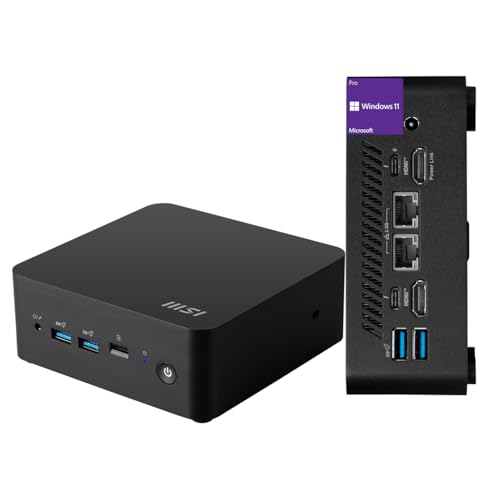
MSI Cubi NUC Mini PC
Best for: Dual-Ethernet home office setups
- Processor
- Intel Core 3 100U
- Installed RAM
- 16GB
- Storage Capacity
- 256GB
- Ethernet Ports
- 2 x RJ45
- High-Speed Expansion
- Thunderbolt 4
- Operating System
- Windows 11 Pro
View on Amazon: MSI Cubi NUC Mini PC Affiliate link
The MSI Cubi NUC packs a 13th Gen Intel Core 3 100U processor and 16GB of RAM into a compact chassis. It includes a 256GB SSD and runs Windows 11 Pro. This mini desktop offers dual RJ45 ports and Thunderbolt 4 connectivity. It suits users needing reliable multitasking for office work or media streaming in a small footprint.
Pros
- 16GB high-bandwidth RAM for smooth multitasking
- Dual RJ45 Ethernet ports for stable networking
- 2 Thunderbolt 4 ports for fast expansion
- Windows 11 Pro operating system included
Cons
- 256GB SSD capacity is limited for large media libraries
- Intel Core 3 100U is entry-level compared to Core i5 or i7 options
- No mention of included wireless keyboard or mouse
Good fit if
- You need dual Ethernet connections for home lab setups
- You want Windows 11 Pro for business features
- You require Thunderbolt 4 for high-speed peripherals
Skip if
- You need heavy video editing or 3D rendering power
- You require more than 256GB of internal storage
- You prefer a Core i5 or higher processor
Verdict: MSI Cubi NUC 13th Gen Mini PC is a compact, networking-focused desktop for basic office tasks. It fits users who value dual LAN ports and Thunderbolt 4 over raw processing power.
Specifications side by side
| Spec | Dell OptiPlex Micro WiFi 6E Mini PC | MSI Cubi NUC Mini PC |
|---|---|---|
| Processor | Intel Core i5-9500T | Intel Core 3 100U |
| Installed RAM | 8GB | 16GB |
| Storage Capacity | 256GB | 256GB |
| Ethernet Ports | not stated | 2 x RJ45 |
| High-Speed Expansion | not stated | Thunderbolt 4 |
| Operating System | Windows 11 Pro | Windows 11 Pro |
| Memory | 8GB RAM | 16GB RAM |
| Storage | 256GB SSD | 256GB SSD |
| Networking | WiFi 6E | not stated |
| Dimensions | 7 × 7 × 1.5 inches | 5.34 × 5.22 × 1.9 inches |
| Weight | 6 pounds | 6 pounds |
| Size | Mini | 16GB RAM | 256GB SSD |
| Color | Black | Black |
| Model | Optiplex 7070 | MSI Cubi Mini |
Frequently asked questions
Which mini PC has better connectivity for office work?
The Dell OptiPlex 7070 Micro offers WiFi 6E for modern wireless networking. This provides faster and more reliable connections in crowded office environments. The MSI Cubi NUC focuses on wired stability with dual Ethernet ports. You should choose the Dell if you need advanced wireless standards, or the MSI if you prefer dual LAN ports for stable connections.
How much RAM does each Dell and MSI mini PC have?
The Dell OptiPlex 7070 Micro comes with 8GB of RAM. The MSI Cubi NUC includes 16GB of RAM. The higher memory in the MSI unit allows for smoother multitasking with more applications open at once. The Dell’s 8GB is sufficient for basic office tasks and moderate performance needs in a compact chassis.
Which model is smaller in physical dimensions?
The MSI Cubi NUC is more compact than the Dell OptiPlex. It measures 5.22 inches wide, 1.9 inches high, and 5.34 inches long. The Dell OptiPlex 7070 Micro is larger, measuring 7 inches wide, 1.5 inches high, and 7 inches long. If space is extremely limited, the MSI unit fits into tighter spots more easily.
Do both mini PCs include Windows 11 Pro?
Yes, both systems run Windows 11 Pro. The Dell OptiPlex 7070 Micro ships with this operating system pre-installed. The MSI Cubi NUC also includes Windows 11 Pro. This ensures you get professional features and security updates right out of the box. Both units are ready for business use without needing additional software licenses.
What storage capacity do these Dell and MSI mini PCs offer?
Both mini PCs provide 256GB of SSD storage. The Dell OptiPlex 7070 Micro includes a 256GB SSD. The MSI Cubi NUC also features a 256GB SSD. This amount of space is adequate for operating system files, applications, and moderate amounts of data. Neither unit offers more storage in this specific configuration.
Which mini PC is heavier?
Both the Dell OptiPlex 7070 Micro and the MSI Cubi NUC weigh 6 pounds. The weight is identical for both models. This makes them similarly easy to mount under a desk or move if needed. The consistent weight suggests comparable internal build density despite their different external dimensions and internal component choices.