MINISFORUM AI X1 Ryzen 7 Mini PC Review: Specs, Pros and Cons
As an Amazon Associate we earn from qualifying purchases. Links on this page are affiliate links.
This minisforum AI x1 255 mini PC review focuses on a compact desktop built for efficiency. It features an AMD Ryzen 7 255 processor with eight cores and sixteen threads, delivering strong multi-threaded performance. The system includes 16GB of DDR5 RAM running at 5600 MT/s, ensuring fast data access. Integrated Radeon 780M graphics handle light gaming and multimedia tasks. You get 512GB of SSD storage for your files. The design supports up to 64GB of RAM and dual PCIe 4.0 SSD slots. This configuration targets users who need reliable computing power in a small footprint.
What stands out
- AMD Ryzen 7 255 processor with Zen4 architecture and up to 4.9 GHz boost
- Dual USB4 ports supporting 40Gbps transfer speeds and PD 65-100W input
- OCuLink port for eGPU connection to enhance graphics performance
- Wi-Fi 7 and 2.5G LAN for stable, low-latency networking
- Support for up to 64GB DDR5 RAM and dual 4TB M.2 SSDs
Who it fits
Good fit for
This mini PC suits professionals who need robust multi-threaded performance for heavy office work or multimedia editing. The Ryzen 7 255 and DDR5 RAM handle complex applications smoothly. Users who plan to connect an external GPU via the OCuLink port will appreciate the expansion options. It is also ideal for those requiring high-speed storage with dual M.2 slots. The comprehensive connectivity, including HDMI and DisplayPort, supports multi-monitor setups for productivity-focused environments.
Who should skip it
You should look at another option if you require hot-swappable storage, as the data notes this feature is not supported. The integrated Radeon 780M graphics are sufficient for light gaming but may not meet the demands of high-end 3D titles without an eGPU. If you need more than 64GB of RAM, this model’s maximum capacity is limited. Additionally, the 512GB SSD might fill up quickly for users storing large media libraries, so those needing extensive built-in storage should consider higher-capacity variations.
Verdict: The MINISFORUM AI X1 Ryzen 7 Mini PC offers a balanced mix of processing power and expandability. It is a solid choice for users who prioritize performance and connectivity in a compact form factor.
Key specs explained for this model
AMD Ryzen 7 255 Processor
This eight-core, sixteen-thread CPU uses Zen4 architecture with a 16 MB L3 cache. It boosts up to 4.9 GHz for fast multi-threaded tasks. You will notice quick application loading and smooth performance during heavy office work or light gaming. This processor suits users who need reliable desktop replacement power in a small form factor without sacrificing speed.
16GB DDR5 5600 MT/s RAM
The system includes 16GB of DDR5 memory running at 5600 MT/s. DDR5 offers higher bandwidth than older DDR4 standards, allowing faster data access for multitasking. You can run multiple browser tabs and editing software simultaneously without slowdowns. The memory supports upgrades up to 64GB via SODIMM slots if your workload demands more capacity in the future.
512GB SSD Storage
This capacity provides ample space for your operating system, applications, and daily files. The drive uses PCIe 4.0 M.2 2280 slots for high-speed read and write operations. You will experience quicker boot times and faster file transfers compared to older SATA drives. If you store large media libraries, you can expand storage by adding a second SSD up to 4TB in the available slot.
Radeon 780M Graphics
Integrated graphics built into the processor handle display output and light visual tasks. It supports smooth HD graphics processing for multimedia editing and casual gaming. You do not need a separate video card for general use. This integrated solution saves space and power while delivering sufficient performance for office work, streaming, and entry-level gaming titles.
Dual USB4 and OCuLink Ports
The dual USB4 ports offer up to 40Gbps transmission speeds for large file transfers. You can connect high-speed peripherals and displays easily. The OCuLink port allows connection to an external GPU dock for enhanced gaming performance. This setup provides flexible expansion options, letting you upgrade graphics capability later without replacing the entire mini PC system.
Design and Build Quality
According to the listing, this unit measures 160 by 115 by 50 millimeters. The compact chassis allows you to mount it behind a monitor using VESA holes. This placement saves desk space and keeps the system out of the way. The small footprint makes it suitable for tight workstations or entertainment centers where space is limited.
The build uses a metal casing with a matte finish. This material choice helps with heat dissipation. The listing notes a large silent fan and internal heat pipes manage the 65W thermal output. Under full load, noise stays around 45dB. This quiet operation means you can keep the PC on your desk without distraction during calls or focused work.
Ports are arranged on the rear and side for easy access. You get two USB4 ports, HDMI, DisplayPort, and an OCuLink connector. The USB4 ports support 40Gbps data transfer and can deliver up to 100W power to the host. This layout supports daisy-chaining peripherals or connecting an external GPU via the OCuLink port. The comprehensive I/O means you can connect multiple displays and high-speed storage without needing extra adapters.
Setup and Everyday Use Guide
Setting up this Mini PC is straightforward thanks to its compact design. You can mount the unit behind a monitor using VESA holes, which saves desk space and keeps cables organized. The chassis includes built-in dual speakers and a microphone, so you do not need external audio devices for basic calls or media playback. Connectivity is robust. You have access to HDMI and DisplayPort outputs, supporting up to four screens simultaneously. This allows you to set up a multi-monitor workspace for heavy office tasks or data processing. The system also features Wi-Fi 7 and Bluetooth 5.4, ensuring stable wireless connections for peripherals and network access. For wired needs, the 2.5G LAN port provides low-latency stability. Storage and memory are expandable. You can upgrade the DDR5 RAM up to 64 GB and add two M.2 2280 PCIe 4.0 SSDs, each holding up to 4 TB. This flexibility supports large file handling and fast application loading. If you need more graphical power, the OCuLink port allows you to connect an external GPU dock, such as the MINISFORUM DEG1. Note that this requires an empty M.2 slot and does not support hot swapping. The dual USB4 ports offer 40 Gbps transfer speeds and can supply up to 100W of power to the host. This makes it easy to connect high-speed drives or charge compatible devices. The cooling system uses a large silent fan and heat pipe, keeping noise levels low even under full load.
Before You Buy This Mini PC
This model requires a display, keyboard, and mouse to operate. You must connect a monitor via HDMI, DisplayPort, or USB4. The unit supports up to four screens simultaneously. Check your monitor’s input compatibility before purchasing. Storage can expand via two M.2 slots. You can install drives up to 4 TB each. Memory is upgradeable to 64 GB using DDR5 SODIMM modules. Ensure your workspace allows for adequate airflow. The cooling system keeps noise low, but placement matters. You can connect external GPUs using the OCuLink port. This requires an M.2280 PCIe 4.0 SSD slot. Verify that your eGPU dock is compatible. Wi-Fi 7 and Bluetooth 5.4 are built-in. You do not need external adapters for wireless peripherals. This option sits alongside other Ryzen-based mini PCs. It offers strong multi-threading for office work and light editing. Compare it with barebone kits if you already have RAM and storage. The 16 GB configuration suits most daily tasks. Heavy users might prefer higher RAM variants.
Check before you buy
- Verify monitor input compatibility for HDMI, DP, or USB4.
- Check if you need an external GPU via OCuLink.
- Ensure you have a display, keyboard, and mouse.
- Confirm space for up to two M.2 SSDs.
The product at a glance
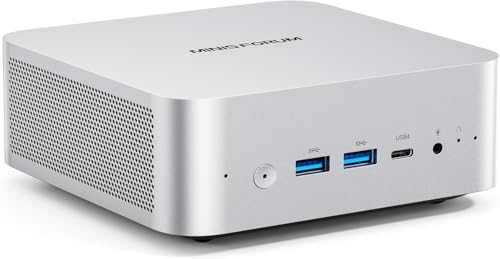
MINISFORUM AI X1 Ryzen 7 Mini PC
Best for: users needing eGPU support and fast data transfer
- Processor
- AMD Ryzen 7 255
- Installed RAM
- 16GB
- Storage Capacity
- 512GB
- Memory Type
- DDR5 5600 MT/s
- Graphics
- Radeon 780M
- Ethernet Ports
- 2.5G LAN
View on Amazon: MINISFORUM AI X1 Ryzen 7 Mini PC Affiliate link
The MINISFORUM AI X1-255 Mini PC uses an AMD Ryzen 7 255 processor with 8 cores and 16 threads. It includes 16GB of DDR5 RAM and a 512GB SSD. The system features dual USB4 ports and an OCuLink connector for external graphics. Wi-Fi 7 and 2.5G LAN provide fast connectivity. This unit suits users needing strong multi-threaded performance and flexible expansion options for office or light creative work.
Pros
- AMD Ryzen 7 255 processor with up to 4.9 GHz boost
- Dual USB4 ports supporting 40Gbps data transfer
- OCuLink port for eGPU connectivity
- Wi-Fi 7 and 2.5G LAN networking
Cons
- 16GB RAM is lower than higher-tier configurations
- 512GB SSD capacity may require upgrades for large media libraries
- OCuLink port shares slot with M.2 SSD storage
Good fit if
- You need high-speed data transfer via USB4
- You plan to connect an external graphics card
- You want Wi-Fi 7 for stable networking
Skip if
- You require more than 16GB of RAM
- You need more than 512GB of storage
- You prefer a system without expansion ports
Verdict: The MINISFORUM AI X1-255 Mini PC fits users who need robust processing power and flexible expansion through its USB4 and OCuLink ports. It is a solid choice for those who prioritize connectivity and upgradeability in a small form factor.
Specifications side by side
| Spec | MINISFORUM AI X1 Ryzen 7 Mini PC |
|---|---|
| Processor | AMD Ryzen 7 255 |
| Installed RAM | 16GB |
| Storage Capacity | 512GB |
| Memory Type | DDR5 5600 MT/s |
| Graphics | Radeon 780M |
| Ethernet Ports | 2.5G LAN |
| High-Speed Expansion | Dual USB4, OCuLink |
| Memory | 16GB RAM |
| Storage | 512GB SSD |
| Networking | 2.5G LAN |
| Size | X1-255-16/512GB |
| Model | X1-255 |
Frequently asked questions
Does the MINISFORUM AI X1 support external graphics cards?
Yes, this Mini PC supports eGPU connections. It includes USB4 and OCuLink ports designed for robust data transfer and flexible expansion. These interfaces allow you to attach external graphics solutions, making it a solid choice for users who need enhanced graphical performance without sacrificing the compact form factor.
What processor powers the MINISFORUM AI X1-255?
The system uses an AMD Ryzen 7 255 processor. This CPU features eight cores and sixteen threads, built on Zen4 architecture with a 16 MB L3 cache. It boosts up to 4.9 GHz, delivering strong multi-threaded performance for heavy tasks and quick application loading.
How much RAM does this model include?
The MINISFORUM AI X1-255 comes with 16GB of DDR5 RAM. This memory runs at 5600 MT/s, providing the bandwidth needed for efficient multitasking. This capacity ensures smooth operation for productivity workloads and general computing tasks without significant bottlenecks.
Is storage expandable on the AI X1?
The unit includes a 512GB SSD for initial storage. You can expand storage further as needed. The design allows for additional internal drives, giving you flexibility to increase capacity for files, media, or applications beyond the base configuration provided by the manufacturer.
What network connectivity options are available?
This Mini PC features 2.5G LAN for wired networking. This port offers faster data transfer speeds compared to standard Gigabit Ethernet. It ensures stable and quick connections for high-bandwidth tasks, file transfers, and online gaming when using a wired connection.
Can I mount this Mini PC behind a monitor?
Yes, the chassis includes VESA mounting holes. You can attach the unit directly to the back of a compatible monitor. This placement saves desk space and keeps cables organized, making it ideal for users who want a clean and efficient workspace setup.
How many displays can this Mini PC support?
The system supports up to four screens simultaneously. You can connect monitors via HDMI, DisplayPort, or USB4. This multi-display capability allows you to create an extensive workstation setup, improving productivity for tasks that require viewing multiple applications or windows at once.