MINISFORUM Ryzen 7 Barebone Mini PC Review: Specs, Pros and Cons
As an Amazon Associate we earn from qualifying purchases. Links on this page are affiliate links.
This minisforum ryzen 7 barebone mini PC review focuses on the X1-Lite 255. It is a compact desktop unit built around the AMD Ryzen 7 255 processor and integrated Radeon 780M graphics. The Ryzen 7 255 offers eight cores and sixteen threads with speeds up to 4.9 GHz. The Radeon 780M provides capable integrated graphics for everyday tasks. As a barebone system, it does not include RAM or storage. You must install your own DDR5 memory and M.2 SSDs. This approach lets you customize performance and capacity to fit your specific needs.
What stands out
- AMD Ryzen 7 255 CPU with 8 cores, 16 threads, and 4.9 GHz boost
- AMD Radeon 780M integrated graphics for multimedia and light gaming
- Support for DDR5 SO-DIMM memory up to 128GB at 5600MHz
- Dual M.2 2280 PCIe 4.0 slots for high-speed SSD storage
- OCuLink port for external GPU expansion at PCIe 4.0 x4 speeds
Who it fits
Good fit for
This system suits users who want to build a powerful desktop from scratch. It is ideal for home offices or creative workstations where you need strong multi-threaded performance. The dual M.2 slots and high-speed DDR5 support benefit those handling large files or video editing. Gamers who plan to add an external GPU via the OCuLink port will find this setup valuable. The triple display outputs also make it a good choice for multi-monitor productivity setups.
Who should skip it
You should look elsewhere if you need a ready-to-use computer out of the box. This is a barebone unit, so it lacks RAM and storage. You must purchase these components separately to make it functional. It is also not suitable if you prefer plug-and-play simplicity without managing hardware installation. Buyers who need a complete system with pre-installed operating system and memory should choose a fully configured model instead of this customizable barebone option.
Verdict: The MINISFORUM X1-Lite 255 offers a flexible platform for building a high-performance mini PC. Its strong CPU and expandable storage make it a solid choice for custom builds.
Key specs explained for this unit
Processor: AMD Ryzen 7 255
This eight-core, sixteen-thread CPU reaches speeds up to 4.9 GHz. The Zen4 architecture and 16 MB L3 cache handle multi-threaded tasks efficiently. You can edit images, browse the web, and run office software without lag. This processor suits users who need strong multitasking power in a small form factor.
Graphics: AMD Radeon 780M
The integrated graphics chip delivers smooth high-definition visuals. It supports lightweight gaming and multimedia playback without a dedicated video card. This GPU handles image editing and video watching well. It is ideal for buyers who want decent visual performance without the cost or size of a discrete graphics card.
Memory: DDR5 5600MHz (up to 128GB)
This barebone unit supports dual-channel DDR5 memory with speeds up to 5600 MHz. You can install up to 128 GB of RAM using SO-DIMM slots. Fast memory ensures smooth software operation and quick data processing. This is crucial for users running demanding applications or managing large datasets on their mini PC.
Storage: Dual M.2 2280 PCIe 4.0 x4
The system includes two slots for PCIe 4.0 NVMe SSDs. Each slot supports drives up to 4 TB in size. This high-speed storage allows for rapid file transfers and quick software loading times. You can store massive amounts of photos and videos while maintaining high read and write speeds for daily tasks.
Expansion: USB4 and OCuLink
The USB4 port offers 40 Gbps transfer speeds and supports power delivery. The OCuLink port provides PCIe 4.0 x4 connectivity for external GPUs. This setup allows you to connect high-speed peripherals or boost graphics performance significantly. It is perfect for users who need flexible connectivity and potential hardware upgrades for specialized workloads.
Design and build quality
According to the listing, the MINISFORUM X1-Lite 255 is a compact barebone unit. It weighs very little because it ships without DDR memory or SSD storage. This minimal weight makes it easy to mount behind a monitor or move between desks. The chassis uses a metal finish that supports efficient heat dissipation. Large ventilation openings on the sides and bottom create a three-dimensional airflow channel. Cool air enters from the bottom while hot air exits the rear. This layout helps prevent heat buildup during long work sessions.
The rear panel features a full USB4 port with 40Gbps transmission speeds. This port supports PD 65-100W input power to the host. It also provides 15W external output for peripherals. You can connect high-demand applications and large files without bottlenecking. An OCuLink port is also present for external GPU connections. This port offers PCIe 4.0 x4 speeds, which are faster than Thunderbolt 4. You must install the included adapter plate to use it. Note that OCuLink is not hot-swappable and requires one M.2 2280 SSD slot.
Display outputs include HDMI 2.1, USB4, and DisplayPort 1.4. These allow you to connect three independent displays simultaneously. The design supports multi-screen collaborative work environments. The internal layout places the CPU fan with PCM phase-change material. A separate bottom fan cools the DDR and SSD slots. This ensures memory and storage run at full speed. The barebone format lets you choose your own RAM and storage. You can install up to 128GB of DDR5 and two 4TB SSDs.
Setup and daily workflow
Setting up this barebone unit requires you to install your own DDR5 SO-DIMM memory and M.2 2280 PCIe 4.0 SSDs. The listing notes that the OCuLink port shares an M.2 slot, so you must choose between external GPU expansion and extra storage. You connect the power adapter, which supports 65-100W input, and attach your displays. The triple output options include HDMI 2.1, DisplayPort 1.4, and a full USB4 port. This allows you to drive three independent screens at up to 8K resolution. For networking, you can use the 2.5GbE LAN port for stable wired connections or rely on Wi-Fi 6E and Bluetooth 5.2 for wireless links. The cooling system draws cool air from the bottom and expels hot air from the rear. A PCM phase-change material helps the CPU fan manage heat, while a separate fan cools the memory and storage drives. This thermal design aims to keep components running at full speed. In daily use, the eight-core processor handles multi-threaded tasks like image editing and video playback. The integrated Radeon 780M graphics support lightweight gaming and high-definition media. You can transfer large files quickly through the 40Gbps USB4 port or the 64Gbps OCuLink interface. The system supports up to 128GB of RAM and 4TB per SSD slot, providing ample space for extensive data projects. The compact form factor allows you to mount it behind a monitor or place it discreetly on a desk. You benefit from a quiet, efficient machine that scales with your hardware choices.
What You Need To Know
This barebone unit requires you to purchase DDR5 SO-DIMM memory and M.2 2280 SSDs separately. The listing supports dual-channel DDR5 up to 128GB and two PCIe 4.0 drives. You must verify that your chosen RAM is compatible with the 5600MHz specification. Storage planning is critical because the OCuLink port shares an M.2 slot. If you plan to use an external GPU dock, you sacrifice one internal drive bay. Check your monitor connections to ensure they match the HDMI 2.1, USB4, or DisplayPort 1.4 outputs. This setup suits users who want modular upgrades. It fits well among other small form factor computers for those who prefer building their own systems. You need to ensure your power supply meets the 65-100W PD requirement for the USB4 port. Regular dust cleaning will help maintain the thermal performance described in the listing.
Check before you buy
- Buy compatible DDR5 SO-DIMM memory sticks
- Select two M.2 2280 PCIe 4.0 SSDs
- Check if OCuLink blocks one storage slot
- Verify monitor ports match HDMI 2.1 or DP 1.4
- Ensure USB-C PD charger meets 65W minimum
The product at a glance
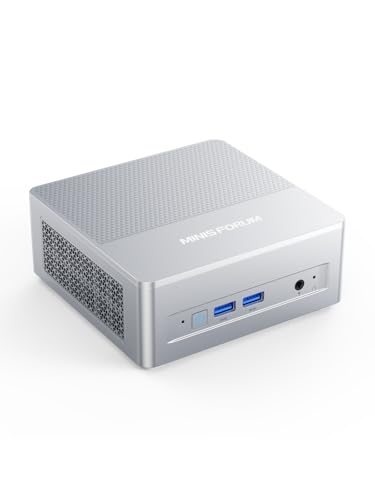
MINISFORUM Ryzen 7 Barebone Mini PC
Best for: customizable barebone workstations
- Processor
- AMD Ryzen 7 255
- Installed RAM
- Barebone
- Storage Capacity
- Barebone
- Memory Type
- DDR5 5600MHz
- Graphics
- AMD Radeon 780M
- Ethernet Ports
- 2.5GbE
View on Amazon: MINISFORUM Ryzen 7 Barebone Mini PC Affiliate link
The MINISFORUM X1 Lite-255 is a barebone mini PC featuring the AMD Ryzen 7 255 processor with eight cores and sixteen threads. It includes integrated Radeon 780M graphics and supports DDR5 memory up to 128GB. You get dual PCIe 4.0 M.2 slots for storage and a full USB4 port. This unit requires you to add your own RAM and SSD.
Pros
- AMD Ryzen 7 255 processor with up to 4.9 GHz boost
- Dual M.2 2280 PCIe 4.0 slots supporting up to 4TB each
- USB4 port with 40Gbps transfer speed and PD output
- OCuLink port for external GPU expansion via PCIe 4.0 x4
- Triple display output including HDMI 2.1 and DisplayPort 1.4
Cons
- Sold as barebone hardware without installed RAM or SSD
- OCuLink port requires one M.2 SSD slot to function
- OCuLink connection is not hot-swappable
Good fit if
- You want to customize RAM and storage capacity yourself
- You need high-speed wired networking with 2.5G LAN
- You plan to use an external GPU via OCuLink
Skip if
- You prefer a ready-to-use system with pre-installed components
- You need a compact solution that does not require separate storage
- You want to frequently swap external GPUs without rebooting
Verdict: MINISFORUM X1 Lite Ryzen 7 Barebone suits builders who value customizable storage and high-speed expansion options over plug-and-play convenience.
Specifications side by side
| Spec | MINISFORUM Ryzen 7 Barebone Mini PC |
|---|---|
| Processor | AMD Ryzen 7 255 |
| Installed RAM | Barebone |
| Storage Capacity | Barebone |
| Memory Type | DDR5 5600MHz |
| Graphics | AMD Radeon 780M |
| Ethernet Ports | 2.5GbE |
| High-Speed Expansion | USB4, OCuLink |
| Networking | 2.5G LAN, WiFi 6E |
| Form Factor | Barebone |
| Size | without DDR&SSD |
| Color | X1 Lite-255 AMD Ryzen 7 255 |
| Model | Deskmini |
Frequently asked questions
Does the MINISFORUM Ryzen 7 barebone include RAM and storage?
No, this unit is sold as a barebone system. You must purchase DDR5 SO-DIMM memory and M.2 2280 SSDs separately. The listing specifies support for dual-channel DDR5 up to 128GB and two PCIe 4.0 drives. This approach allows you to customize capacity and speed to fit your specific workflow needs.
What networking capabilities does this mini PC offer?
The system features 2.5G LAN and WiFi 6E connectivity. This combination provides high-speed wired connections for stable data transfer and robust wireless performance for modern networks. These specs ensure you can handle large file transfers and maintain strong signal strength in crowded environments without needing additional adapters.
Can I use an external GPU with this barebone?
Yes, the unit includes an OCuLink port for external GPU expansion. However, note that this port shares an M.2 slot with your internal storage. You must choose between connecting an external graphics card or adding a second internal SSD. This trade-off requires careful planning for your specific hardware setup.
Is this suitable for users who want a plug-and-play experience?
This model is designed for builders who prioritize customization over convenience. It requires you to install your own memory and storage components. If you prefer a system that works immediately out of the box, you might look for a fully equipped unit instead. This barebone version is ideal for those who enjoy building their own workstations.
What is the physical size of the MINISFORUM X1 Lite?
The unit is compact, weighing very little because it ships without DDR memory or SSD storage. Its small form factor makes it easy to mount behind a monitor or move between different desks. This portability allows you to set up a powerful desktop in minimal space, fitting easily into tight corners or under a monitor arm.
What type of memory does this barebone support?
The listing supports DDR5 SO-DIMM memory. You can configure up to 128GB of RAM in a dual-channel configuration. It is important to verify that your chosen RAM is compatible with the 5600MHz specification. This high-speed memory ensures efficient multitasking and smooth performance for demanding applications and heavy workloads.