Looking Beyond the MINISFORUM UM870 Slim Mini PC? 6 Alternatives Worth a Look
As an Amazon Associate we earn from qualifying purchases. Links on this page are affiliate links.
The minisforum um870 slim mini PC alternatives list helps you find compact desktops with similar core specifications. This guide compares options that share key traits like DDR5 memory, high-speed networking, and expandable storage. The original UM870 Slim offers strong Ryzen 7 processing power and triple-display support via USB4 and HDMI. Its 32GB of RAM and 1TB SSD provide a solid baseline for multitasking and media work. You might look elsewhere if you need more cores, a different brand, or specific ports like OCuLink for external graphics.
The alternatives in this list were chosen because their specs overlap with the original. Each option balances processing power, connectivity, and form factor differently. Some models prioritize raw CPU performance for heavy editing, while others focus on workstation-grade networking or flexible storage expansion. You can compare these 6 picks to find the best fit for your specific workflow. This selection covers a range of use cases, from budget-friendly builds to premium configurations with advanced I/O options.
Our top pick: MINISFORUM Slim Ryzen 7 Mini PC.
How these alternatives compare
ACEMAGIC Core i9 Mini PC
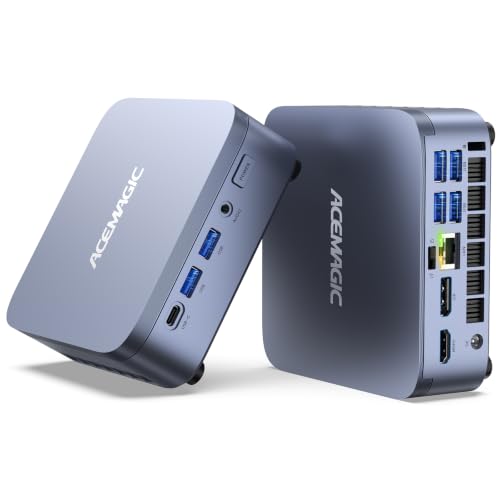
The ACEMAGIC M5 replaces the AMD Ryzen 7 8745H with an Intel Core i9-13900HX. This processor offers more cores for heavy multitasking and video editing workloads. It keeps the 32GB DDR5 RAM and 1TB SSD configuration found in the original. You also get the same 2.5G LAN and Wi-Fi 6E connectivity. The trade-off is that you lose the integrated Radeon 780M graphics performance, which handles light gaming and creative tasks well. This model suits users who prioritize raw CPU power over integrated graphics efficiency. It is a strong choice for editors who need maximum processing throughput in a compact form factor.
MINISFORUM DeskMini Ryzen 7 Workstation
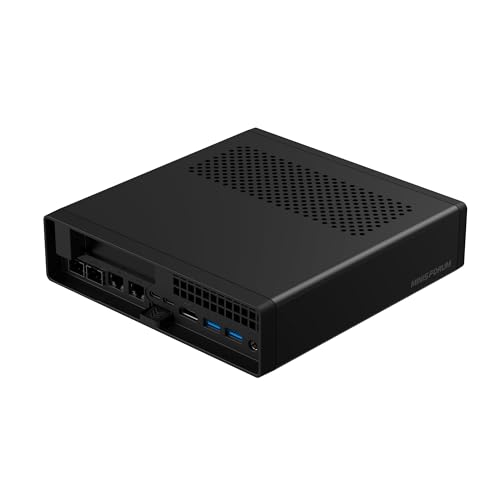
The MINISFORUM MS-A2-7745 focuses on workstation-level expandability rather than consumer features. It uses a Ryzen 7 processor with 32GB RAM and a 1TB SSD. Unlike the UM870 Slim, this model emphasizes high-throughput wired connections and PCIe expansion slots for hardware upgrades. It lacks Wi-Fi 6E, relying instead on the robust 2.5G LAN port for stable data transfer. This design choice benefits users who prioritize wired reliability and internal hardware flexibility. It is ideal for compact workstation setups where external display outputs are less critical than internal storage and network expansion capabilities. You get serious connectivity in a small chassis.
MINISFORUM UM880 Plus Ryzen 7 Mini PC
The MINISFORUM UM880 Plus switches to the Ryzen 7 8845HS processor. This chip provides similar Zen 4 performance but adds an OCuLink port for external GPU expansion. It retains the 32GB DDR5 RAM and 1TB SSD layout. The UM880 Plus gives up the USB4 port found on the UM870 Slim, opting for OCuLink instead. This makes it better for users who want to connect powerful discrete graphics cards externally. It supports multi-monitor output but lacks the specific USB4 versatility of the original. This model is best for creators who need extra graphics power without building a full desktop tower. It offers a clear path for modular graphics upgrades.
MINISFORUM X1 Lite Ryzen 7 Mini PC
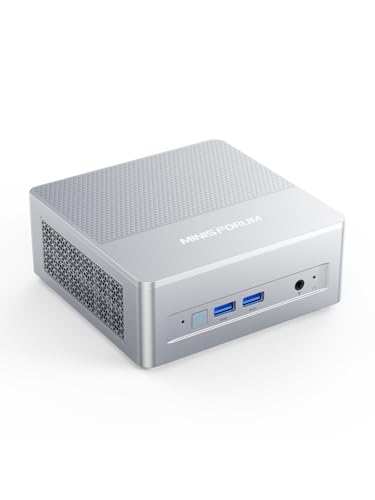
The MINISFORUM X1 Lite delivers 8-core Ryzen 7 processing with expandable DDR5 memory. It includes a 1TB SSD and supports external GPU expansion via OCuLink. Unlike the UM870 Slim, it does not list specific storage expansion slots in its primary description, focusing instead on the OCuLink connectivity. It provides 2.5G LAN and Wi-Fi 6E for strong networking. This model is designed for users who need triple-display setups combined with eGPU capabilities. It offers a solid compact workstation experience. The X1 Lite is a good alternative if you prioritize external graphics expansion over the internal storage flexibility of the UM870 Slim. It balances processing power with modular connectivity.
MINISFORUM Intel Core i9 Mini PC
The MINISFORUM Intel Core i9 Mini PC offers 14-core processing power for multithreaded office work. It includes 32GB RAM and a 1TB SSD. This model supports triple-display setups and internal SATA expansion, which the UM870 Slim does not feature. It keeps the 2.5G LAN and Wi-Fi 6E connectivity. The main difference is the Intel architecture, which some users prefer for specific software compatibility. It provides strong performance for productivity tasks. This model is a capable alternative for those who want Intel hardware and additional internal storage options. It maintains the compact form factor while offering different expansion capabilities. It suits users who need robust processing for heavy office applications.
MINISFORUM X1 Ryzen 7 Mini PC
The MINISFORUM X1 Ryzen 7 Mini PC provides quad-display output capability, exceeding the UM870 Slim's triple-display limit. It includes 32GB RAM and a 1TB SSD. This model supports triple M.2 drive potential for significant storage expansion. It also features OCuLink connectivity for external GPU setups. Unlike the UM870 Slim, it lacks Wi-Fi 6E, relying on 2.5G LAN for networking. This design benefits users who need maximum display connectivity and internal storage flexibility. It is a versatile choice for workstation environments. The X1 offers high-speed connectivity and modular expansion options. It is ideal for users who prioritize display count and storage capacity over wireless networking features.
Quick picks
Our 7 picks

MINISFORUM Slim Ryzen 7 Mini PC
Best for: compact triple-display productivity and expandable storage
- Processor
- AMD Ryzen 7 8745H
- Installed RAM
- 32GB
- Storage Capacity
- 1TB SSD
- Memory Type
- DDR5
- Graphics
- AMD Radeon 780M
- Ethernet Ports
- 1x 2.5Gbps LAN
This compact desktop features an AMD Ryzen 7 8745H processor with 8 cores and integrated Radeon 780M graphics. You get 32GB of DDR5 memory and a 1TB PCIe 4.0 SSD out of the box, with support for up to 96GB of RAM and two M.2 drives. Triple display output runs across HDMI, DisplayPort, and a 40Gbps USB4 port. It suits you if you need dense everyday multitasking power in a small workspace.
Pros
- Full-function 40Gbps USB4 port supports 8K display output and PD power input
- Dual memory slots support DDR5 RAM expansion up to 96GB
- Dual M.2 2280 PCIe 4.0 slots support storage expansion up to 4TB
- Fast connectivity with 2.5Gbps Ethernet and Wi-Fi 6E
Cons
- Only one wired Ethernet port is provided
- Two of the Type-A ports are limited to USB 2.0 speeds
Good fit if
- You run up to three monitors using HDMI, DisplayPort, and USB4
- You plan to upgrade memory and storage capacity over time
- You need 2.5Gbps wired networking for fast local transfers
Skip if
- You require dual Ethernet ports for dedicated network routing
- You need all USB Type-A ports to support high-speed data transfers
Verdict: MINISFORUM Ryzen 7 Slim Mini PC delivers solid processing power and wide display connectivity in a compact frame. It gives you flexible memory and storage expandability alongside a capable 40Gbps USB4 connection.
ACEMAGIC Core i9 Mini PC
Best for: heavy multitasking and 4K video editing
- Processor
- Intel Core i9-13900HX
- Installed RAM
- 32GB
- Storage Capacity
- 1TB PCIe 4.0 NVMe SSD
- Memory Type
- DDR4
- Ethernet Ports
- 2.5GbE LAN
- High-Speed Expansion
- USB4
The ACEMAGIC M5 packs an Intel Core i9-13900HX with 24 cores and 32 threads into a compact chassis. It includes 32GB of DDR4 RAM and a 1TB PCIe 4.0 NVMe SSD. You get USB4 connectivity, WiFi 6E, and a 2.5GbE LAN port. This setup suits professionals who need heavy multitasking, 4K video editing, and expandable storage for demanding workloads.
Pros
- Intel Core i9-13900HX with 24 cores and 32 threads
- 32GB DDR4 RAM expandable to 64GB
- 1TB PCIe 4.0 NVMe SSD
- USB4 port with 40Gbps transfer speeds
- Windows 11 Pro preinstalled
Cons
- Uses DDR4 memory instead of DDR5
- No Thunderbolt certification listed
- Dual-fan cooling may generate noise under load
Good fit if
- You need high core counts for video editing
- You require USB4 connectivity for fast storage
- You want Windows 11 Pro out of the box
Skip if
- You require DDR5 memory for maximum bandwidth
- You need Thunderbolt certification for certified docks
- You prefer silent operation without fan noise
Verdict: The ACEMAGIC M5 Intel Core i9 Mini PC delivers raw processing power for heavy workloads, making it a strong option for editors and multitaskers who prioritize core count and USB4 speed over memory generation.
MINISFORUM DeskMini Ryzen 7 Workstation
Best for: high-speed networking and compact workstation storage expansion
- Processor
- AMD Ryzen 7 7745HX
- Installed RAM
- 32 GB
- Storage Capacity
- 1 TB
- Memory Type
- DDR5 5200 MT/s
- Ethernet Ports
- 2x 2.5GbE, 2x 10G SFP+
- Networking
- 2.5G LAN
This compact desktop pairs an AMD Ryzen 7 7745HX processor with rare hardware expandability. You get a dedicated PCIe x16 slot for half-height add-in cards, three M.2 storage drive slots with U.2 support, and dual 10G Ethernet ports alongside dual 2.5GbE connections. It suits you if you require high-speed wired networking, expansive multi-terabyte storage configurations, or add-in card flexibility without stepping up to a full tower chassis.
Pros
- PCIe x16 expansion slot supports half-height add-in cards or a dual PCIe x4 split
- Dual 10G Ethernet ports alongside dual 2.5GbE network connections
- Three M.2 NVMe slots supporting up to 23 TB total storage and RAID 0/1
- AMD Ryzen 7 7745HX 8-core processor reaches clock speeds up to 5.1 GHz
Cons
- PCIe slot accommodates only half-height cards rather than full-size GPUs
- DDR5 memory speed is rated at 5200 MT/s rather than faster profiles
- Provides only one dedicated HDMI port alongside USB-C video outputs
Good fit if
- You need high-bandwidth wired networking with dual 10G Ethernet ports.
- You want to install half-height PCIe expansion cards or extra network controllers.
- You plan to run multi-drive NVMe or U.2 storage arrays up to 23 TB.
Skip if
- You need to install full-height desktop graphics cards.
- You prefer multiple dedicated full-size HDMI or DisplayPort connections.
Verdict: MINISFORUM Ryzen 7 PCIe Expansion Mini PC delivers rare workstation-level networking and hardware expandability in a compact format. It provides substantial storage capacity and high-throughput wired connections for demanding setups.

MINISFORUM UM880 Plus Ryzen 7 Mini PC
Best for: external GPU setups via OCuLink
- Processor
- AMD Ryzen 7 8845HS
- Installed RAM
- 32GB
- Storage Capacity
- 1TB
- Memory Type
- DDR5-5600
- Graphics
- AMD Radeon 780M
- High-Speed Expansion
- OCuLink, USB4
The MINISFORUM Ryzen 7 8845HS Mini PC is a compact desktop built for demanding workloads. You get an 8-core AMD Ryzen 7 8845HS processor, 32GB of DDR5 RAM, and a 1TB SSD. Integrated Radeon 780M graphics handle daily visual tasks, while a built-in OCuLink port lets you connect an external graphics card for extra performance. This system suits you if you need workstation speed with external expansion options.
Pros
- AMD Ryzen 7 8845HS with 8 cores and up to 5.1 GHz boost
- OCuLink port for high-bandwidth external graphics connection
- Supports triple displays across HDMI 2.1, DisplayPort 1.4, and USB4
- DDR5-5600 RAM expandable up to 96GB
Cons
- OCuLink port does not support hot plugging
- Relies on integrated graphics unless you add an external card
Good fit if
- You want an OCuLink interface for external GPU connectivity.
- You run up to three monitors simultaneously.
- You need expandable DDR5 memory up to 96GB.
Skip if
- You require hot-swapping for external PCIe peripherals.
- You need built-in discrete graphics out of the box.
Verdict: MINISFORUM Ryzen 7 8845HS Mini PC provides solid Zen 4 processing power and an OCuLink port for external graphics expansion. It is a capable compact option if you want fast connectivity and multi-monitor output.
MINISFORUM X1 Lite Ryzen 7 Mini PC
Best for: triple-display setups needing external GPU expansion
- Processor
- AMD Ryzen 7 255
- Installed RAM
- 32GB
- Storage Capacity
- 1TB
- Memory Type
- DDR5 5600MHz
- Graphics
- AMD Radeon 780M
- Ethernet Ports
- 2.5GbE
This compact desktop features an AMD Ryzen 7 255 processor with 8 cores and 16 threads, paired with 32GB of DDR5 memory and a 1TB PCIe 4.0 SSD. You get integrated Radeon 780M graphics and high-speed expansion via USB4 and OCuLink. Triple display outputs handle up to 8K resolution. It suits you if you need fast multi-threaded computing, external GPU expansion support, and 2.5G networking in small spaces.
Pros
- AMD Ryzen 7 255 processor with 8 cores, 16 threads, and up to 4.9 GHz
- OCuLink expansion support running at PCIe 4.0 x4 speeds up to 64Gbps
- Triple display outputs via HDMI 2.1, DisplayPort 1.4, and 40Gbps USB4
- Dual-channel DDR5 memory expandable up to 128GB at 5600MHz
- High-speed networking with 2.5GbE LAN and Wi-Fi 6E
Cons
- OCuLink requires installing an included adapter plate that occupies an M.2 SSD slot
- OCuLink connection is not hot-swappable
Good fit if
- You want an external GPU connection via 64Gbps OCuLink or 40Gbps USB4
- You need triple display support running up to 8K resolution
- You plan to expand your memory later up to 128GB DDR5
Skip if
- You need multiple M.2 storage drives while utilizing the OCuLink port
- You require hot-swappable external PCIe connections
Verdict: MINISFORUM X1 Lite Ryzen 7 Mini PC delivers capable 8-core processing, expandable DDR5 memory, and high-bandwidth eGPU support through OCuLink. It is a solid compact workstation for multi-monitor productivity and modular graphics setups.

MINISFORUM Intel Core i9 Mini PC
Best for: multithreaded office work and triple-display setups
- Processor
- Intel Core i9-12900HK
- Installed RAM
- 32GB
- Storage Capacity
- 1TB
- Memory Type
- DDR4
- Graphics
- Intel Iris Xe Graphics
- Ethernet Ports
- 1x 2.5G LAN
This mini desktop features a 14-core Intel Core i9-12900HK processor instead of the AMD chips common in this category. You get 32GB of DDR4 memory, a 1TB PCIe 4.0 SSD, and space for an extra 2.5-inch SATA drive. Triple video outputs over HDMI, DisplayPort, and USB-C let you run multiple monitors simultaneously. It suits you if you need high thread counts for programming or daily office workloads.
Pros
- Intel Core i9-12900HK processor with 14 cores and 20 threads
- Triple display outputs via HDMI, DisplayPort, and USB-C
- Internal expansion bay for a 2.5-inch SATA drive
- 2.5G Ethernet port alongside WiFi 6E connectivity
Cons
- Uses DDR4 memory rather than DDR5
- Relies on integrated Intel Iris Xe graphics
Good fit if
- You need a 14-core Intel processor for multi-threaded office work and programming.
- You want to connect three external displays without buying adapters.
- You plan to expand your storage using a 2.5-inch SATA drive.
Skip if
- You prefer systems built with DDR5 memory.
- You require dedicated graphics hardware for heavy 3D workloads.
Verdict: MINISFORUM Intel Core i9 Mini PC delivers strong 14-core processing and triple-display capability in a compact chassis. It offers a capable workstation alternative if you prefer Intel hardware and internal SATA expansion.

MINISFORUM X1 Ryzen 7 Mini PC
Best for: quad-display setups and external GPU expansion
- Processor
- AMD Ryzen 7 255
- Installed RAM
- 32GB
- Storage Capacity
- 1TB SSD
- Memory Type
- DDR5
- Ethernet Ports
- 2.5G LAN
- High-Speed Expansion
- 2x USB4, OCuLink
The MINISFORUM X1 Ryzen 7 Mini PC is a compact desktop powered by an 8-core AMD Ryzen 7 255 processor, 32GB of DDR5 memory, and a 1TB SSD. You get modern high-speed connectivity via two USB4 ports, Wi-Fi 7, and an OCuLink expansion port for external graphics. With support for up to four external displays and three total M.2 storage drives, it suits you if you need workstation flexibility in a small chassis.
Pros
- Dedicated OCuLink port offering 64Gbps PCIe 4.0 x4 bandwidth for external GPUs
- Four independent video outputs using HDMI, DisplayPort, and two USB4 ports
- Three M.2 2280 PCIe 4.0 SSD slots supporting up to 12TB total storage
- Modern wireless networking with Wi-Fi 7 and Bluetooth 5.4
Cons
- Using the OCuLink port requires sacrificing one M.2 2280 SSD slot
- OCuLink connection does not support hot-plugging
Good fit if
- You want to attach an external GPU through a high-bandwidth 64Gbps OCuLink connection.
- You need quad-display productivity via HDMI, DisplayPort, and twin USB4 ports.
- You plan to expand internal solid-state storage across up to three M.2 NVMe drives.
Skip if
- You require hot-swappable external graphics connections without rebooting.
- You plan to use three internal M.2 SSDs while simultaneously running an external GPU via OCuLink.
Verdict: MINISFORUM X1 Ryzen 7 Mini PC delivers versatile expandability with quad-display output, triple M.2 drive potential, and high-speed OCuLink connectivity. It is a capable choice if you want workstation-style hardware flexibility in a compact form factor.
Specifications side by side
| Spec | MINISFORUM Slim Ryzen 7 Mini PC | ACEMAGIC Core i9 Mini PC | MINISFORUM DeskMini Ryzen 7 Workstation | MINISFORUM UM880 Plus Ryzen 7 Mini PC | MINISFORUM X1 Lite Ryzen 7 Mini PC | MINISFORUM Intel Core i9 Mini PC | MINISFORUM X1 Ryzen 7 Mini PC |
|---|---|---|---|---|---|---|---|
| Processor | AMD Ryzen 7 8745H | Intel Core i9-13900HX | AMD Ryzen 7 7745HX | AMD Ryzen 7 8845HS | AMD Ryzen 7 255 | Intel Core i9-12900HK | AMD Ryzen 7 255 |
| Installed RAM | 32GB | 32GB | 32 GB | 32GB | 32GB | 32GB | 32GB |
| Storage Capacity | 1TB SSD | 1TB PCIe 4.0 NVMe SSD | 1 TB | 1TB | 1TB | 1TB | 1TB SSD |
| Memory Type | DDR5 | DDR4 | DDR5 5200 MT/s | DDR5-5600 | DDR5 5600MHz | DDR4 | DDR5 |
| Graphics | AMD Radeon 780M | not specified | not specified | AMD Radeon 780M | AMD Radeon 780M | Intel Iris Xe Graphics | not specified |
| Ethernet Ports | 1x 2.5Gbps LAN | 2.5GbE LAN | 2x 2.5GbE, 2x 10G SFP+ | not specified | 2.5GbE | 1x 2.5G LAN | 2.5G LAN |
| High-Speed Expansion | USB4 | USB4 | not specified | OCuLink, USB4 | USB4, OCuLink | not specified | 2x USB4, OCuLink |
| Operating System | not specified | Windows 11 Pro | not specified | not specified | not specified | not specified | not specified |
| Memory | 32GB RAM | 32GB RAM | 32GB RAM | 32GB RAM | 32GB RAM | 32GB RAM | 32GB RAM |
| Storage | 1TB SSD | 1TB SSD | 1TB SSD | 1TB SSD | not specified | 1TB SSD | 1TB SSD |
| Networking | 2.5G LAN, WiFi 6E | 2.5G LAN, WiFi 6E | 2.5G LAN | WiFi 6E | 2.5G LAN, WiFi 6E | 2.5G LAN, WiFi 6E | 2.5G LAN |
| Weight | 2.73 pounds | not specified | not specified | 3.11 pounds | not specified | 1.26 pounds | not specified |
| Dimensions | not specified | not specified | not specified | 5.12 × 4.96 × 1.97 inches | not specified | not specified | not specified |
| Size | UM870 Slim 32+1T | Intel Core i9 13900HX 32+1TB | MS-A2-7745(32+1TB) | UM880 Plus(32+1TB) | 32GB DDR+1TB SSD | not specified | X1-255(32+1T) |
| Color | Silver | not specified | not specified | not specified | X1 Lite-255 AMD Ryzen 7 255 | Silver | Silver |
| Model | DeskMini | M5 | DeskMini | UM870 Slim | X1-Lite 255 | DeskMini | X1-255 |
If you want compact brew gear for your desk, compare hario mini slim plus ceramic coffee alternatives.
Frequently asked questions
Which alternative offers the best overall balance of performance and connectivity?
The MINISFORUM Slim Ryzen 7 Mini PC is the top pick for most users. It provides solid processing power and wide display connectivity in a compact frame. You get flexible memory and storage expandability alongside a capable 40Gbps USB4 connection. This makes it ideal for compact triple-display productivity and expandable storage needs.
What is the best premium option for heavy multitasking?
The ACEMAGIC Core i9 Mini PC is the best premium choice for heavy workloads. It delivers raw processing power for editors and multitaskers who prioritize core count. The Intel Core i9-13900HX offers high-speed USB4 connectivity. It maintains 32GB of RAM and a 1TB SSD for robust performance.
Which mini PC is best for external GPU setups?
The MINISFORUM UM880 Plus Ryzen 7 Mini PC is best for external GPU setups via OCuLink. It provides solid Zen 4 processing power and a dedicated OCuLink port for graphics expansion. This makes it a capable compact option if you want fast connectivity and multi-monitor output for modular builds.
Can I get a quad-display setup with these alternatives?
Yes, the MINISFORUM X1 Ryzen 7 Mini PC supports quad-display output. It delivers versatile expandability with high-speed OCuLink connectivity for external graphics. You also get triple M.2 drive potential. This makes it a capable choice for workstation-style hardware flexibility in a compact form factor.
Which model is best for compact workstation storage expansion?
The MINISFORUM DeskMini Ryzen 7 Workstation is best for high-speed networking and storage expansion. It delivers rare workstation-level networking and hardware expandability in a compact format. You get substantial storage capacity and high-throughput wired connections. This is ideal for demanding setups requiring robust internal connectivity.
Is there a lightweight option for triple-display productivity?
The MINISFORUM Intel Core i9 Mini PC is a lightweight option at 1.26 pounds. It delivers strong 14-core processing and triple-display capability in a compact chassis. It offers a capable workstation alternative if you prefer Intel hardware. You also get internal SATA expansion for additional storage flexibility.
Which alternative supports DDR5 memory expansion?
The MINISFORUM X1 Lite Ryzen 7 Mini PC supports expandable DDR5 memory. It delivers capable 8-core processing and high-bandwidth eGPU support through OCuLink. This makes it a solid compact workstation for multi-monitor productivity. You get flexible memory upgrades alongside robust networking and processing power.
What is the best budget-friendly Ryzen 7 alternative?
The MINISFORUM UM880 Plus Ryzen 7 Mini PC is the best budget option. It provides solid Zen 4 processing power and an OCuLink port for external graphics. It is a capable compact option if you want fast connectivity. You get a reliable configuration for multi-monitor output without premium pricing.