MINISFORUM Slim Ryzen 7 Mini PC vs MINISFORUM AI X1 Ryzen 7 Mini PC (2026): Key Differences
As an Amazon Associate we earn from qualifying purchases. Links on this page are affiliate links.
This guide compares the minisforum um870 slim mini PC vs AI x1 255 mini PC. Both units feature an 8-core AMD Ryzen 7 processor and Radeon 780M graphics. They share DDR5 memory support and 2.5G LAN connectivity. The main difference lies in your starting configuration. The UM870 Slim ships with 32GB of RAM and a 1TB SSD. The AI X1 255 starts with 16GB of RAM and a 512GB SSD. You also get different networking and expansion options between the two models.
Key differences
| Aspect | MINISFORUM Slim Ryzen 7 Mini PC | MINISFORUM AI X1 Ryzen 7 Mini PC |
|---|---|---|
| Processor | AMD Ryzen 7 8745H | AMD Ryzen 7 255 |
| Installed RAM | 32GB | 16GB |
| Storage | 1TB SSD | 512GB SSD |
| Networking | Wi-Fi 6E | Wi-Fi 7 |
| Expansion Ports | USB4 | Dual USB4, OCuLink |
| Display Output | Triple display | Quad display |
Which one should you choose?
Choose MINISFORUM Slim Ryzen 7 Mini PC if
- You need more RAM and storage out of the box
- You prefer a simpler single USB4 port setup
- You want triple display support without extra adapters
Choose MINISFORUM AI X1 Ryzen 7 Mini PC if
- You want the latest Wi-Fi 7 connectivity
- You plan to use an external GPU via OCuLink
- You need support for up to four connected displays
Verdict: Choose the UM870 Slim if you want higher base memory and storage without immediate upgrades. Pick the AI X1 255 if you need future-proof networking and the flexibility of an OCuLink port for external graphics. Both models offer strong multi-threaded performance for daily tasks.
UM870 Slim vs AI X1 Specs
Processor
Both mini PCs use an eight-core, sixteen-thread AMD Ryzen 7 processor with up to 4.9 GHz boost speeds and 16 MB L3 cache. The UM870 Slim features the Ryzen 7 8745H, while the AI X1-255 uses the Ryzen 7 255. Both chips rely on Zen4 architecture for multi-threaded computing. This similarity means general productivity tasks and heavy office work will feel comparable on either machine. You get identical core counts and thread counts, so single-core and multi-core performance benchmarks should remain very close. The choice here depends less on raw CPU power and more on how each model manages that power under load.
Memory
The UM870 Slim ships with 32 GB of DDR5 RAM, whereas the AI X1-255 includes 16 GB. Both systems support DDR5 SODIMM modules, with the AI X1-255 explicitly noting speeds up to 5600 MT/s. The UM870 Slim allows expansion up to 96 GB across its two slots. The AI X1-255 supports up to 64 GB. Starting with 32 GB gives you more headroom for multitasking right out of the box. You will not need to upgrade immediately if you run many applications simultaneously. The AI X1-255 may require a RAM upgrade sooner for heavy workloads. This initial configuration difference impacts your immediate usability and long-term upgrade costs.
Storage
The UM870 Slim includes a 1 TB M.2 2280 PCIe 4.0 SSD. The AI X1-255 comes with a 512 GB SSD of the same interface type. Both units feature dual M.2 slots that support expansion up to 4 TB per drive. The UM870 Slim offers double the starting storage capacity. This is beneficial for storing large files, videos, or multiple operating systems without immediate expansion. The AI X1-255 provides adequate space for standard office use but may fill up faster for media editors. You can upgrade either system later, but the UM870 Slim saves you an initial purchase. The dual-slot design on both ensures future flexibility for large data sets.
Networking
Both systems include a 2.5Gbps LAN port for stable wired connections. Wireless capabilities differ significantly. The UM870 Slim uses Wi-Fi 6E and Bluetooth 5.3. The AI X1-255 upgrades to Wi-Fi 7 and Bluetooth 5.4. Wi-Fi 7 offers higher throughput, lower latency, and better congestion handling than Wi-Fi 6E. This makes the AI X1-255 superior for modern wireless networks and future-proofing. If you rely on high-speed wireless transfers or live in a dense network environment, the newer standard provides a clear advantage. The wired 2.5G port remains identical on both, so Ethernet performance will not vary between the two models.
Compatibility
The AI X1-255 features an OCuLink port, allowing direct connection to external GPUs like the MINISFORUM DEG1 dock. This provides a pathway for significantly enhanced graphics performance for gaming or rendering. The UM870 Slim does not list an OCuLink port. Both units support USB4 for high-speed data and display output. The UM870 Slim supports triple displays via HDMI, USB4, and DisplayPort. The AI X1-255 supports four-screen display setups. The OCuLink port on the AI X1-255 offers unique expansion potential that the UM870 Slim lacks. If you plan to use discrete graphics later, the AI X1-255 is the only viable option.
Which Mini PC Fits Your Needs
Users needing maximum out-of-box RAM and storage
The UM870 Slim arrives with 32GB DDR5 RAM and a 1TB SSD. This configuration handles heavy multitasking and large file storage immediately. You avoid the initial cost and effort of upgrading memory or adding drives later. The dual M.2 slots allow expansion to 4TB total storage, ensuring you have ample space for projects without extra purchases.
Users wanting modern networking and eGPU support
The AI X1-255 includes Wi-Fi 7 and Bluetooth 5.4 for faster wireless connections. It also features an OCuLink port, allowing you to connect an external graphics card for better gaming performance. This model supports four-screen displays and includes built-in microphones and speakers, making it ideal for versatile setups and future hardware additions.
Professionals requiring triple display productivity
The UM870 Slim supports three independent displays via HDMI 2.1, USB4, and DisplayPort 1.4. This setup boosts productivity by expanding your workspace. You can connect an 8K monitor and two additional screens simultaneously. The stable 2.5G LAN connection ensures smooth data transfer, making it a reliable choice for office environments requiring multiple active windows.
The products compared

MINISFORUM Slim Ryzen 7 Mini PC
Best for: Triple-display productivity setups requiring high RAM capacity
- Processor
- AMD Ryzen 7 8745H
- Installed RAM
- 32GB
- Storage Capacity
- 1TB SSD
- Memory Type
- DDR5
- Graphics
- AMD Radeon 780M
- Ethernet Ports
- 1x 2.5Gbps LAN
View on Amazon: MINISFORUM Slim Ryzen 7 Mini PC Affiliate link
This compact desktop pairs an eight-core AMD Ryzen 7 8745H processor with integrated Radeon 780M graphics. It arrives with 32GB of DDR5 memory and a 1TB PCIe 4.0 solid-state drive, supporting memory upgrades up to 96GB. With USB4, DisplayPort, and HDMI, you get triple-monitor connectivity and high-speed networking for daily multitasking and demanding desktop workloads.
Pros
- AMD Ryzen 7 8745H processor with 8 cores, 16 threads, and up to 65W TDP
- Triple-display support via USB4, HDMI 2.1, and DisplayPort 1.4
- Expandable memory up to 96GB DDR5 across two SO-DIMM slots
- Dual M.2 2280 PCIe 4.0 slots supporting up to 4TB total storage
Cons
- Includes two legacy USB 2.0 ports on the chassis
- Single 2.5Gbps Ethernet jack limits dual-LAN network setups
Good fit if
- You need triple display outputs with support for up to 8K resolution.
- You plan to expand system RAM beyond standard 32GB capacities.
- You run heavy computing tasks that utilize a 65W performance mode.
Skip if
- You require dual Ethernet ports for dedicated router or home server tasks.
- You want only modern USB 3.2 or USB4 ports without USB 2.0 connectors.
Verdict: MINISFORUM Slim Ryzen 7 Mini PC suits power users who require triple 4K or 8K display outputs and extensive memory expansion up to 96GB for heavy multi-threaded productivity.
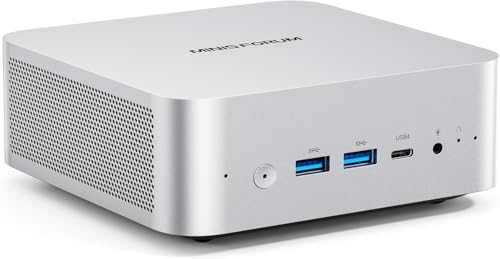
MINISFORUM AI X1 Ryzen 7 Mini PC
Best for: Users needing eGPU support and fast I/O
- Processor
- AMD Ryzen 7 255
- Installed RAM
- 16GB
- Storage Capacity
- 512GB
- Memory Type
- DDR5 5600 MT/s
- Graphics
- Radeon 780M
- Ethernet Ports
- 2.5G LAN
View on Amazon: MINISFORUM AI X1 Ryzen 7 Mini PC Affiliate link
The MINISFORUM AI X1 features an AMD Ryzen 7 255 processor with 8 cores and 16 threads, paired with 16GB of DDR5 RAM and a 512GB SSD. It supports dual 4K displays via HDMI and DisplayPort, plus Wi-Fi 7 and Bluetooth 5.4. This compact desktop handles heavy office tasks and light gaming. You get robust connectivity including USB4 and OCuLink for external graphics. It is a solid choice for users needing reliable performance in a small form factor.
Pros
- AMD Ryzen 7 255 processor with up to 4.9 GHz boost
- Dual USB4 ports supporting 40Gbps transfer speeds
- OCuLink port enables eGPU expansion
- Wi-Fi 7 and 2.5G LAN for stable networking
Cons
- Included 16GB RAM is lower than the 32GB option available in the lineup
- 512GB SSD capacity is modest for large media libraries
- Full-load noise reaches 45dB under high load
Good fit if
- You need eGPU support for enhanced gaming performance
- You require fast data transfer via USB4
- You want modern Wi-Fi 7 connectivity
Skip if
- You need more than 16GB of RAM without upgrading
- You prefer a completely silent operation under load
- You require more than 512GB of storage installed
Verdict: MINISFORUM AI X1 Ryzen 7 Mini PC is a capable desktop for users who value expandability through OCuLink and USB4. It suits those who need strong multi-threaded performance for office work or light editing.
Specifications side by side
| Spec | MINISFORUM Slim Ryzen 7 Mini PC | MINISFORUM AI X1 Ryzen 7 Mini PC |
|---|---|---|
| Processor | AMD Ryzen 7 8745H | AMD Ryzen 7 255 |
| Installed RAM | 32GB | 16GB |
| Storage Capacity | 1TB SSD | 512GB |
| Memory Type | DDR5 | DDR5 5600 MT/s |
| Graphics | AMD Radeon 780M | Radeon 780M |
| Ethernet Ports | 1x 2.5Gbps LAN | 2.5G LAN |
| High-Speed Expansion | USB4 | Dual USB4, OCuLink |
| Memory | 32GB RAM | 16GB RAM |
| Storage | 1TB SSD | 512GB SSD |
| Networking | 2.5G LAN, WiFi 6E | 2.5G LAN |
| Weight | 2.73 pounds | not stated |
| Size | UM870 Slim 32+1T | X1-255-16/512GB |
| Color | Silver | not stated |
| Model | DeskMini | X1-255 |
Frequently asked questions
Does the MINISFORUM Slim Ryzen 7 Mini PC support external graphics cards?
Yes, it supports external GPUs via its USB4 port. This allows you to connect a compatible eGPU enclosure for improved gaming or rendering performance. The AI X1 also offers USB4, but adds OCuLink for even faster external graphics connections.
Which model has more RAM for multitasking?
The MINISFORUM Slim Ryzen 7 Mini PC comes with 32GB of RAM. The AI X1 includes 16GB. If you need maximum out-of-box memory for heavy multitasking, the Slim model provides double the capacity without requiring immediate upgrades.
Is storage expandable on both mini PCs?
Both units support SSD storage upgrades. The Slim model starts with a 1TB SSD, while the AI X1 begins with 512GB. You can likely add or replace drives in both chassis to meet your specific storage needs over time.
Do both computers have Wi-Fi capabilities?
The MINISFORUM Slim Ryzen 7 Mini PC includes WiFi 6E for faster wireless connections. The AI X1 data lists only 2.5G LAN connectivity. Check the specific AI X1 configuration details to confirm if a Wi-Fi module is included or required.
Which Mini PC is lighter to carry?
The MINISFORUM Slim Ryzen 7 Mini PC weighs 2.73 pounds. The AI X1 weight is not listed in the provided data. If portability is a priority, the Slim model offers a known lightweight form factor for easy transport.
Can I use both PCs for office work?
Yes, both models are suitable for office tasks. They share the same eight-core Ryzen 7 processor, providing strong multi-threaded performance. The AI X1 is explicitly noted as capable for office work and light editing, while the Slim handles robust multitasking.