MINISFORUM or Msi? Mini PCs Compared in 2026
As an Amazon Associate we earn from qualifying purchases. Links on this page are affiliate links.
This MINISFORUM vs msi mini PC comparison looks at two distinct approaches to small desktop computing. Both systems offer compact footprints for home or office use. The MINISFORUM UM870 Slim focuses on raw performance with a high-end Ryzen 7 processor and ample memory. The MSI Cubi NUC prioritizes business reliability with an Intel Core 3 chip and Windows 11 Pro. You should choose based on whether you need heavy multitasking power or stable daily office efficiency.
Key differences
| Aspect | MINISFORUM Slim Ryzen 7 Mini PC | MSI Cubi NUC Mini PC |
|---|---|---|
| Processor | AMD Ryzen 7 8745H | Intel Core 3 100U |
| Installed RAM | 32GB DDR5 | 16GB |
| Storage | 1TB SSD | 256GB SSD |
| Operating System | Not listed | Windows 11 Pro |
| Networking | 2.5G LAN, Wi-Fi 6E | 2x RJ45, Wi-Fi 6 |
Which one should you choose?
Choose MINISFORUM Slim Ryzen 7 Mini PC if
- You need high performance for multitasking and creative work.
- You require 32GB of RAM and 1TB of storage out of the box.
- You want advanced connectivity with USB4 and 2.5G LAN.
Choose MSI Cubi NUC Mini PC if
- You prefer a business-ready system with Windows 11 Pro.
- You need dual Ethernet ports for network redundancy.
- You want a compact unit with Thunderbolt 4 support.
Verdict: The MINISFORUM UM870 Slim is the better choice for users who demand strong processing power and generous memory for demanding tasks. The MSI Cubi NUC suits business environments that prioritize stable, everyday performance and included enterprise software features.
MINISFORUM vs MSI Mini PC Specs
Processor Performance
The MINISFORUM UM870 Slim uses an AMD Ryzen 7 8745H processor with eight cores and sixteen threads. It boosts up to 4.9GHz and supports a thermal design power of 65W for sustained performance. This setup handles heavy computing tasks and multitasking with ease. The MSI Cubi NUC relies on an Intel Core 3 100U processor. It features six cores and eight threads, boosting up to 4.7GHz. This chip targets daily office work and light multitasking. The Ryzen 7 offers more cores and higher performance headroom for demanding workloads compared to the Core 3.
Memory Capacity
Memory is a major differentiator between these two mini PCs. The MINISFORUM UM870 Slim comes equipped with 32GB of DDR5 RAM. It also features two DDR5 SO-DIMM slots, allowing you to expand the memory up to 96GB if needed. This provides significant headroom for intensive applications. The MSI Cubi NUC is configured with 16GB of RAM. While it supports various configurations in other models, this specific unit has half the memory of the MINISFORUM. The larger capacity and faster DDR5 standard in the MINISFORUM make it better for memory-heavy tasks.
Storage Space
Storage capacity and speed vary significantly in this comparison. The MINISFORUM UM870 Slim includes a 1TB M.2 2280 PCIe 4.0 SSD. It also features two M.2 slots, allowing you to add more drives for up to 4TB of total storage. The MSI Cubi NUC comes with a 256GB M.2 SSD. This is sufficient for basic operating system files and light documents but fills up quickly. The MINISFORUM offers four times the storage space and supports expansion, making it more suitable for large media libraries or extensive project files.
Networking Speed
Both systems offer modern wireless connectivity, but wired speeds differ. The MINISFORUM UM870 Slim includes a 2.5Gbps LAN port for fast wired connections. It also features Wi-Fi 6E and Bluetooth 5.3 for reliable wireless networking. The MSI Cubi NUC provides two RJ45 Ethernet ports, which is useful for dual-network setups. It supports Wi-Fi 6 and Bluetooth. While the MSI offers dual ports, the MINISFORUM provides higher single-link bandwidth with its 2.5Gbps port and newer Wi-Fi 6E standard for faster wireless transfers.
Graphics Capability
Integrated graphics performance impacts media playback and light gaming. The MINISFORUM UM870 Slim features AMD Radeon 780M graphics with twelve cores running at 2600MHz. This architecture is based on RDNA3 and delivers performance close to a GTX 1650 discrete card. The MSI Cubi NUC uses the integrated graphics from the Intel Core 3 100U. The data does not specify the exact graphics model or performance tier for the Intel chip. The AMD Radeon 780M is generally recognized for superior integrated graphics performance compared to entry-level Intel solutions.
Which mini PC fits your needs
Users needing high performance and large memory
This MINISFORUM model includes 32GB of DDR5 RAM and a powerful Ryzen 7 processor. It supports expansion up to 96GB RAM and offers a 1TB SSD. The AMD Radeon 780M graphics handle heavy tasks smoothly. You get fast USB4 ports and dual M.2 slots for storage upgrades.
Office workers wanting business features and OS
The MSI Cubi NUC comes with Windows 11 Pro, ideal for business environments. It includes two RJ45 ports for stable dual-network setups. The Intel Core 3 processor handles daily office tasks efficiently. You also get Thunderbolt 4 connectivity and a compact form factor that saves desk space.
Creators requiring multiple high-resolution displays
You can connect three independent displays simultaneously with this unit. It supports HDMI 2.1 8K output and USB4 8K video. The AMD Radeon 780M graphics architecture provides strong visual performance. This setup boosts productivity by expanding your workspace across multiple monitors for editing or multitasking workflows.
The products compared

MINISFORUM Slim Ryzen 7 Mini PC
Best for: multitasking and heavy computing tasks
- Processor
- AMD Ryzen 7 8745H
- Installed RAM
- 32GB
- Storage Capacity
- 1TB SSD
- Memory Type
- DDR5
- Graphics
- AMD Radeon 780M
- Ethernet Ports
- 1x 2.5Gbps LAN
View on Amazon: MINISFORUM Slim Ryzen 7 Mini PC Affiliate link
The MINISFORUM UM870 Slim uses an AMD Ryzen 7 8745H processor with 8 cores and 32GB of DDR5 RAM. It includes a 1TB SSD and AMD Radeon 780M graphics. You get USB4, Wi-Fi 6E, and a 2.5G LAN port. This setup handles multitasking and heavy computing tasks smoothly. It suits users needing strong performance in a compact form factor.
Pros
- AMD Ryzen 7 8745H processor with up to 4.9GHz
- 32GB DDR5 RAM expandable to 96GB
- 1TB PCIe 4.0 SSD with dual slot support
- USB4 port with 40 Gbps transfer speed
- Wi-Fi 6E and 2.5Gbps LAN connectivity
Cons
- Uses integrated AMD Radeon 780M graphics instead of a discrete GPU
- Limited to triple display output via HDMI, USB4, and DisplayPort
- Heavier at 2.73 pounds compared to lighter alternatives
Good fit if
- You need high RAM capacity for multitasking
- You require fast wired and wireless networking
- You want expandable storage options
Skip if
- You need a dedicated discrete graphics card
- You prefer a lighter and more portable device
- You only need basic office productivity tasks
Verdict: The MINISFORUM UM870 Slim Ryzen 7 Mini PC delivers robust processing power and ample memory for demanding workflows, making it ideal for users who prioritize performance and connectivity over portability.
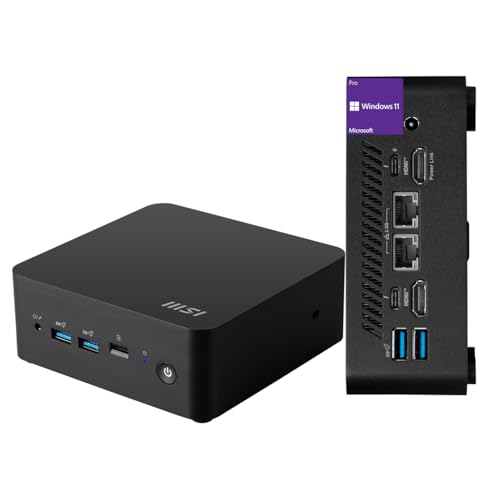
MSI Cubi NUC Mini PC
Best for: Office work and dual Ethernet setups
- Processor
- Intel Core 3 100U
- Installed RAM
- 16GB
- Storage Capacity
- 256GB
- Ethernet Ports
- 2 x RJ45
- High-Speed Expansion
- Thunderbolt 4
- Operating System
- Windows 11 Pro
View on Amazon: MSI Cubi NUC Mini PC Affiliate link
The MSI Cubi NUC packs a 13th Gen Intel Core 3 100U processor into a compact chassis. It includes 16GB of RAM and 256GB of storage. Windows 11 Pro comes pre-installed. Dual RJ45 ports and Thunderbolt 4 connectivity offer solid expansion. This small form factor PC suits office tasks and media streaming. It is ideal for users who need reliable daily performance in a space-saving design.
Pros
- 13th Gen Intel Core 3 100U processor
- 16GB high-bandwidth RAM
- Dual RJ45 Ethernet ports
- Windows 11 Pro included
- Thunderbolt 4 connectivity
Cons
- 256GB SSD storage is limited for large files
- No dedicated graphics card for heavy gaming
- Base clock speed is low at 1.2GHz
Good fit if
- You need dual Ethernet connections for network setups
- You want Windows 11 Pro for business features
- You require a compact PC for desk space saving
Skip if
- You need high-end gaming performance
- You require more than 256GB of internal storage
- You prefer a larger chassis for easier upgrades
Verdict: MSI Cubi NUC Mini PC delivers efficient office performance with dual Ethernet ports. It fits users who prioritize connectivity and compact size over raw power.
Specifications side by side
| Spec | MINISFORUM Slim Ryzen 7 Mini PC | MSI Cubi NUC Mini PC |
|---|---|---|
| Processor | AMD Ryzen 7 8745H | Intel Core 3 100U |
| Installed RAM | 32GB | 16GB |
| Storage Capacity | 1TB SSD | 256GB |
| Memory Type | DDR5 | not stated |
| Graphics | AMD Radeon 780M | not stated |
| Ethernet Ports | 1x 2.5Gbps LAN | 2 x RJ45 |
| High-Speed Expansion | USB4 | Thunderbolt 4 |
| Operating System | not stated | Windows 11 Pro |
| Memory | 32GB RAM | 16GB RAM |
| Storage | 1TB SSD | 256GB SSD |
| Networking | 2.5G LAN, WiFi 6E | not stated |
| Weight | 2.73 pounds | 6 pounds |
| Dimensions | not stated | 5.34 × 5.22 × 1.9 inches |
| Size | UM870 Slim 32+1T | 16GB RAM | 256GB SSD |
| Color | Silver | Black |
| Model | DeskMini | MSI Cubi Mini |
Frequently asked questions
Which mini PC is better for multitasking?
The MINISFORUM UM870 Slim is the better choice for multitasking. It includes 32GB of RAM and a Ryzen 7 processor. These specs allow you to run multiple demanding applications simultaneously without slowdowns. The MSI Cubi NUC offers only 16GB of RAM, which limits heavy workflow performance.
Does the MSI Cubi NUC have dual Ethernet ports?
Yes, the MSI Cubi NUC Mini PC features dual Ethernet ports. This setup is ideal for office environments requiring stable network connections. It also supports WiFi connectivity. The MINISFORUM model provides WiFi 6E and a single 2.5G LAN port instead.
Which model has more storage capacity?
The MINISFORUM UM870 Slim comes with a 1TB SSD. This provides ample space for large files and applications. The MSI Cubi NUC includes a smaller 256GB SSD. You will need to add external storage if you choose the MSI option for heavy data usage.
Is the MINISFORUM Slim portable enough for travel?
The MINISFORUM UM870 Slim weighs 2.73 pounds. This makes it relatively lightweight and easy to transport. The MSI Cubi NUC is significantly heavier at 6 pounds. It is designed more for stationary office use rather than frequent movement or travel.
Which mini PC offers faster wireless networking?
The MINISFORUM UM870 Slim supports WiFi 6E. This standard offers faster speeds and less congestion than previous versions. The MSI Cubi NUC supports standard WiFi. If you rely on high-speed wireless connections, the MINISFORUM model provides the more advanced networking technology.
What is the best use case for the MSI Cubi NUC?
The MSI Cubi NUC is best for office work and dual Ethernet setups. It prioritizes connectivity and compact size over raw processing power. It is suitable for users who need reliable network interfaces and do not require high-end gaming or heavy computing capabilities.