Msi Cubi NUC 13th Gen Review: Who It Fits and Who Should Skip It
As an Amazon Associate we earn from qualifying purchases. Links on this page are affiliate links.
This msi cubi nuc 13th gen review looks at a compact desktop built for everyday efficiency. It features an Intel Core 3 100U processor and 16GB of RAM, providing enough power for office tasks and media streaming. The 256GB SSD ensures quick boot times and fast data access. Measuring just 5.22 by 5.34 by 1.97 inches, it saves desk space while running Windows 11 Pro. This setup is designed for users who need reliable performance in a small footprint, combining practical connectivity with a sustainable build for home or business use.
What stands out
- 16GB high-bandwidth RAM supports smooth multitasking across multiple applications and browser tabs.
- 256GB M.2 SSD delivers fast bootup speeds and efficient data transfer.
- Intel Core 3 100U processor with 6 cores and 8 threads handles daily workloads with ease.
- Two Thunderbolt 4 ports and four USB 10Gbps Type A ports offer versatile connectivity.
- Windows 11 Pro includes Android app compatibility and improved window layout options.
Who it fits
Good fit for
This mini PC suits remote workers and small business users who need a quiet, space-saving desktop for office applications. The 16GB RAM and efficient processor handle spreadsheet work, video calls, and web browsing without lag. The dual RJ45 Ethernet ports are ideal for users requiring stable wired connections or network redundancy. If you want a ready-to-use system with Windows 11 Pro and solid daily performance, this compact unit fits your desk setup perfectly.
Who should skip it
You should look elsewhere if you need high-end gaming or heavy video editing capabilities. The Intel Core 3 100U is designed for light multitasking and office work, not intensive graphical tasks. Additionally, the 256GB storage may fill up quickly if you store large media libraries or numerous programs. Users requiring more than 16GB of RAM for complex virtualization or professional workloads will find this configuration limiting compared to higher-tier options.
Verdict: The MSI Cubi NUC offers a practical, compact solution for everyday computing needs with solid multitasking capabilities. It is a sensible choice for users prioritizing space savings and reliable office performance over raw power.
Key specs explained for MSI Cubi NUC
Intel Core 3 100U
This 6-core, 8-thread processor runs at a base of 1.2GHz and boosts up to 4.7GHz. It delivers responsive performance for daily office work, media streaming, and light multitasking. You get enough power to handle multiple browser tabs and applications smoothly without significant lag. This chip is ideal for users who need reliable desktop performance for standard productivity tasks rather than heavy gaming or video editing.
16GB RAM
High-bandwidth RAM allows you to run multiple applications and browser tabs simultaneously. This amount of memory ensures the system remains responsive even when you switch between different programs. It prevents slowdowns during typical daily use, such as working with spreadsheets while streaming video. For most users, 16GB provides a comfortable buffer for multitasking without needing to upgrade later.
256GB SSD
The M.2 Solid State Drive enables fast boot times and quick data transfer. You will notice the system starting up rapidly and applications launching almost instantly. This storage capacity is sufficient for your operating system, essential programs, and a moderate amount of personal files. If you store large media libraries or extensive project files, you may need external storage or a larger drive variant.
Windows 11 Pro
This operating system offers a consistent design and improved window layout options for better organization. It includes enhanced performance features and compatibility with Android apps. Windows 11 Pro is designed for business scenarios, providing robust security and management tools. You benefit from a modern interface that supports efficient multitasking and integrates well with professional workflows, making it suitable for both home and office environments.
2 x Thunderbolt 4
These ports provide high-speed connectivity for external devices and displays. Thunderbolt 4 supports data transfer rates up to 40Gbps, allowing you to connect fast storage drives or high-resolution monitors efficiently. You can also daisy-chain multiple devices through a single cable. This feature is valuable for users who need versatile expansion options or require rapid data movement between the mini PC and peripherals.
Compact Design and Build Quality
The MSI Cubi NUC measures 5.22 by 5.34 by 1.97 inches and weighs 6 pounds. This ultra-compact form factor saves valuable desk space. You can place it behind a monitor or in tight office cubicles without clutter. The listing notes a black finish with eco-friendly construction. It uses PCR recycled plastics and FSC-certified packaging pulp. This choice reduces environmental impact while maintaining a durable, business-grade exterior suitable for daily use.
The rear panel prioritizes connectivity over aesthetics. You get four USB 10Gbps Type A ports and two Thunderbolt 4 connections. Thunderbolt 4 allows fast data transfer and high-speed display output. Two HDMI ports let you drive dual monitors. Two RJ45 Ethernet ports support dual-network setups for stable office connections. A Kensington lock slot adds security for public or shared workspaces.
Controls are minimal. A single external power switch pin header manages power states. You also find a micro-SD card reader and a mic-in/headphone-out combo jack. This layout supports direct audio and video input without extra adapters. The design focuses on practical utility. You get essential ports in a small footprint. This makes the unit ideal for users who need reliable connectivity in a space-saving package.
Setup and everyday use
Setting up this mini PC is straightforward thanks to its compact design and included operating system. You receive Windows 11 Pro, which provides a consistent interface and improved performance features right out of the box. The system supports Android apps, adding flexibility for your specific workflow needs. Connectivity is robust, featuring two RJ45 Ethernet ports for stable wired internet, which is ideal for office environments or when you need reliable latency. You also get WiFi 6 and Bluetooth for wireless peripherals and network access without cluttering your desk with cables. The rear panel includes two HDMI ports, allowing you to connect dual displays easily. This setup supports multitasking efficiently, as the 16GB of high-bandwidth RAM can handle multiple browser tabs and applications simultaneously without slowing down. The 256GB M.2 SSD ensures fast boot times and quick data transfer, making daily operations feel responsive. With two Thunderbolt 4 ports, you can connect high-speed external storage or docks. The inclusion of a micro-SD card reader adds convenience for transferring photos or documents directly from cameras. The unit’s small footprint, measuring just 5.22 by 5.34 by 1.97 inches, means it fits easily behind monitors or in tight spaces. This makes it suitable for home offices or business cubicles where desk space is limited. The eco-friendly design using recycled plastics and FSC-certified packaging adds a sustainable element to your purchase. Overall, the specs indicate a machine built for efficient, clutter-free daily computing.
Before you buy this mini pc
You will need a display, keyboard, and mouse since the listing does not include them. This unit relies on external monitors for output. It features two HDMI ports and two Thunderbolt 4 connections. Verify your monitor supports these inputs for optimal resolution. The system includes Windows 11 Pro, so you do not need to purchase a license separately. However, you should check if your preferred software is compatible with this operating system. The 256GB SSD offers fast boot times but limited space. You may need an external drive for large files. Regularly update drivers to maintain performance. This model fits well alongside other small form factor computers for office or home use. It suits users who value desk space over raw power. Consider other options if you require heavy gaming or video editing capabilities. The compact size makes it ideal for tight spaces.
Check before you buy
- Confirm your monitor supports HDMI or Thunderbolt 4 inputs.
- Ensure you have a keyboard and mouse ready.
- Check if Windows 11 Pro meets your software needs.
- Verify if 256GB storage is sufficient for your files.
The product at a glance
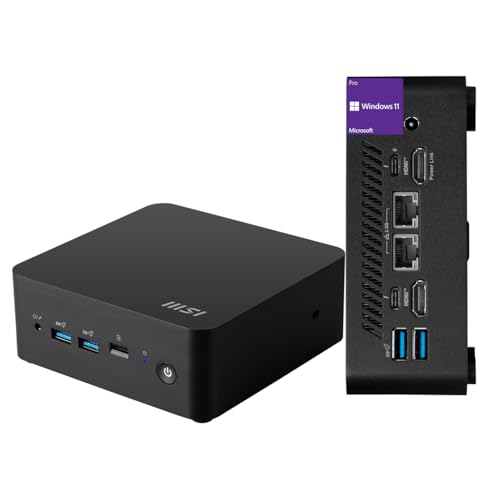
MSI Cubi NUC Mini PC
Best for: Light office work and dual Ethernet needs
- Processor
- Intel Core 3 100U
- Installed RAM
- 16GB
- Storage Capacity
- 256GB
- Ethernet Ports
- 2 x RJ45
- High-Speed Expansion
- Thunderbolt 4
- Operating System
- Windows 11 Pro
View on Amazon: MSI Cubi NUC Mini PC Affiliate link
The MSI Cubi NUC is a compact mini PC powered by a 13th Gen Intel Core 3 100U processor. It includes 16GB of RAM and a 256GB SSD for daily tasks. The unit measures 5.22 by 5.34 by 1.97 inches and runs Windows 11 Pro. You get two Thunderbolt 4 ports and dual Ethernet jacks. This setup suits light office work and media streaming in small spaces.
Pros
- 13th Gen Intel Core 3 100U processor with 6 cores
- 16GB high-bandwidth RAM for multitasking
- Two Thunderbolt 4 ports for fast expansion
- Dual RJ45 Ethernet ports for network flexibility
- Windows 11 Pro pre-installed
Cons
- 256GB SSD storage is limited for large files
- 6-pound weight is heavy for its small size
- No mention of internal storage expansion slots
Good fit if
- You need dual Ethernet connections for home or office
- You want a compact PC for light daily tasks
- You require Thunderbolt 4 connectivity for peripherals
Skip if
- You need high performance for video editing or gaming
- You require more than 256GB of internal storage
- You prefer a lighter device for frequent transport
Verdict: MSI Cubi NUC Core 3 100U Mini PC fits users who need dual Ethernet and Thunderbolt 4 in a small footprint for basic computing. It is not suitable for heavy workloads or users needing large storage capacity.
Specifications side by side
| Spec | MSI Cubi NUC Mini PC |
|---|---|
| Processor | Intel Core 3 100U |
| Installed RAM | 16GB |
| Storage Capacity | 256GB |
| Ethernet Ports | 2 x RJ45 |
| High-Speed Expansion | Thunderbolt 4 |
| Operating System | Windows 11 Pro |
| Memory | 16GB RAM |
| Storage | 256GB SSD |
| Dimensions | 5.34 × 5.22 × 1.9 inches |
| Weight | 6 pounds |
| Size | 16GB RAM | 256GB SSD |
| Color | Black |
| Model | MSI Cubi Mini |
Frequently asked questions
Is the MSI Cubi NUC good for office work?
Yes, this mini PC is ideal for light office tasks. The Intel Core 3 100U processor handles basic computing and media streaming efficiently. Combined with 16GB of RAM, it manages daily workflows without lag. You will find it suitable for document editing and web browsing.
Does this model support dual monitors?
Yes, you can connect multiple displays using its video outputs. The system includes two HDMI ports and two Thunderbolt 4 connections. This flexibility allows you to set up a multi-monitor workspace. Ensure your monitors support these input types for optimal performance.
How much storage does the MSI Cubi NUC have?
It comes with a 256GB SSD for storage. This capacity ensures quick boot times and responsive application loading. It is sufficient for operating system files and essential documents. You may need external storage if you plan to keep large media libraries locally.
Can I use this for heavy video editing?
No, it is not suitable for heavy workloads. The Intel Core 3 100U is designed for everyday efficiency rather than intensive processing. If you require high performance for video rendering or 3D modeling, you should look for a more powerful configuration.
What operating system comes with this unit?
The listing includes Windows 11 Pro. This provides a consistent interface and improved performance features right out of the box. It also supports Android apps, adding versatility to your workflow. You do not need to purchase additional software licenses for basic setup.
Is the MSI Cubi NUC quiet during operation?
The compact design suggests efficient thermal management for its class. While specific noise levels are not listed, small form factor PCs typically prioritize low power consumption. This often results in quieter operation during light office tasks and media streaming compared to larger desktops.
Does it have dual Ethernet ports?
Yes, this model is noted for its dual Ethernet capability. This feature is beneficial for users needing stable network connections or VLAN tagging. It supports Thunderbolt 4 as well, offering high-speed data transfer options. This makes it a strong choice for specific networking requirements.