Msi Cubi NUC 13th Gen vs Msi Cubi 5 Professional Mini PC: Spec Comparison
As an Amazon Associate we earn from qualifying purchases. Links on this page are affiliate links.
When you compare the msi cubi nuc 13th gen vs cubi 5 professional mini PC, you see two compact desktops with distinct strengths. Both units ship with Windows 11 Pro and 16GB of RAM for smooth multitasking. They also share dual RJ-45 Ethernet ports and Thunderbolt 4 connectivity for high-speed data transfer. The main difference lies in their processors and storage capacity. One offers a newer 13th Gen chip with less storage, while the other provides a 12th Gen i5 with double the SSD space.
Key differences
| Aspect | MSI Cubi NUC Mini PC | MSI Cubi 5 Pro i5-1235U |
|---|---|---|
| Processor | Intel Core 3 100U (6-core, 8-thread) | Intel Core i5-1235U (10-core, 12-thread) |
| Storage Capacity | 256GB SSD | 512GB SSD |
| Dimensions | 5.22 x 5.34 x 1.97 inches | 4.4 x 4.6 x 1.8 inches |
| Weight | 6 pounds | 2.95 pounds |
| Rear Video Outputs | 2 x HDMI | 1 x HDMI 2.1, 1 x DisplayPort |
Which one should you choose?
Choose MSI Cubi NUC Mini PC if
- You need the latest 13th Gen Intel architecture for future-proofing.
- You prefer a system with two identical HDMI ports for dual monitors.
- You prioritize a larger internal storage expansion slot availability.
Choose MSI Cubi 5 Pro i5-1235U if
- You require more raw core count for heavier multitasking tasks.
- You want double the base storage capacity without upgrading.
- You need a lighter, more compact unit for easy VESA mounting.
Verdict: Choose the Cubi NUC if you want the newest 13th Gen processor and dual HDMI outputs for standard displays. Pick the Cubi 5 Professional if you need more processing cores, double the storage, and a lighter form factor for mounting. Both models provide solid Windows 11 Pro performance for daily office work.
MSI Cubi NUC vs Cubi 5 Pro Specs
processor performance
The MSI Cubi NUC features a 13th Gen Intel Core 3 100U processor with six cores and eight threads. It offers a base speed of 1.2GHz and a max boost up to 4.7GHz, which suits daily office tasks and media streaming. The MSI Cubi 5 Professional uses a 12th Gen Intel Core i5-1235U with ten cores and twelve threads. The i5-1235U generally provides stronger multi-core performance for heavier multitasking compared to the Core 3. If you need more processing power for complex applications, the Cubi 5 Pro has the advantage here due to its higher core and thread count.
storage capacity
Storage options differ between these two mini PCs. The MSI Cubi NUC comes with a 256GB M.2 SSD for fast boot times and data transfers. The MSI Cubi 5 Professional includes a larger 512GB PCIe NVMe M.2 SSD. This double storage space allows you to keep more files, applications, and media on the drive without needing external solutions. For users who store large datasets or many programs locally, the Cubi 5 Pro offers more immediate capacity. You can upgrade both models, but the Cubi 5 starts with more room to grow.
connectivity ports
Port selection varies significantly between the two units. The Cubi NUC provides four USB 10Gbps Type A ports and two Thunderbolt 4 ports, along with two HDMI outputs. This setup supports faster data transfer speeds and multiple high-resolution displays. The Cubi 5 Professional offers two USB 3.2 Gen 2 Type A ports, one Thunderbolt 4 port, one DisplayPort, and one HDMI 2.1 port. The Cubi NUC gives you more high-speed USB ports and dual HDMI outputs, which is better for connecting many peripherals or screens simultaneously.
physical dimensions
Size matters for desk space. The MSI Cubi NUC measures 5.22 x 5.34 x 1.97 inches. The MSI Cubi 5 Professional is smaller, measuring 4.4 x 4.6 x 1.8 inches. The Cubi 5 Pro is more compact, making it easier to fit in tight spaces or mount via VESA. It also weighs significantly less at 2.95 pounds compared to the Cubi NUC's 6 pounds. If you prioritize a smaller footprint and lighter weight for mobility or discreet placement, the Cubi 5 Pro is the better choice.
networking options
Both mini PCs include dual RJ-45 Ethernet ports, which is excellent for stable wired connections and network redundancy. They also both support Wi-Fi 6 and Bluetooth for wireless connectivity. The Cubi NUC lists Bluetooth generally, while the Cubi 5 Pro also specifies Wi-Fi 6. Since both offer the same dual Ethernet capability and modern wireless standards, neither has a clear advantage in networking hardware. You get reliable, high-speed wired and wireless options on both machines for home or office use.
build sustainability
The MSI Cubi NUC emphasizes eco-friendly construction. It uses PCR recycled plastics and FSC-certified packaging pulp. It is Energy Star compliant and produced with renewable energy. The product data for the Cubi 5 Professional does not mention specific sustainability materials or manufacturing processes. If environmental impact and recycled materials are important to you, the Cubi NUC provides transparent details about its green design. The Cubi 5 Pro focuses on performance and connectivity without highlighting its ecological footprint in the provided specifications.
Choose Your MSI Cubi Model
Users needing maximum port speed and connectivity
The MSI Cubi NUC includes two Thunderbolt 4 ports, offering higher bandwidth and more versatile peripheral connections than the single port on the Cubi 5 Pro. It also provides four USB 10Gbps Type A ports for faster data transfer. If you rely on high-speed docks or external storage, this model handles those demands more effectively.
Those prioritizing raw multi-core processing power
The Cubi 5 Pro uses an Intel Core i5-1235U with ten cores and twelve threads. This configuration delivers stronger multi-threaded performance compared to the six-core Core 3 100U in the Cubi NUC. For tasks involving heavy multitasking or resource-intensive applications, the additional cores in the i5 processor provide a clear computational advantage.
People wanting more internal storage space
This model comes with 512GB of SSD storage, which is double the capacity of the 256GB drive in the Cubi NUC. This extra space allows you to store more files, applications, and media without needing external drives. If your workflow requires significant local storage for large datasets or media libraries, this option saves you from immediate upgrades.
Users seeking a lighter, more portable device
The Cubi 5 Pro weighs only 2.95 pounds and measures 4.4 by 4.6 by 1.8 inches. In contrast, the Cubi NUC is heavier at six pounds and slightly larger in footprint. If you plan to move your computer between locations or need a smaller footprint for tight desk spaces, the lighter and more compact design of the Cubi 5 Pro is preferable.
The products compared
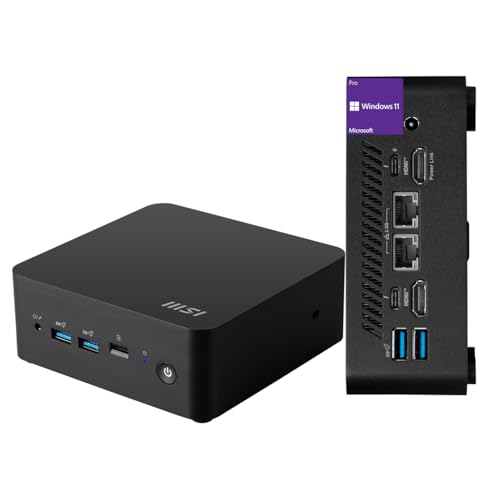
MSI Cubi NUC Mini PC
Best for: Office work with dual Ethernet needs
- Processor
- Intel Core 3 100U
- Installed RAM
- 16GB
- Storage Capacity
- 256GB
- Ethernet Ports
- 2 x RJ45
- High-Speed Expansion
- Thunderbolt 4
- Operating System
- Windows 11 Pro
View on Amazon: MSI Cubi NUC Mini PC Affiliate link
The MSI Cubi NUC is a compact desktop powered by a 13th Gen Intel Core 3 100U processor. It includes 16GB of RAM and a 256GB SSD for daily tasks. You get Windows 11 Pro, dual Ethernet ports, and Thunderbolt 4 connectivity. This model suits users needing reliable office performance in a small footprint without requiring high-end gaming or heavy creative workloads.
Pros
- 13th Gen Intel Core 3 100U processor with 6 cores
- 16GB high-bandwidth RAM for smooth multitasking
- Dual RJ45 Ethernet ports for stable networking
- Two Thunderbolt 4 ports for fast data transfer
- Windows 11 Pro operating system included
Cons
- 256GB SSD storage is limited for large files
- Base clock speed is low at 1.2GHz
- No dedicated graphics card for heavy rendering
Good fit if
- You need dual Ethernet connections for home or office
- You want Windows 11 Pro for business features
- You require Thunderbolt 4 for high-speed peripherals
Skip if
- You need more than 256GB of storage
- You require high-performance gaming capabilities
- You need a processor with higher base speeds
Verdict: MSI Cubi NUC Core 3 Mini PC fits users who prioritize dual Ethernet and Thunderbolt 4 connectivity over raw processing power. It delivers solid daily performance for office work and media streaming in a compact chassis.

MSI Cubi 5 Pro i5-1235U
Best for: Dual Ethernet networking and compact office use
- Processor
- Intel i5-1235U
- Installed RAM
- 16GB
- Storage Capacity
- 512GB
- Graphics
- Intel Graphics
- Ethernet Ports
- 2 x RJ-45
- High-Speed Expansion
- Thunderbolt 4
View on Amazon: MSI Cubi 5 Pro i5-1235U Affiliate link
The MSI Cubi 5 Professional features a 12th Gen Intel Core i5-1235U processor with 16GB of RAM and a 512GB SSD. It includes dual Ethernet ports and Thunderbolt 4 connectivity. This compact unit runs Windows 11 Pro and supports VESA mounting. It suits users who need reliable multitasking and robust port options in a small footprint.
Pros
- 12th Gen Intel Core i5-1235U processor with 10 cores
- 16GB RAM and 512GB PCIe NVMe SSD
- Dual RJ-45 Ethernet ports for stable networking
- Thunderbolt 4 port for high-speed data transfer
- Windows 11 Pro pre-installed
Cons
- Only includes 256GB SSD in some variations, though this unit has 512GB
- Integrated Intel Graphics limits heavy gaming performance
- No dedicated discrete GPU listed in specifications
Good fit if
- You need dual Ethernet connections for home lab setups
- You require Thunderbolt 4 for fast external storage
- You want a VESA-mountable system for clean desks
Skip if
- You require high-end discrete graphics for gaming
- You need more than 512GB of internal storage
- You prefer a larger chassis for easier upgrades
Verdict: MSI Cubi 5 Professional i5 Mini PC offers solid multitasking power and unique dual Ethernet ports. It fits professionals who need reliable connectivity and compact size without gaming demands.
Specifications side by side
| Spec | MSI Cubi NUC Mini PC | MSI Cubi 5 Pro i5-1235U |
|---|---|---|
| Processor | Intel Core 3 100U | Intel i5-1235U |
| Installed RAM | 16GB | 16GB |
| Storage Capacity | 256GB | 512GB |
| Graphics | not stated | Intel Graphics |
| Ethernet Ports | 2 x RJ45 | 2 x RJ-45 |
| High-Speed Expansion | Thunderbolt 4 | Thunderbolt 4 |
| Operating System | Windows 11 Pro | Windows 11 Pro |
| Memory | 16GB RAM | 16GB RAM |
| Storage | 256GB SSD | 512GB SSD |
| Use | not stated | Gaming |
| Dimensions | 5.34 × 5.22 × 1.9 inches | 4.6 × 4.4 × 1.8 inches |
| Weight | 6 pounds | 2.95 pounds |
| Size | 16GB RAM | 256GB SSD | 16GB RAM | 512GB SSD |
| Color | Black | i5-1235U |
| Model | MSI Cubi Mini | Cubi 5 12M |
Frequently asked questions
Which MSI Cubi model is smaller and lighter?
The MSI Cubi 5 Pro is more compact. It measures 4.4 inches wide, 4.6 inches long, and 1.8 inches high. It also weighs just 2.95 pounds. The Cubi NUC is larger at 5.34 inches long and 1.9 inches high. It weighs 6 pounds. Choose the Cubi 5 Pro if you need the smallest footprint.
Does the MSI Cubi NUC have more storage?
No, it has less. The MSI Cubi NUC comes with a 256GB SSD. The MSI Cubi 5 Pro includes a 512GB SSD. If you need double the internal storage space for files and applications, the Cubi 5 Pro is the better choice. Both models include 16GB of RAM for multitasking.
Is the MSI Cubi 5 Pro good for gaming?
The product data lists its use as gaming. However, it features an Intel Core i5-1235U processor. This chip is designed for office work and multitasking. It is not a high-performance gaming machine. You can expect smooth performance for light tasks, but it is not built for demanding 3D games.
Do both models include Windows 11 Pro?
Yes, both units ship with Windows 11 Pro. This operating system provides enhanced security features and management tools for professionals. It supports the dual Ethernet ports and other connectivity options on both machines. You get the same OS experience regardless of which chassis you choose.
Which model is better for office work?
The MSI Cubi NUC is best for office work with dual Ethernet needs. It fits users who prioritize connectivity over raw power. It delivers solid daily performance for media streaming and standard office tasks. The Cubi 5 Pro is also suitable for office use but offers more storage and a different processor.
What is the main difference in connectivity?
The MSI Cubi NUC includes two Thunderbolt 4 ports. This offers higher bandwidth and versatile peripheral connections. The Cubi 5 Pro has fewer high-speed ports. The NUC also provides four USB 10Gbps ports. If you need maximum port speed and connectivity options, the NUC is the superior choice.