Looking Beyond the Msi Cubi NUC AI+ Barebone? 6 Alternatives Worth a Look
As an Amazon Associate we earn from qualifying purchases. Links on this page are affiliate links.
The MSI Cubi NUC AI+ Barebone offers a compact 0.51L chassis with an Intel Core Ultra 9 386H processor and Thunderbolt 4 connectivity. You get tool-less access and support for dual DDR5 slots, making it a flexible platform for multi-display setups. However, you might look for msi cubi nuc AI barebone alternatives if you need a different form factor or specific networking features. Some users prefer external GPU expansion via OCuLink or enterprise-grade 10Gbps connectivity that this model does not provide.
This list includes 6 options selected because their specifications overlap with the original. The alternatives range from budget-friendly Ryzen 7 systems to powerful Core i9 workstations. You can find barebone units from brands like MINISFORUM and GEEKOM that offer varying sizes and processor options. Each entry focuses on the hardware specs you can actually build with, such as memory types, storage slots, and expansion ports. This approach helps you compare the raw capabilities of each system without relying on pre-installed components or pricing.
How alternatives compare to MSI
Intel NUC 13 Pro Core i5 Barebone
The Reatan Intel NUC 13 Pro Core i5 uses an older i5-1340P processor, which delivers less raw power than the Core Ultra 9 386H in the MSI Cubi NUC AI+. It features WiFi 6E networking rather than the newer WiFi 7 standard. The chassis is slightly larger at 2.1 inches in height compared to the ultra-compact 1.48-inch profile of the MSI unit. You get a barebone platform for custom memory and storage, similar to the MSI, but the connectivity options are more limited. This system suits users who need a reliable Intel-based mini PC for light gaming and office tasks without needing the highest tier of processing speed or modern Thunderbolt expansion capabilities.
MINISFORUM Ryzen 7 Barebone Mini PC
The MINISFORUM Ryzen 7 Barebone Mini PC offers an 8-core AMD processor instead of the Intel Core Ultra 9. It replaces Thunderbolt 4 with OCuLink expansion, which allows for high-bandwidth external GPU connections. This makes it ideal for builders who want to add desktop-class graphics rather than relying on integrated solutions. The system supports 2.5G LAN networking, differing from the MSI’s WiFi 7 and Thunderbolt 4 setup. You retain the flexibility of a barebone design to choose your own RAM and storage. This alternative is best for DIY enthusiasts who prioritize external graphics performance and modular customization over the multi-display Thunderbolt capabilities and compact form factor of the MSI Cubi NUC AI+.
GEEKOM A8 Max Ryzen 7 Mini PC
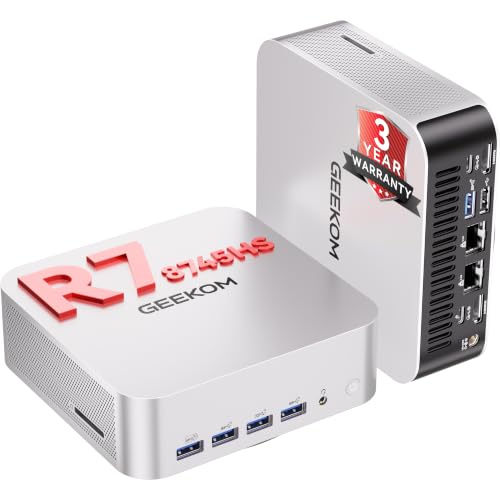
The GEEKOM A8 Max Ryzen 7 Mini PC features a significantly larger chassis, measuring 8.96 inches in length and 5.27 inches in height, compared to the tiny 0.51L footprint of the MSI Cubi NUC AI+. It uses a Ryzen 7 processor rather than the Intel Core Ultra 9. The design emphasizes network isolation and hardware customization for developers and IT professionals. Like the MSI, it is a barebone system allowing you to install your own memory and storage. However, the increased size provides more internal space for components. This unit suits users who prioritize network security features and extensive hardware customization over the ultra-compact, VESA-mountable design and Thunderbolt 4 connectivity found in the MSI model.
MINISFORUM M1 Pro Core Ultra 5 Mini PC
The MINISFORUM M1 Pro Core Ultra 5 uses a Core Ultra 5 processor, which offers lower performance than the Core Ultra 9 386H in the MSI Cubi NUC AI+. It includes dedicated OCuLink expansion for external graphics, a feature absent in the MSI’s Thunderbolt 4 setup. The system features dual RAID-capable drive slots, providing robust storage options for high-bandwidth local workloads. It maintains the barebone format, letting you select your own memory and storage components. This alternative is designed for DIY builders who need modern Intel Core Ultra architecture combined with desktop-class graphics expansion. It trades the MSI’s multi-display Thunderbolt capabilities and smaller size for specialized external GPU connectivity and flexible storage configurations.
MINISFORUM MS-01 Core i9 Barebone PC
The MINISFORUM MS-01 Core i9 Barebone PC targets enterprise users with vPRO security features and 10Gbps networking, which differ from the consumer-focused WiFi 7 and Thunderbolt 4 of the MSI Cubi NUC AI+. It is designed for extensive storage expansion and demanding professional tasks. The system is a barebone platform, allowing you to customize memory and storage, similar to the MSI. However, it prioritizes enterprise networking and security over the compact, VESA-mountable form factor of the MSI unit. This alternative suits professionals who require high-speed connectivity and robust security features for edge computing or remote workstation environments. It offers a different connectivity profile focused on enterprise needs rather than the multi-display and portability advantages of the MSI model.
MINISFORUM Core Ultra 5 Workstation Barebone
The MINISFORUM Core Ultra 5 Workstation Barebone uses a Core Ultra 5 processor, providing less processing power than the Core Ultra 9 386H in the MSI Cubi NUC AI+. It is optimized for local AI inference and high-speed networking, making it suitable for specialized edge computing tasks. The system supports high memory capacity for demanding AI workloads. Like the MSI, it is a barebone unit allowing you to choose your own components. However, it focuses on robust networking and AI capabilities rather than the multi-display Thunderbolt 4 connectivity and ultra-compact size of the MSI Cubi NUC AI+. This alternative is ideal for users building remote workstations or edge computing environments who prioritize AI processing and network performance over the broader multimedia and portability features of the MSI model.
Quick picks
Our 7 picks

MSI Cubi NUC AI+ Barebone
Best for: Power users needing multi-display setups
- Processor
- Intel Core Ultra 9 386H
- Installed RAM
- Barebone
- Storage Capacity
- Barebone
- Memory Type
- DDR5
- High-Speed Expansion
- Thunderbolt 4
- Dimensions
- 4.71 × 4.54 × 1.48 inches
View on Amazon: MSI Cubi NUC AI+ Barebone Affiliate link
This barebone mini PC features the Intel Core Ultra 9 386H processor. It includes dual DDR5 slots supporting up to 64GB of RAM and an M.2 PCIe SSD slot. The compact 0.51L chassis supports VESA mounting. You get dual HDMI and dual Thunderbolt 4 ports for multi-display setups. It is a Copilot+ PC designed for high-performance tasks and efficient multitasking.
Pros
- Intel Core Ultra 9 386H processor with up to 4.9GHz boost
- Dual DDR5 SO-DIMM slots for memory expansion up to 64GB
- Dual Thunderbolt 4 and dual HDMI ports for four 4K displays
- Compact 0.51L form factor with VESA mount compatibility
- Tool-less design for easy internal access and upgrades
Cons
- Sold as a barebone system without installed RAM or storage
- No dedicated discrete GPU listed for heavy gaming or rendering
- Higher-end Core Ultra 9 chip may generate more heat in a small chassis
Good fit if
- You need a powerful CPU for demanding productivity workloads
- You require multiple high-resolution displays via Thunderbolt 4
- You want to customize RAM and storage capacity yourself
Skip if
- You need a pre-built system with RAM and SSD included
- You require a dedicated graphics card for gaming
- You prefer a larger chassis for easier airflow management
Verdict: MSI Cubi NUC AI+ Barebone is a high-performance mini PC for users who need the Intel Core Ultra 9 386H and extensive connectivity. It suits professionals who want to build their own memory and storage configuration.

Intel NUC 13 Pro Core i5 Barebone
Best for: light gaming and compact office setups
- Processor
- Intel Core i5-1340P
- Installed RAM
- Barebone
- Storage Capacity
- Barebone
- Graphics
- Intel Iris Xe Graphics
- Use
- Gaming
- Networking
- WiFi 6E
View on Amazon: Intel NUC 13 Pro Core i5 Barebone Affiliate link
This Reatan barebone unit houses the Intel Core i5-1340P processor with Intel Iris Xe graphics. It measures 4.4 by 4.6 by 2.1 inches and includes Wi-Fi 6E and Bluetooth 5.3. The system supports DDR5 memory and SSD storage, which you must purchase separately. It offers a compact form factor suitable for light gaming and office tasks. You get a three-year warranty on the barebone components from Intel.
Pros
- Intel Core i5-1340P processor with 12 cores and 16 threads
- Intel Iris Xe integrated graphics
- Wi-Fi 6E AX211 and Bluetooth 5.3 connectivity
- Compact dimensions of 4.4 x 4.6 x 2.1 inches
Cons
- Barebone configuration requires separate RAM and SSD purchase
- Intel Iris Xe graphics limit heavy gaming performance
- Lower core count compared to Ryzen 7 and Core Ultra 5 alternatives
Good fit if
- You need a compact system for light gaming
- You want Wi-Fi 6E connectivity
- You prefer Intel processors for office work
Skip if
- You require pre-installed RAM and storage
- You need dedicated graphics for high-end gaming
- You want a higher core count CPU
Verdict: Reatan Intel NUC 13 Pro i5-1340P fits users who need a small Intel-based system for light gaming and office tasks. It lacks the raw power of the Core Ultra or Ryzen 7 options on this list.

MINISFORUM Ryzen 7 Barebone Mini PC
Best for: DIY builds needing external GPU expansion
- Processor
- AMD Ryzen 7 8845HS
- Installed RAM
- Barebone
- Storage Capacity
- Barebone
- Graphics
- AMD Radeon 780M
- Ethernet Ports
- 2.5Gbps LAN
- High-Speed Expansion
- OCuLink, USB4
View on Amazon: MINISFORUM Ryzen 7 Barebone Mini PC Affiliate link
This barebone mini desktop runs on an 8-core AMD Ryzen 7 8845HS processor paired with integrated Radeon 780M graphics. You get two DDR5 memory slots supporting up to 96 GB, dual M.2 PCIe 4.0 storage bays, and an OCuLink expansion port. It suits you if you want to supply your own RAM, storage, and operating system.
Pros
- AMD Ryzen 7 8845HS processor with 8 cores and up to 5.1 GHz clock speed
- Dedicated OCuLink port supporting 64 Gbps PCIe 4.0 x4 external graphics
- Triple display outputs via HDMI 2.1, DisplayPort 1.4, and USB4
- Supports up to 96 GB of DDR5 system memory
Cons
- Ships without installed RAM, storage drive, or operating system
- Using the OCuLink port requires taking up one internal M.2 SSD slot
- Internal storage capacity caps at 2 TB per M.2 slot
Good fit if
- You already own compatible DDR5 RAM and an M.2 2280 PCIe SSD.
- You plan to run an external graphics card through an OCuLink interface.
- You want triple display outputs supporting high-refresh resolutions.
Skip if
- You need a complete system that includes pre-installed memory, storage, and an OS.
- You want to use two internal SSDs alongside an OCuLink connection.
Verdict: MINISFORUM Ryzen 7 Barebone Mini PC delivers 8-core processing and high-bandwidth OCuLink expansion for builders wanting custom components. It gives you complete control over your memory, storage, and external GPU configuration.
GEEKOM A8 Max Ryzen 7 Mini PC
Best for: network isolation and hardware customization
- Processor
- AMD Ryzen 7 8745HS
- Installed RAM
- Barebone
- Storage Capacity
- Barebone
- Graphics
- Radeon 780M
- Ethernet Ports
- Dual 2.5G
- High-Speed Expansion
- USB4
View on Amazon: GEEKOM A8 Max Ryzen 7 Mini PC Affiliate link
The GEEKOM A8 Max is a barebone mini PC powered by the AMD Ryzen 7 8745HS processor. It features dual 2.5G Ethernet ports for network separation and a USB4 port for high-speed expansion. The system supports up to 64GB of DDR5 RAM and dual PCIe 4.0 SSDs. You can install your preferred operating system, including Linux or Ubuntu. This unit offers flexible storage and memory upgrades for various workflows.
Pros
- AMD Ryzen 7 8745HS processor with 8 cores
- Dual 2.5G Ethernet ports for network isolation
- USB4 port supporting eGPU and high-speed storage
- Supports up to 64GB DDR5 RAM via SO-DIMM slots
- Dual M.2 2280 PCIe 4.0 SSD slots
Cons
- No pre-installed RAM or storage drives
- Limited to HDMI 2.0 output ports
- Supports only up to 4 displays simultaneously
Good fit if
- You need physical network separation for office use
- You want to customize your RAM and storage capacity
- You require a system that supports Linux or Ubuntu
Skip if
- You need a ready-to-use system with pre-installed components
- You require Thunderbolt 4 certified connectivity
- You need more than four display outputs
Verdict: The GEEKOM A8 Max Mini PC is a flexible barebone system for users who value network isolation and hardware customization. It suits developers and IT professionals who prefer to build their own storage and memory configurations rather than buying a pre-built unit.

MINISFORUM M1 Pro Core Ultra 5 Mini PC
Best for: Custom builds needing OCuLink external graphics
- Processor
- Intel Core Ultra 5 125H
- Installed RAM
- Barebone
- Storage Capacity
- Barebone
- Graphics
- Intel Arc
- High-Speed Expansion
- OCuLink, USB4
- Operating System
- No OS (Barebone)
View on Amazon: MINISFORUM M1 Pro Core Ultra 5 Mini PC Affiliate link
This barebone system pairs Intel's Core Ultra 5 125H processor and Arc graphics with dual M.2 PCIe 4.0 storage slots and support for up to 96 GB of DDR5 memory. You get high-bandwidth OCuLink and USB4 ports for external expansion alongside Wi-Fi 7. It fits anyone needing a compact workstation base that accommodates high-capacity memory and external GPU options.
Pros
- Dedicated OCuLink port and dual USB4 ports for high-speed hardware expansion
- Two M.2 2280 PCIe 4.0 SSD slots supporting up to 8TB total with RAID 0 and 1 options
- Supports up to 96 GB of DDR5-5600 memory across two SODIMM slots
- Wi-Fi 7 and Bluetooth 5.4 wireless connectivity
Cons
- Requires you to supply and install your own RAM, SSD, and operating system
- HDMI 2.1 output port is capped at 4K resolution at 60Hz
Good fit if
- You want to configure your own DDR5 memory and PCIe 4.0 solid-state drives
- You plan to attach an external desktop graphics card using the OCuLink port
Skip if
- You need a complete system that works directly out of the box with an operating system
- You prefer buying pre-installed storage and memory rather than assembling them yourself
Verdict: MINISFORUM M1 Pro Core Ultra 5 Barebone Mini PC suits DIY builders who want modern Intel Core Ultra architecture alongside dedicated OCuLink expansion for desktop-class graphics. Its dual RAID-capable drive slots make it a solid match for high-bandwidth local workloads.

MINISFORUM MS-01 Core i9 Barebone PC
Best for: Enterprise networking and custom storage builds
- Processor
- Intel Core i9-13900H
- Installed RAM
- Barebone
- Storage Capacity
- Barebone
- Graphics
- Intel Iris Xe Graphics
- Ethernet Ports
- 2x 10Gbps SFP+, 2x 2.5G RJ45
- High-Speed Expansion
- 2x USB4
View on Amazon: MINISFORUM MS-01 Core i9 Barebone PC Affiliate link
The MINISFORUM MS-01 is a barebone mini workstation built for heavy workloads. It uses an Intel Core i9-13900H processor with vPRO support. You get dual 10Gbps SFP+ ports and dual 2.5Gbps RJ45 ports for fast networking. The system supports up to 96GB of DDR5 RAM. It also offers extensive storage options with three M.2 slots. This unit is designed for users who need high performance and enterprise features.
Pros
- Intel Core i9-13900H processor for high computational power
- Dual 10Gbps SFP+ Ethernet ports for secure, high-speed networking
- Supports up to 96GB of dual-channel DDR5 RAM
- Three M.2 NVMe slots with RAID support for up to 24TB storage
- PCIe 4.0 x16 slot for high-performance external GPUs
Cons
- Barebone design requires you to purchase RAM, storage, and an operating system separately
- Lacks built-in Wi-Fi and Bluetooth connectivity
- No pre-installed OS means additional setup effort
Good fit if
- You need enterprise-grade security features like Intel vPRO
- You require high-speed wired networking with 10Gbps SFP+ ports
- You want to build a custom storage array with RAID capabilities
Skip if
- You want a plug-and-play system with an OS and RAM included
- You need wireless Wi-Fi or Bluetooth connectivity without adapters
- You are looking for a basic desktop for simple web browsing
Verdict: The MINISFORUM MS-01 Mini Workstation is a powerful barebone platform for users who need enterprise networking and extensive storage expansion. It fits professionals who require vPRO security and 10Gbps connectivity for demanding tasks.

MINISFORUM Core Ultra 5 Workstation Barebone
Best for: local AI inference and high-speed networking
- Processor
- Intel Core Ultra 5 336H
- Installed RAM
- Barebone
- Storage Capacity
- Barebone
- Memory Type
- DDR5 7200
- Ethernet Ports
- 2x 10G SFP+, 1x 10G RJ45, 1x 2.5G RJ45
- High-Speed Expansion
- Dual USB4, PCIe x16
View on Amazon: MINISFORUM Core Ultra 5 Workstation Barebone Affiliate link
The MINISFORUM MS-03 Mini PC is a barebone workstation powered by the Intel Core Ultra 5 336H processor. It supports up to 128 GB of DDR5 RAM and includes three M.2 SSD slots for extensive storage expansion. You will appreciate the robust networking options, featuring dual 10G SFP+ ports and a 10G RJ45 port. This setup suits users who need local AI inference capabilities and enterprise-grade remote management via Intel vPro.
Pros
- Intel Core Ultra 5 336H processor for local AI workloads
- Supports up to 128 GB of DDR5 7200 memory
- Three M.2 SSD slots including PCIe 5.0 support
- Dual 10G SFP+ fiber ports and 10G RJ45 port
- Intel vPro technology for remote management
Cons
- Barebone configuration requires separate RAM and SSD purchase
- Only one 2.5G RJ45 port for standard networking
- No included operating system or pre-installed software
Good fit if
- You need high-speed fiber networking for edge computing
- You plan to run local AI models with large memory
- You require remote management for distributed office deployments
Skip if
- You want a fully assembled system with pre-installed OS
- You only need standard 1G Ethernet connectivity
- You prefer a smaller footprint with fewer expansion slots
Verdict: MINISFORUM MS-03 Mini PC fits professionals who need robust networking and high memory capacity for local AI tasks. It is ideal for users building specialized edge computing or remote workstation environments.
Specifications side by side
| Spec | MSI Cubi NUC AI+ Barebone | Intel NUC 13 Pro Core i5 Barebone | MINISFORUM Ryzen 7 Barebone Mini PC | GEEKOM A8 Max Ryzen 7 Mini PC | MINISFORUM M1 Pro Core Ultra 5 Mini PC | MINISFORUM MS-01 Core i9 Barebone PC | MINISFORUM Core Ultra 5 Workstation Barebone |
|---|---|---|---|---|---|---|---|
| Processor | Intel Core Ultra 9 386H | Intel Core i5-1340P | AMD Ryzen 7 8845HS | AMD Ryzen 7 8745HS | Intel Core Ultra 5 125H | Intel Core i9-13900H | Intel Core Ultra 5 336H |
| Installed RAM | Barebone | Barebone | Barebone | Barebone | Barebone | Barebone | Barebone |
| Storage Capacity | Barebone | Barebone | Barebone | Barebone | Barebone | Barebone | Barebone |
| Memory Type | DDR5 | not stated | not stated | not stated | not stated | not stated | DDR5 7200 |
| Graphics | not stated | Intel Iris Xe Graphics | AMD Radeon 780M | Radeon 780M | Intel Arc | Intel Iris Xe Graphics | not stated |
| Ethernet Ports | not stated | not stated | 2.5Gbps LAN | Dual 2.5G | not stated | 2x 10Gbps SFP+, 2x 2.5G RJ45 | 2x 10G SFP+, 1x 10G RJ45, 1x 2.5G RJ45 |
| High-Speed Expansion | Thunderbolt 4 | not stated | OCuLink, USB4 | USB4 | OCuLink, USB4 | 2x USB4 | Dual USB4, PCIe x16 |
| Operating System | not stated | not stated | No OS (Barebone) | No OS (Barebone) | No OS (Barebone) | No OS (Barebone) | not stated |
| Use | not stated | Gaming | not stated | not stated | not stated | not stated | not stated |
| Networking | not stated | WiFi 6E | 2.5G LAN | not stated | not stated | not stated | not stated |
| Form Factor | Barebone | Barebone | Barebone | Barebone | Barebone | Barebone | Barebone |
| Dimensions | 4.71 × 4.54 × 1.48 inches | 4.6 × 4.4 × 2.1 inches | not stated | 8.96 × 6.92 × 5.27 inches | not stated | not stated | not stated |
| Weight | 1.1 pounds | 3.3 pounds | not stated | not stated | not stated | 3.13 pounds | not stated |
| Color | Black | Black02 | Silver | White | not stated | Black | not stated |
| Model | CuNUCAI3MG006B | core i5 | DeskMini | GEEKOM A8 Max | M1 Pro-125H | DeskMini | DeskMini |
| Size | not stated | NUC13 i5 Barebone | UM880 Plus 0+0 | White | M1 Pro-125H-Barebone | MS-01-S1390-Barebone | MS-03-S336H-Barebone |
For msi codex r2 AI gaming alternatives, see our guide on comparable desktop options worth considering.
Frequently asked questions
What is the smallest MSI Cubi NUC AI+ alternative?
The Reatan Intel NUC 13 Pro Core i5 Barebone is a compact option measuring 4.4 by 4.6 inches. It weighs 3.3 pounds, making it slightly heavier than some competitors. This model uses an i5-1340P processor. It suits users who need a small form factor for light gaming or office tasks without requiring maximum processing power.
Which barebone PC supports external GPUs best?
The MINISFORUM Ryzen 7 Barebone Mini PC offers high-bandwidth OCuLink expansion. This feature allows builders to connect desktop-class graphics cards directly. It provides complete control over memory, storage, and external GPU configuration. This makes it ideal for DIY enthusiasts who need more graphical performance than integrated solutions can provide.
Can I use the MINISFORUM M1 Pro for AI tasks?
Yes, the MINISFORUM M1 Pro Core Ultra 5 Barebone supports local AI inference. It features modern Intel Core Ultra architecture and dedicated OCuLink expansion for external graphics. The dual RAID-capable drive slots also handle high-bandwidth local workloads efficiently. This makes it a solid choice for developers and AI-focused projects.
Does the GEEKOM A8 Max have networking isolation?
The GEEKOM A8 Max Ryzen 7 Mini PC is designed for network isolation and hardware customization. It suits developers and IT professionals who prefer building their own storage and memory configurations. This flexible barebone system allows for specialized setups that require secure, isolated network environments for sensitive data processing tasks.
Which barebone PC offers 10Gbps connectivity?
The MINISFORUM MS-01 Core i9 Barebone PC provides 10Gbps connectivity. It is built for enterprise networking and extensive storage expansion. This model includes vPRO security features for demanding professional tasks. It fits users who require high-speed data transfer rates and robust security protocols for their workstation environments.
Is there a Ryzen 7 option for barebone builds?
Both the MINISFORUM Ryzen 7 Barebone and the GEEKOM A8 Max use Ryzen 7 processors. The MINISFORUM model focuses on OCuLink expansion for external GPUs. The GEEKOM A8 Max emphasizes network isolation and hardware customization. Both options allow you to choose your own memory and storage for tailored performance.
What is the weight of the MINISFORUM MS-01?
The MINISFORUM MS-01 Core i9 Barebone PC weighs 3.13 pounds. This compact workstation is designed for enterprise networking and custom storage builds. Its weight reflects the robust internal components and metal chassis. It provides a stable platform for professionals who need high performance and extensive connectivity options in a small form factor.