Msi vs Reatan: Mini PCs Compared by Specs
As an Amazon Associate we earn from qualifying purchases. Links on this page are affiliate links.
This msi vs reatan mini PC guide compares two distinct approaches to small computing. Both devices utilize 13th Gen Intel processors for daily tasks. The MSI Cubi NUC arrives as a complete system with RAM and storage pre-installed. The Reatan unit is a barebone kit requiring you to add those components. You will also note differences in connectivity and form factor size. These specs define which machine fits your specific workflow better.
Key differences
| Aspect | MSI Cubi NUC Mini PC | Intel NUC 13 Pro Core i5 Barebone |
|---|---|---|
| Processor | Intel Core 3 100U | Intel Core i5-1340P |
| Memory | 16GB | Barebone |
| Storage | 256GB SSD | Barebone |
| Operating System | Windows 11 Pro | Not listed |
| Networking | Wi-Fi 6 | Wi-Fi 6E |
| Dimensions | 5.22 x 5.34 x 1.97 inches | 4.6 x 4.4 x 2.1 inches |
Which one should you choose?
Choose MSI Cubi NUC Mini PC if
- You want a ready-to-use desktop with RAM and storage included.
- You need Windows 11 Pro pre-installed for business features.
- You prefer a larger chassis with dual Ethernet ports.
Choose Intel NUC 13 Pro Core i5 Barebone if
- You want to customize your RAM and storage choices.
- You require the higher core count of the Core i5-1340P.
- You need Wi-Fi 6E for faster wireless connectivity.
Verdict: Choose the MSI Cubi NUC if you need a complete, out-of-the-box solution with Pro features. Select the Reatan Intel NUC 13 Pro if you prefer to build your own configuration with a more powerful processor and modern Wi-Fi standard.
MSI vs Reatan Mini PC Specs
Processor performance
The MSI Cubi NUC uses the Intel Core 3 100U, a 6-core, 8-thread chip with a base speed of 1.2GHz and a max boost of 4.7GHz. This setup targets daily office work and media streaming. The Reatan unit features the Intel Core i5-1340P, which has 12 cores and 16 threads. It includes 4 Performance cores and 8 Efficient cores, with turbo speeds up to 4.6GHz. The i5-1340P offers significantly more processing power and thread count than the Core 3 100U, making it better for heavier multitasking or creative apps like Photoshop.
Memory and storage
The MSI Cubi NUC arrives as a complete system with 16GB of high-bandwidth RAM and a 256GB M.2 SSD pre-installed. This allows for immediate use without additional upgrades. In contrast, the Reatan Intel NUC 13 Pro is a barebone kit. It includes the processor but does not come with RAM or storage. You must purchase and install these components separately. The MSI is ready out of the box, while the Reatan requires extra hardware investment to function.
Operating system
The MSI Cubi NUC includes Windows 11 Pro. This version offers enhanced security features, improved window layout options, and better performance capabilities suitable for business environments. It also supports Android apps. The Reatan Intel NUC 13 Pro is sold as a barebone kit. It does not include an operating system. You will need to install Windows or another OS yourself. The MSI provides a more complete experience for users who want a pre-configured software environment.
Networking connectivity
Both units offer robust wireless options, but the Reatan has a slight edge in modern standards. The Reatan Intel NUC 13 Pro uses Intel Wi-Fi 6E AX211, supporting 802.11ax and Bluetooth 5.3. This provides higher bandwidth, lower latency, and better stability. The MSI Cubi NUC features Wi-Fi 6 and Bluetooth. While sufficient for most tasks, it lacks the 6E band for less congested 6GHz spectrum. The Reatan also includes two RJ45 Ethernet ports, matching the MSI's dual wired connection capability.
Form factor and ports
The MSI Cubi NUC measures 5.22 x 5.34 x 1.97 inches and weighs 6 pounds. It offers extensive connectivity, including 4 USB 10Gbps Type A ports, 2 Thunderbolt 4 ports, 2 HDMI outputs, and a Micro-SD card reader. The Reatan Intel NUC 13 Pro is smaller, measuring 4.4 x 4.6 x 2.1 inches and weighing 3.3 pounds. It is more portable. However, the MSI provides more high-speed expansion options like Thunderbolt 4 and more USB ports, making it more versatile for connecting multiple peripherals.
Graphics capability
The Reatan Intel NUC 13 Pro features the Intel Core i5-1340P processor, which integrates Intel Iris Xe Graphics. This GPU is capable of handling light photo editing, video playback, and casual gaming. The MSI Cubi NUC uses the Intel Core 3 100U. While it also has integrated graphics, the Core 3 series typically has fewer execution units than the Core i5 P-series. The Reatan's Iris Xe graphics provide better performance for visual tasks and media acceleration compared to the entry-level graphics in the MSI unit.
Which Mini PC Should You Buy
Users needing a ready-to-use system
The MSI Cubi NUC arrives as a complete system with 16GB of RAM and a 256GB SSD already installed. You get Windows 11 Pro pre-loaded, saving you the hassle of buying separate components. This makes it ideal for immediate setup without needing to source memory or storage yourself.
Users prioritizing processor power and connectivity
The Reatan Intel NUC 13 Pro features the Core i5-1340P, a 12-core, 16-thread processor that offers more raw processing power than the MSI. It also includes Wi-Fi 6E and Bluetooth 5.3 for faster wireless connections. This barebone kit is best for those who want to customize their RAM and storage upgrades.
Users wanting maximum portability and size
The Reatan unit measures just 4.4 by 4.6 by 2.1 inches and weighs 3.3 pounds, making it smaller and lighter than the MSI. Its compact form factor allows for easy transport or mounting behind displays. This makes it a superior choice for users who need a truly portable or space-saving desktop solution.
The products compared
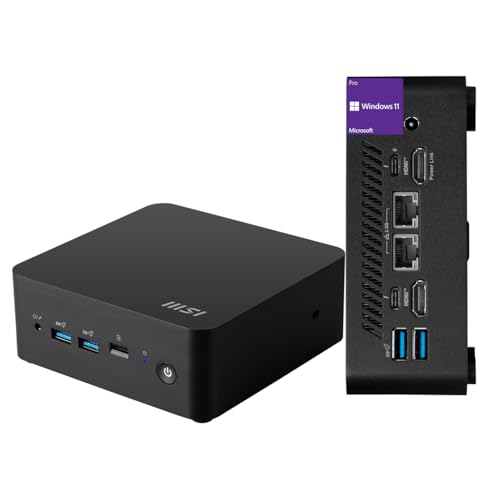
MSI Cubi NUC Mini PC
Best for: Office tasks and dual Ethernet needs
- Processor
- Intel Core 3 100U
- Installed RAM
- 16GB
- Storage Capacity
- 256GB
- Ethernet Ports
- 2 x RJ45
- High-Speed Expansion
- Thunderbolt 4
- Operating System
- Windows 11 Pro
View on Amazon: MSI Cubi NUC Mini PC Affiliate link
The MSI Cubi NUC is a compact desktop built for daily office tasks and media streaming. It features a 13th Gen Intel Core 3 100U processor with 16GB of RAM and a 256GB SSD. This configuration handles multiple browser tabs and applications smoothly. The unit includes Windows 11 Pro and dual RJ45 Ethernet ports for stable networking. Its small footprint saves desk space while delivering reliable business-grade performance.
Pros
- 13th Gen Intel Core 3 100U processor with 16GB RAM
- Dual RJ45 Ethernet ports for reliable connectivity
- Two Thunderbolt 4 ports for high-speed expansion
- Compact dimensions of 5.22 x 5.34 x 1.97 inches
- Pre-installed Windows 11 Pro operating system
Cons
- 256GB SSD storage limits capacity for large files
- No dedicated graphics card for heavy gaming
- Base processor speed is modest at 1.2GHz
Good fit if
- You need a reliable machine for office work
- You require dual Ethernet ports for networking
- You want a small form factor for tight spaces
Skip if
- You need high-end gaming performance
- You require more than 256GB of storage
- You prefer a larger chassis for easier upgrades
Verdict: MSI Cubi NUC Mini PC is a practical solution for users who prioritize compact size and stable connectivity over raw power. It fits well in office environments where dual networking ports and a small footprint are essential.

Intel NUC 13 Pro Core i5 Barebone
Best for: users with existing RAM and SSDs
- Processor
- Intel Core i5-1340P
- Installed RAM
- Barebone
- Storage Capacity
- Barebone
- Graphics
- Intel Iris Xe Graphics
- Use
- Gaming
- Networking
- WiFi 6E
View on Amazon: Intel NUC 13 Pro Core i5 Barebone Affiliate link
This Reatan barebone mini PC features the Intel Core i5-1340P processor with 12 cores and 16 threads. It includes Intel Iris Xe Graphics and Wi-Fi 6E with Bluetooth 5.3. The unit measures 4.6 by 4.4 by 2.1 inches. You must add your own RAM and SSD. It suits users who want a compact, efficient system for office tasks or light creative work.
Pros
- 13th Gen Intel Core i5-1340P processor with 35W TDP
- Intel Iris Xe Graphics for light multimedia and office apps
- Wi-Fi 6E AX211 and Bluetooth 5.3 connectivity
- Compact 4.6 x 4.4 x 2.1 inch form factor
Cons
- Sold as a barebone system without installed RAM or SSD
- Base model lacks the 16GB RAM found in comparable barebone options
- Integrated graphics only, not suitable for heavy gaming
Good fit if
- You already have compatible DDR4 or DDR5 memory and an M.2 SSD
- You need a small footprint for a desk or monitor mount
- You want Wi-Fi 6E for stable wireless connections
Skip if
- You need a fully assembled computer with RAM and storage included
- You require dedicated graphics for high-end gaming or 3D rendering
- You prefer a larger chassis for easier internal upgrades
Verdict: Reatan Intel NUC 13 Pro i5-1340P is a compact, efficient barebone platform for users who already own RAM and SSDs. It fits those who value Wi-Fi 6E and a small footprint over plug-and-play convenience.
Specifications side by side
| Spec | MSI Cubi NUC Mini PC | Intel NUC 13 Pro Core i5 Barebone |
|---|---|---|
| Processor | Intel Core 3 100U | Intel Core i5-1340P |
| Installed RAM | 16GB | Barebone |
| Storage Capacity | 256GB | Barebone |
| Graphics | not stated | Intel Iris Xe Graphics |
| Ethernet Ports | 2 x RJ45 | not stated |
| High-Speed Expansion | Thunderbolt 4 | not stated |
| Operating System | Windows 11 Pro | not stated |
| Memory | 16GB RAM | not stated |
| Storage | 256GB SSD | not stated |
| Use | not stated | Gaming |
| Networking | not stated | WiFi 6E |
| Form Factor | not stated | Barebone |
| Dimensions | 5.34 × 5.22 × 1.9 inches | 4.6 × 4.4 × 2.1 inches |
| Weight | 6 pounds | 3.3 pounds |
| Size | 16GB RAM | 256GB SSD | NUC13 i5 Barebone |
| Color | Black | Black02 |
| Model | MSI Cubi Mini | core i5 |
Frequently asked questions
Which mini PC is better for office work with dual Ethernet?
The MSI Cubi NUC is the better choice for office tasks requiring stable dual networking. It features dual Ethernet ports and arrives as a complete system with 16GB of RAM and a 256GB SSD pre-installed. This setup saves you the hassle of buying separate components, making it ideal for environments where connectivity and compact size are essential.
Does the Reatan mini PC come with RAM and storage installed?
No, the Reatan Intel NUC 13 Pro is a barebone kit. It does not include RAM or storage drives. This design is intended for users who already own these components and want to install them themselves. You get a compact platform with Wi-Fi 6E support, but you must provide your own memory and SSD to make it functional.
How do the sizes of the MSI and Reatan mini PCs compare?
The MSI Cubi NUC measures 5.22 by 5.34 by 1.9 inches and weighs 6 pounds. The Reatan unit is smaller, measuring 4.4 by 4.6 by 2.1 inches, and weighs just 3.3 pounds. If you need the smallest possible footprint for a tight space, the Reatan barebone kit offers a more compact physical profile than the pre-built MSI option.
Is the MSI Cubi NUC suitable for users who want a plug-and-play experience?
Yes, the MSI Cubi NUC is designed for immediate use. It comes with Windows 11 Pro pre-loaded, along with 16GB of RAM and a 256GB SSD. You do not need to assemble components or install an operating system. This makes it a practical solution for users who prioritize convenience and stable connectivity over raw power or custom builds.
What networking features does the Reatan Intel NUC 13 Pro offer?
The Reatan Intel NUC 13 Pro includes Wi-Fi 6E networking. This provides faster wireless speeds and better performance in congested areas compared to older standards. Since it is a barebone kit, you get this advanced connectivity in a small form factor, provided you add your own RAM and SSD to complete the system.
Can I use the Reatan mini PC for gaming?
The Reatan Intel NUC 13 Pro is listed with a use case of gaming. However, as a barebone kit, its capability depends on the components you install. It features a 13th Gen Intel Core i5 processor. You will need to pair it with adequate RAM and an SSD to handle gaming workloads effectively in this compact chassis.
What processor does the MSI Cubi NUC use?
The MSI Cubi NUC uses the Intel Core 3 100U processor. This is a 6-core, 8-thread chip with a base speed of 1.2GHz and a max boost of 4.7GHz. This configuration targets daily office work and media streaming, providing enough power for standard productivity tasks without requiring the higher performance of more expensive gaming chips.